
Nintex Community Menu Bar

When I create an update a Date and Time workflow with set field value it always defaults to 12:00AM

  • June 5, 2020
  • 2 replies
  • 92 views

NintexNewb
Forum|alt.badge.img+3

Hello,


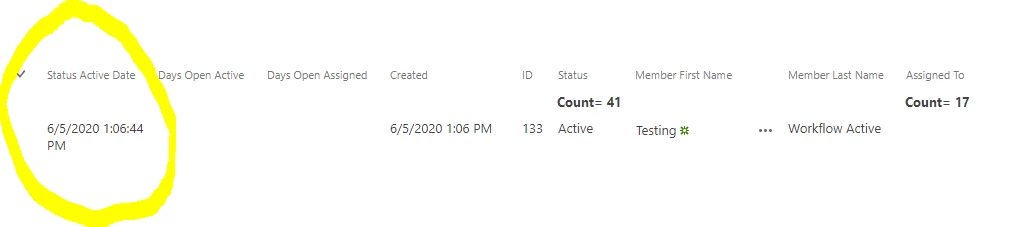
I have been trying to create a workflow that is to update a date and time column in a list when a certain status from another column is chosen. I want the workflow to update the date and time column with the current date and time when a certain status is chosen. I was able to get a workflow put together but it saves correctly the first time and the second time when I save the item again it keeps defaulting the time to 12:00AM. The date portion works well. I tried the "Calculate Date" function, I have tried to build a date and time string and I have tried changing things in SharePoint. I have it set to only run on an item once. I have attached pictures of the first save and the second save below.


If anyone has ideas on what kind of workflow would stop this from happening please let me know. Any help is much appreciated! Thank you in advance!7994i1D57B00741ECF705.png7995iB23123BEE7F70674.png
2 replies

Forum|alt.badge.img+1
  • June 6, 2020

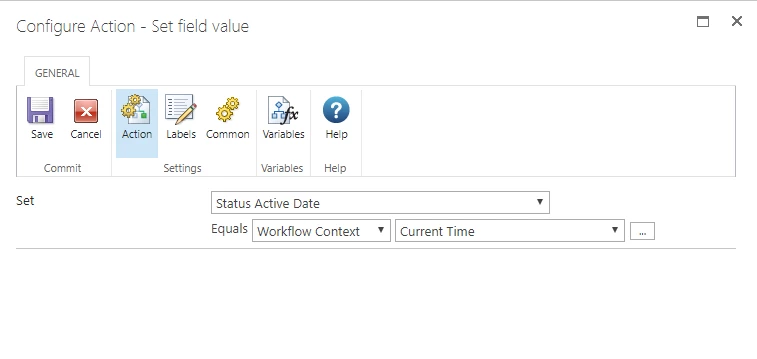
In your workflow choose the action "Set Field Value"

Choose your Status Active Date

In the value field drop down select Workflow Context > Current Time

Your List Column must be set to Date/Time for this value to work otherwise you will get a workflow error that they type of data you are trying to enter doesn't match (in which case you should use Current Date). 


NintexNewb
Forum|alt.badge.img+3
  • Author
  • June 6, 2020

@missbrad Thank you so much for your advice! For some reason it still works the first time I save the item but the second time I save it it defaults back to 12:00 AM. I have it set not to run again on this item with conditions. I'm not sure if it's something with how Nintex is talking to SharePoint, just Nintex or just SharePoint? 

7999iDE0190FC35EBA45A.png8000iBC965784FC43B834.png