Nintex Community Menu Bar

Weekly summary email workflow

  • March 21, 2019
  • 2 replies
  • 40 views
  • Translate All

Forum|alt.badge.img+1

I'm very new to all this, so apologies if this is a bit simple of me.....


I need to create a site workflow (I think), which runs once a week (on a Friday), and emails a list of people the events for the following day (it's a weekend duty rota).


All I want to get is the Title, Start Date and End Date. 


The data looks like this (it's in a Sharepoint calendar):
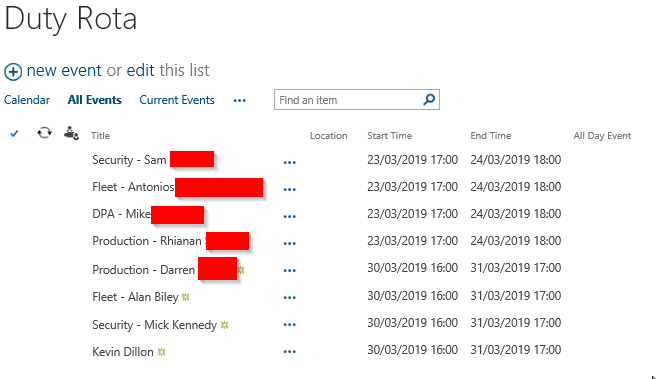
 

1097iDE7D656DAEA1FD5D.png

I'd like the email to be something like:


"The duty rota for the weekend 23/03/2019 to 24/03/2019 is as follows:


Security - blah blah

Fleet - blah blah

DPA - blah blah

Production - blah blah"


I've seen some workflows where summary emails are done but I can't work out how to get it to work for this (what I think should be fairly simple) scenario.....could someone please give me some pointers (or better still examples)!


Thanks!



2 replies

Forum|alt.badge.img+7

Hello,


Yes, you will need a site workflow that kicks of every Friday. 


1. You need to identify the tasks for the weekend.  So to do this, you will need a Query list action  that will filter on Start date bigger than Current Date and End date smaller than Monday.  This will then be saved to a collection.  I personnaly prefer to save the ID field in the collection so that I know exactly which field to work with.

2. To work with the Collection you need a For Each action.  The For each action with take the tasks one by one.  First action in your for each would be a query list again but this time you are using each ID one at a time and getting the Title field and maybe the body field or even an assigned to field. There is a lot of different ways that the tasks can be displayed with varying degrees of difficulty. :smileyhappy:

3. Send notification - outside of the For Each, you can perform a Send notification action that will send all the details to the list of people.  


This is very highlevel. Let me know where you get stuck.


Kind regards,

Francois Crous

Translate

Forum|alt.badge.img+1
  • Author
  • May 9, 2019

I solved it like this:


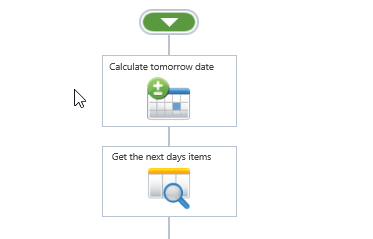
Calculate tomorrows date

From that - get the next days items (query list where start date = tomorrow and return to a collection variable)

1883i85D8864724BB266F.png


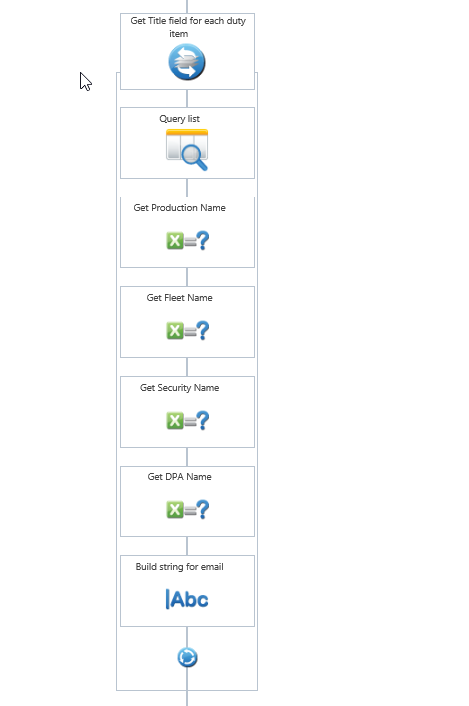
Loop through each item, and retrieve the values you want to put in the email.

Add these to a string for the email.


1885iECBE0A90A1F212A4.png


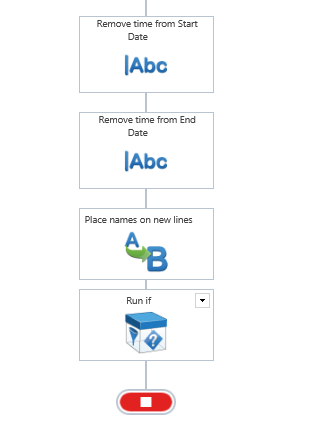
Remove time from date/time to just display the date.

Place names on new lines (formatting issue)

If values are present (ie there are some records found) then send an email.


1884iA1EC515C885B4737.png


Translate