Nintex Community Menu Bar

Validation on a submit button from a Choice Drop Down control within a Nintex form 2016

  • December 11, 2019
  • 3 replies
  • 75 views

Forum|alt.badge.img+1

Very new to developing a SharePoint/working with Nintex forms - trying to create a validation on a drop down when I select the "Complete and Submit" button. I have done so with a date validation but I cannot figure out how to with a drop down choice control. How can I create a validation that will display an error when selecting Complete and Submit, when the field is left untouched (diplaying "Please select a value...")?




3 replies

Simon Muntz
Nintex Partner
Forum|alt.badge.img+23
  • Nintex Partner
  • December 11, 2019
Hi,

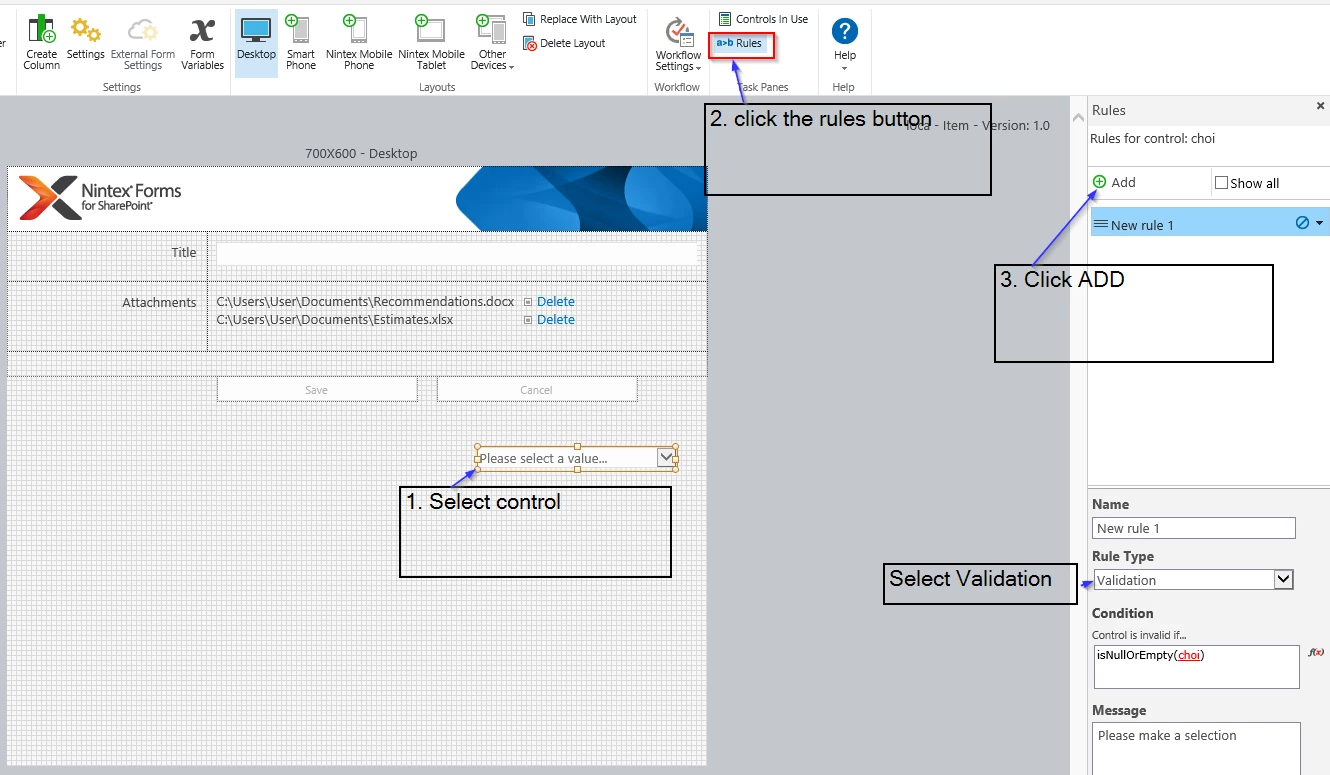
Just use a validation rule.
isNullOrEmpty(NameOfTheChoiceControl)

Forum|alt.badge.img+1
  • Author
  • December 12, 2019

I have tried this and still no error message appears:

isNullOrEmpty({Sef})

isNullOrEmpty(Master?)

I have tried a few other formulas


Is there supposed to be a condition within the actual submitt button itself?


Simon Muntz
Nintex Partner
Forum|alt.badge.img+23
  • Nintex Partner
  • December 12, 2019

5929iE69DBE76F981B56D.png