Nintex Community Menu Bar

Validate that a date is not older than first of January of last year (last year based on input)

  • October 28, 2019
  • 4 replies
  • 19 views

Forum|alt.badge.img+10

Hi all,


I need to validate a customer date within a form. The rule is: date must be this year or last year.

I was not able to get this running.


My thoughts:

1. get customer date year 

vCustomerDate = formatdate(CustomerDate, "yyyy")

2. get last year

vCustomerDateMinus1Year = vCustomerDate - 1

3. create string

vFirstDayLastYear = "01.01."&&vCustomerDateMinus1Year

4. Convert string to date

5. Compare CustomerDate with FirstDayLastYear


I was able to do the first two things, but failed with point 3.

Recommandations are really appriciated.


Cheers

mai-kel



4 replies

Forum|alt.badge.img+12
  • Scholar
  • October 28, 2019

@mai-kel ....try below approach:


  1. ctrl_date_customer_date - This is your input from user
  2. Add 4 calculated controls:
    1. dt_calc_current_year - using format date function and current year get the year
    2. dt_calc_previous_year - in this function will be "dt_calc_current_year-1"
    3. dt_calc_jan_first_prev_year - use this formula with double quotes "01/01"+dt_calc_previous_year
    4. dt_calc_compare_date - using this formula greaterThanOrEqual(ctrl_date_customer_date, dt_calc_jan_first_prev_year)

Forum|alt.badge.img+10
  • Author
  • Nintex Partner
  • October 28, 2019

Hi @kunalpatel 


Thanks for your response. So I used "&&" instead of "+" that was my first fault.

Meanwhile I was able to calculate the earliest possible date and to format the input date but the comparison doesn't work. :(

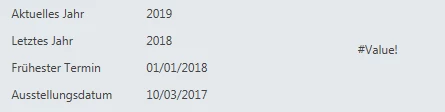
5115iD4EF91F1F000A658.png

Current year: 2019

Last year: 2018

Earliest date: 01.January 2018

Issue date: 10. March 2017


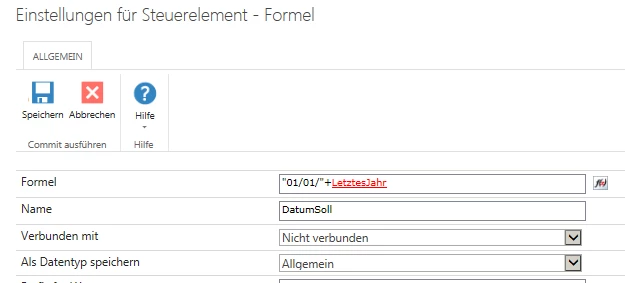
Formular for earliest date:

5116i4413E5D5C4D360E4.png


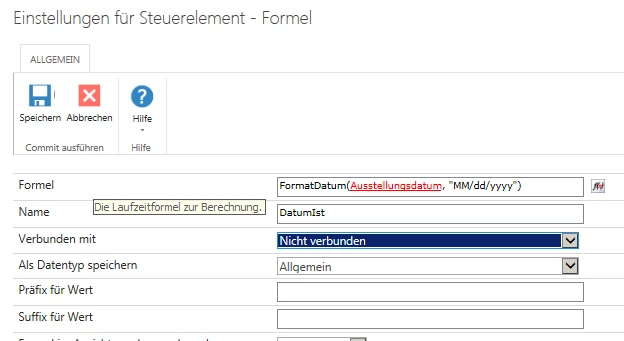
Formular for Issue date:

5117iE9B60FEEA19B7FE6.png


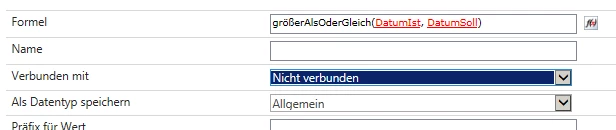
Last formular for comparison:

5118i4A2D8022A76D8651.png


I guess it has something to do with not fitting formats?!?


Forum|alt.badge.img+12
  • Scholar
  • October 28, 2019

@mai-kel ....no need to convert the string. In calculated control where you concatenate 01/01 with previous year, store is as string and in other calculated control, simply do the greater than equal to. First option should be your customer date and in second option of that function select named control of the calculated control where you're concatenating the value.


Forum|alt.badge.img+10
  • Author
  • Nintex Partner
  • November 5, 2019

Unfortunately this didn't work. @kunalpatel 


BUT thinking over it again, there is simply no need to concatenate or convert or anything.

Simply use date function to get the year. Substract "1" and you have last year.


So you only need to compare the years, no need to extend by day and month. :)


And that is working beautifully.