Nintex Community Menu Bar

Use the value of lookup field in the e-mail

  • April 25, 2019
  • 8 replies
  • 29 views

Forum|alt.badge.img+2

 I have a lookup column in the list where the workflow is running. I would like to display the value of this field in the e-mail sent to the initiatior after successful submission.


When using the "Insert reference" -> Item properties -> the value is not available in the e-mail.

Tried using "Set variable" -> List lookup -> Current item -> Field with lookup -> it's not working too.


Do you have any other ideas how to do it?

8 replies

ArunPrakash
Forum|alt.badge.img+2
  • Novice
  • April 25, 2019

Hello,


You can use Query list action item to qeury the current list lookup value and use the same in the e-mail. 


Forum|alt.badge.img+2
  • Author
  • Novice
  • April 25, 2019

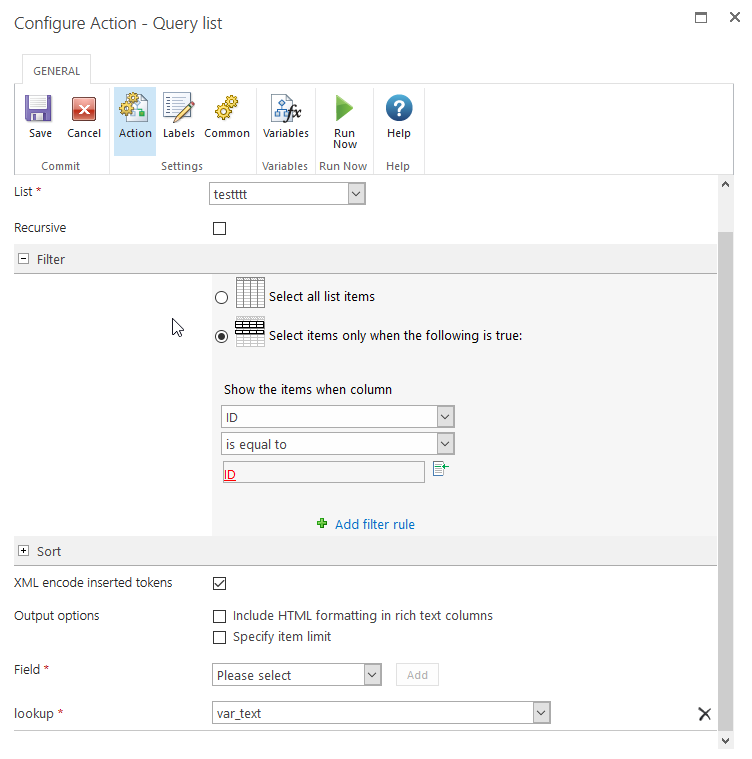
@ArunPrakash I used the "Query list" action with following configuration:

List -> Current list

Filter -> ID is equal to {Item Property:ID}

Field -> My lookup column -> store in a variable


Tried both - a single text and number variable.

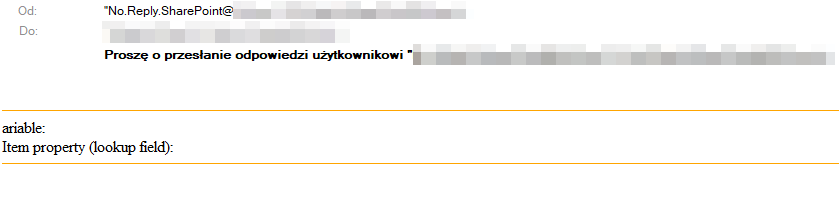
In both cases the value from the lookup column is still empty.


cabeza
Forum|alt.badge.img+3
  • Novice
  • April 25, 2019

set the Variable as text, use log in history  and insert that variable, run the workflow and in workflow history see what is the value that was logged


Forum|alt.badge.img+2
  • Author
  • Novice
  • April 26, 2019

@cabeza Did that as you suggested.

In both cases:

- when I log the value of the variable and

- when I log the value of the lookup column it was correctly logged.

So it seems to be an issue with the "Send notification" action.


cabeza
Forum|alt.badge.img+3
  • Novice
  • April 26, 2019

if it logged correctly, then everything should be okey,
if you can share or attach more info, we can have a look into it


Forum|alt.badge.img+2
  • Author
  • Novice
  • April 26, 2019

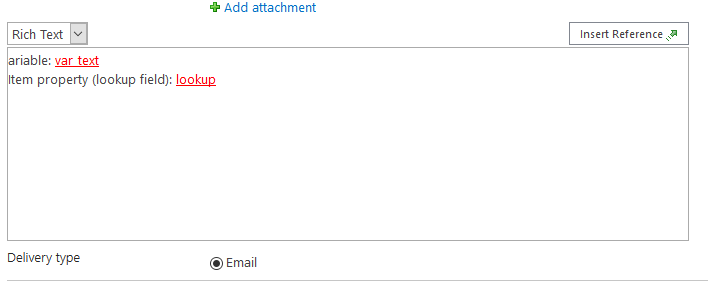
I attach here the screenshot from my workflow. Hope it helps you to find the reason.

1700i64E14F1F937F1BCA.png

1699iE06760169C69517A.png

1702i1FCE335559D70C7B.png

1701i486510CAE4D8ABF0.png


Forum|alt.badge.img+14
  • Scholar
  • April 26, 2019

less then ('<') character within the value is misinterpreted by your mail client as a start of HTML tag.

if you sent the mail in a plain text format you'd see correct output.


Forum|alt.badge.img+2
  • Author
  • Novice
  • April 26, 2019
Thanks. That worked out!