Nintex Community Menu Bar

Use a button to skip to a different section of the form

  • April 19, 2019
  • 12 replies
  • 104 views
  • Translate All

Forum|alt.badge.img+9

Hello all.  I am attempting to setup a button that would allow the user to skip to a different part of a form.  This is a fairly lengthy form and there is a three page section that is actually filled out by a different user (other than the original creator).  As a way to make it a little easier, I thought that you should be able to press a button that has you skip to a different part of the form.  I'm guessing this would require JS, so I was wondering if anyone else has tried this.  

12 replies

Forum|alt.badge.img

I am actually trying to figure out this very thing right now.  I hope you get some good advice.

Translate

Forum|alt.badge.img+14
  • Scholar
  • April 30, 2019

Forum|alt.badge.img+9

Anchor links would work as well.  Let me attempt to implement one of these solutions and I'll see how it works.

Translate

Forum|alt.badge.img+9

I'm not sure what I'm doing wrong here.  I've added a label control and assigned the css class to it.  I then added the code found in @chaddavis's post https://community.nintex.com/t5/Nintex-for-SharePoint/Hi-Is-there-a-way-to-create-a-link-to-a-location-in-the-NINTEX/m-p/60867#M50306

However when I attempt to run it, nothing happens.  I'm clicking on my control but it does nothing.  Any thoughts?


NWF$(document).ready(function(){

NWF$('.moveTop').on('click', function() {
$('#s4-workspace').animate({scrollTop: 0}, 0);
});

NWF$('.moveBottom').on('click', function() {
$('#s4-workspace').animate({scrollTop: 1000}, 0);
});

});‍‍‍‍‍‍‍‍‍‍‍

Translate

Forum|alt.badge.img+14
  • Scholar
  • May 20, 2019

I've tried your code and it worked for me...


check developer console whether there are not any errors reported.

have you correctly assigned classes to the labels - one at the top should have class "moveBottom" and one at the bottom should have class "moveTop"

Translate

Forum|alt.badge.img+9

I think I know what I'm doing wrong, but I'd like to confirm.  So I have a label control in a part of the form and it is named "Skip Section".  Right now, if I click on it nothing happens.  I've added another label towards the bottom of the form and gave it the  CSS class moveBottom.  Do I need to use something else like a button to click on?  

Translate

Forum|alt.badge.img+14
  • Scholar
  • May 23, 2019

Do I need to use something else like a button to click on?  

no, click on label control works either


 I've added another label towards the bottom of the form and gave it the  CSS class moveBottom.

that's what I've written in the previous post...

if you are at the bottom of the form and click on a control with 'moveBottom' class, you will very likely not see any 'movement' since you are already at the bottom.


Translate

Forum|alt.badge.img+9

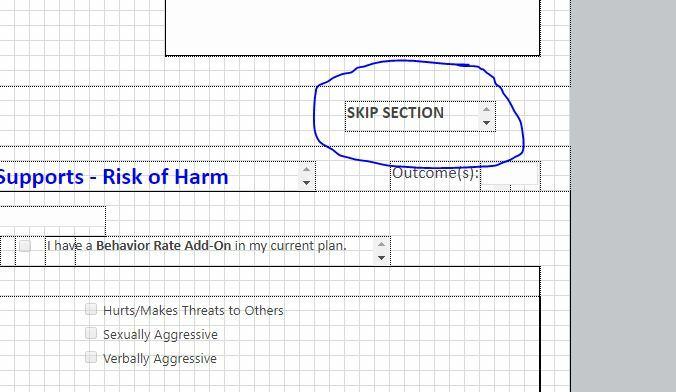
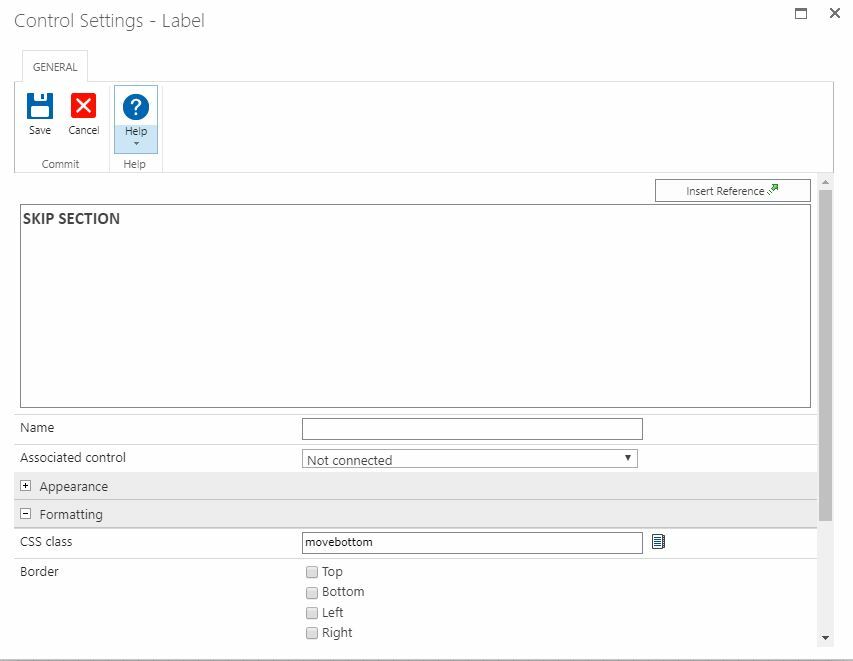
Sorry, was on vacation the last few weeks.  Getting back into the swing of things.  I think this is just me not exactly knowing how to do this correctly.  So I have a label in the middle of the of the form.  Is this where I place the CSS class of movebottom? Because that is where I have the label and when I click on it, nothing happens.

 2522i144094A312FB96E0.jpg  

2524i2D6B8FF4890AF239.jpg

What am I missing here?  


Translate

Forum|alt.badge.img+14
  • Scholar
  • June 11, 2019

your configuration seems to be almost correct.

only issue I spot is that class names are case sensitive in selectors.

so if you address class like 'moveBottom' (with capital B) you have to just like configure it in panel's settings

Translate

Forum|alt.badge.img+9

Ok, I fixed that typo.  However, it still is not working.  I'm again wondering if I am confusing what label needs to have the CSS class of moveBottom.  Right now, I have that listed on the label pictured above.  That is the label I want someone to click on to skip the next couple of pages so they can get to the section that pertains to them.  Do I need another label control with the CSS class of moveBottom at the bottom of the form (or where I want the person to go to when they click on the label named "skip section"?  Would it be helpful if I uploaded  a copy of the form to see what I'm doing wrong?  

Translate

Forum|alt.badge.img+14
  • Scholar
  • June 12, 2019

I'm affraid I will not be able to check your form since I'll miss your underlying infrastructure.


I've created an empty form with just two labels. try to look on it and compare with your solution

Translate

Forum|alt.badge.img+9

Thank you for all the help here.  Honestly, I'm not sure what was wrong.  The code was exactly the same and I had the labels setup correctly.  I just recopied the code from the your form and pasted in back in and that got it to work.  Thank you again.  

Translate