Nintex Community Menu Bar

Upload to SharePoint document library from InfoPath attachment

  • January 28, 2008
  • 9 replies
  • 18 views

Forum|alt.badge.img+7

See http://blog.mgallen.com/?p=93 for pictures/screenshots


You guys must be getting bored of my postings!


Anyway...


I've been getting a "path or filename too long" error message in the error logs whenever I try to upload an infopath attachment to a sharepoint document library.


is this a known issue, or is it something I've done!


Martin



9 replies

Forum|alt.badge.img+9
  • January 28, 2008
Love your blog, very informative!  When you are progressing through the SharePoint Documents event wizard, doesn't one of the screens read 'Upload Document Destination'?  In this screen, you can specify the actual file name to be used on the uploaded file.  What are you specifying in that field?

Forum|alt.badge.img+7
  • Author
  • January 28, 2008

Hi Tim,


Unfortunately the wizard takes the filename from the Unicode attachment (as in the wizard you specify upload from K2 field), so it doesn't give me an option of specifying my own filename, this is one of the reasons i'm confused about the whole thing... i've even tried uploading a document on the c: partition (3 characters long path) with a document called "a.doc"... this doesn't work either!


K2 support got back to me an hour ago suggesting that the problem may lie with the destination library rather than the filename... hmm... I'll go play some more.


Martin


Forum|alt.badge.img+9
  • January 28, 2008
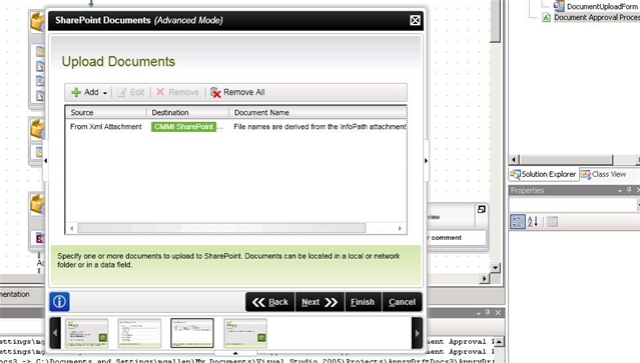
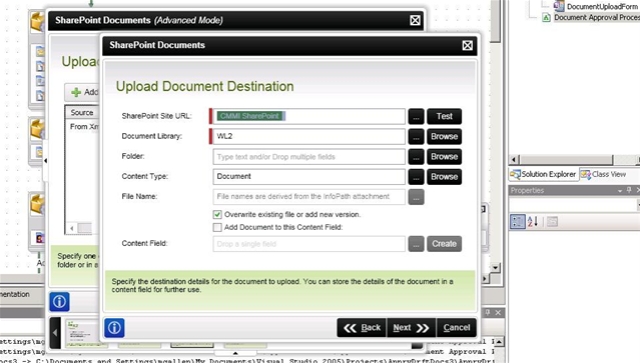
The 'File Name' option is disabled in the wizard?  That would be strange, I've never seen that myself, could you post a screenshot? 

Forum|alt.badge.img+7
  • Author
  • January 28, 2008

http://blog.mgallen.com/?p=99


windowslivewriterdisabledfilenameentry-e9e1filenamedisabled132.jpg


Upload Docs from XML attachment with disabled filename


windowslivewriterdisabledfilenameentry-e9e1filenamedisabled232.jpg


Doc destination page, with disabled filename


hope this helps


Martin


Forum|alt.badge.img+9
  • January 29, 2008
I was expecting to see that you were uploading from a 'K2 Field', where you can navigate to the item you want to upload through the object browser, drilling into your InfoPath form xml to fild the attachment field.  Is that an option instead of 'xml attachment'?  I'll give this a try myself in a few.

Forum|alt.badge.img+7
  • Author
  • January 30, 2008

Well, it would appear all my time was wasted, as my project must have got corrupted somewhere as it seemed to be executing the wrong block of code


 When you upload from an XML attachment (stored in a K2 field) the wizard should point the workflow at the block of code "UploadDocumentFromXMLAttachment_ExecuteCode" it was however executing the "UploadDocumentFromFileSystem_ExecuteCode" block of code.


You can see for yourself if you follow my debugging guide on my blog. http://blog.mgallen.com/?p=114... and potentialy look at (and debug) the code for every wizard.... this is how I found my particular fault.


In the end, I deleted the upload (sharepoint document) event and recreated it.... and all is well :-D


happy debugging everyone.... this one really had me stumped!


Forum|alt.badge.img+9
  • January 30, 2008
Nice detective work, I was about ready to throw up my hands and give up on this one.  Thanks for posting how you determined the problem, I'm sure we'll all find that useful.

Forum|alt.badge.img+1
  • March 11, 2008

Hi There,


I'm receiving the same error, just curious if you happened to find a resolution. The process was working fine... I'm simply archiving a InfoPath form that is used in a process.


Forum|alt.badge.img+7
  • Author
  • March 11, 2008
Yes - my resolution was to delete the sharepoint event activity and recreate it - it seems that if you create a SharePoint event wizard that uploads from the filesystem... and then change it to upload from a K2 field.. it seems to remember that it was once an upload from filesystem wizard, and tried to go down that path in the code regardless of the K2 field being set.

You'll see this if you attach to the K2HostServer.exe process in visual studio - it will break in a block of code that seems illogical - as its a block of code that only should execute if you are uploading from the filesystem.

Martin