

Nintex Community Menu Bar

State machine is not switching the states

  • August 25, 2019
  • 4 replies
  • 77 views

Forum|alt.badge.img+6

Hi All,

I have a very simple workflow which has the state machine. It has 2 states Verification and resubmit.

Initially it will go to verification state which has assign task action. On approval the state machine will end and on rejection of task it is changing the state to resubmit. On resubmit state it wait until user submits the data and it has to change the state back to verification.But once user submits the data it is not changing the state to verification. There is no error also.
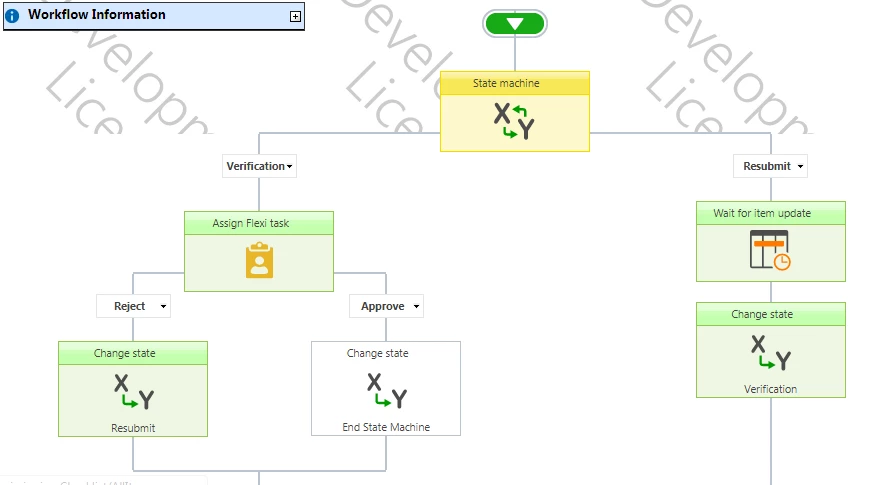
4093i351BE74CF4A8520A.png


Please help in resolving this.


Regards,

Hema

4 replies

Simon Muntz
Nintex Partner
Forum|alt.badge.img+23
  • Nintex Partner
  • August 26, 2019
Hi,
I have looked at your worklfow design and tested it.
It worked fine in my ShaerPoint 2016 environment.
There will usually be around a 5 minute pause between changing from the Resubmit state to the Verification state and the task is generated again. This is because when the state changes the workflow resumes in the Workflow timer service which by defulat runs every 5 minutes.

Forum|alt.badge.img+6
  • Author
  • August 26, 2019

Hi Simon,


Thanks for the response. Even i have worked on this scenario before but never faced this issue. Yesterday i started to face this issue.

Till now the workflow has not changed its state. We are also using SP 2016. Not getting the exact cause for this.


Simon Muntz
Nintex Partner
Forum|alt.badge.img+23
  • Nintex Partner
  • August 26, 2019
Hi,

Have you run the workflow multiple times? And if so does it always gets stuck in that spot? If you run a simple workflow with a pause action does the workflow complete?
If you restart the timer service does the workflow complete?

Forum|alt.badge.img+6
  • Author
  • August 26, 2019

Hi ,


Yes it was my timer service error. After restarting the timer service it is working!


Thanks Simon.


