Nintex Community Menu Bar

Start workflow action: how to collect parent workflow variables and retrieve them in the child

  • November 26, 2019
  • 7 replies
  • 47 views

Forum|alt.badge.img+1

Hi All,


Please I need to know what type of actions/logic are/is to be used (other than Store/Retrieve data actions since only 1 variable is to be stored/retrieved) to Store all variables of the Parent workflow and Retrieve them all in the child so it can be used as child variables.


Thank you in advance.

7 replies

Forum|alt.badge.img+12
  • Scholar
  • November 26, 2019

@selhage ....There are 2 actions called store data and retrieve data. You can use them to store your values from parent workflow and get them using retrieve data in child workflow.


Simon Muntz
Nintex Partner
Forum|alt.badge.img+23
  • Nintex Partner
  • November 26, 2019

Forum|alt.badge.img+1
  • Author
  • November 27, 2019

Thank you for your reply.
Actually I already implemented the Store/Retrieve data actions and it is working fine but what I'm in need for is to be able to store/collect all parent workflow variables since i have more than 20 variables that needs to be used in the child workflow


Forum|alt.badge.img+12
  • Scholar
  • November 27, 2019

@selhage ....Can't you update list item with those variables? If not the I'll suggest you create an action set and put all you're store data actions in it.


Simon Muntz
Nintex Partner
Forum|alt.badge.img+23
  • Nintex Partner
  • November 27, 2019
With the web service you just need to use an update XML action to update the associated data XML file with your variables.

Forum|alt.badge.img+1
  • Author
  • November 28, 2019

Thank you for your reply.

Please can you give me more information about the XPath query that I should use for the Update XML action.


Simon Muntz
Nintex Partner
Forum|alt.badge.img+23
  • Nintex Partner
  • November 28, 2019

Sorry my mistake.

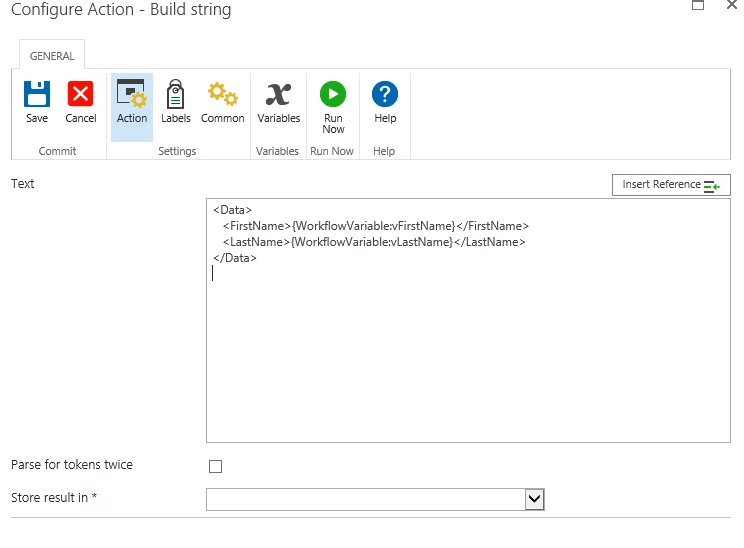
The Associated data actually looks like:

<Data>
   <WorkflowVariableName>Value</WorkflowVariableName>
</Data>

So all you would have to do is use a build string action and replace the values with your variables.

e.g.

5673i1591F53A7F2A5AA5.png

Save as a Multi Lines of text variable and use that in your Start Workflow web request.


Associated data help file:

https://help.nintex.com/en-US/sdks/sdk2013/#Operational/SDK_NW_OPS_WorkflowsAssocData.htm