Nintex Community Menu Bar

Site Workflow not running on schedule issue

  • September 25, 2019
  • 7 replies
  • 321 views

Forum|alt.badge.img+3


Hi All,


1. I have a site workflow which is not running on schedule, but it runs on manually triggering it.4659i4932AE10B487DD4D.png

4660i1573CF10C8522335.png

2. I have created a test site workflow to test if the scheduled workflows are running on the site - It is working

3. Verified Nintex workflow scheduler job in Central admin - Its working fine

4. Verified SharePoint timer serive - Working fine

5. saved the site workflow and created a new site workflow by importing it and renamed the workflow, to see if that is the issue -It didnt help


Any help is really appreciated.!!


Thanks,

PSSRK 



7 replies

Forum|alt.badge.img+17
  • Nintex Partner
  • September 25, 2019

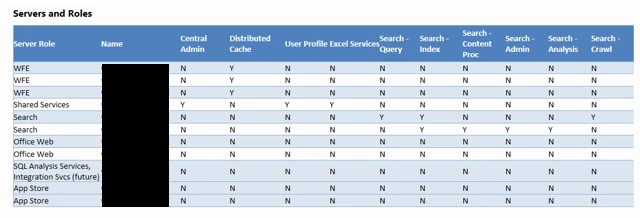
What SharePoint Server version are you running and what does your server layout look like?(#wfe, any app servers? etc. )


Forum|alt.badge.img+3
  • Author
  • Rookie
  • September 25, 2019

Thanks for the response.!

Sharepoint Version - 2013

3 WFE


4662iEB850A9B0097504A.png


Forum|alt.badge.img+17
  • Nintex Partner
  • September 26, 2019
This used to be a very common occurrence because of the server the workflow timer service would fire up. If it was in conflict with where the users are (WFE) then the exact error you got would occur. https://community.nintex.com/t5/Best-Practices/SharePoint-Timer-Service-And-Workflow/ta-p/90375

But, in 2013, there were updates to help with that scenario. I'm missing the info at the moment but will look to post it here soon.

Forum|alt.badge.img+17
  • Nintex Partner
  • September 26, 2019
I can't find what I remember about a 2013 update, but here is more best practices to review. https://community.nintex.com/t5/Best-Practices/Scheduled-Workflows-and-the-Nintex-Workflow-Scheduler-Job/ta-p/90424
Please be aware that these kinds of changes can effect user access while making the changes.

Forum|alt.badge.img+12
  • Scholar
  • September 27, 2019

In regards to site workflow.....can someone tell me why the site workflow will run twice and that too at the same time?


I've a site workflow which I've scheduled to run at 6 AM & 6 PM i.e. every 12 hours....but when I go and check the workflow history, I see that it runs twice at 6AM & twice at 6PM.


And yes, there are no web services or anything which will schudule this site worflow or trigger this workflow.


Forum|alt.badge.img
  • September 27, 2019

I think this is a similar issue I've had in the past after an update. The timer job "Nintex Workflow Scheduler" was tied to my Central Admin Web Application instead of our company intranet set Web Application. I used NWAdmin to install it on the proper Web Application. 
Here are the commands I would use from PowerShell ISE:

NWAdmin.exe -o UninstallTimerJob -job ScheduledWorkflows
NWAdmin.exe -o InstallTimerJob -job ScheduledWorkflows -url [Your Primary Web App]


Simon Muntz
Nintex Partner
Forum|alt.badge.img+23
  • Nintex Partner
  • September 30, 2019

@kunalpatel You have two Nintex Workflow Scheduler jobs running.

You only need one for the whole environment and not one for each web application.


Follow the steps in the previous post to emove them all and just add one back into the environment.