Nintex Community Menu Bar

Simple condition not working correctly

  • July 16, 2019
  • 8 replies
  • 18 views

Forum|alt.badge.img+1

Hello,

I have this rule with a simple condition :
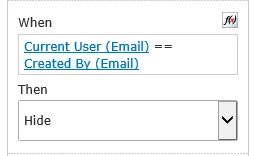
3156iBDF0C487DAE89904.png

But it is not working. When I edit an item which I am the creator, this field is not hidden.

I try with equals but there are no difference.

8 replies

Forum|alt.badge.img+9
  • Nintex Employee
  • July 16, 2019

Hi @CanardNocturne ,


I would suggest verifying that the rule in question is associated with the appropriate control. Once that is done, try adding a Calculated Value control with the formula = Current User (Email) in one and Created By (Email) in another. Publish the form and open an item again to ensure that the return on these two references are in fact the same.


-Nick


Simon Muntz
Nintex Partner
Forum|alt.badge.img+23
  • Nintex Partner
  • July 17, 2019

Hi,
I checked the output of both the references being used and they are the same format.
I then tried both of the functions that you have suggested and they both worked.
Do you have any issue with any other function? If so it could be a browser issue.
If you do sometyhing like 1 == 1 or similar does that work?


Also you have posted this in the Nintex On-premise section of the forum but based on the references you are using you are using Nintex for Office 365


Forum|alt.badge.img+1

@nicksha :

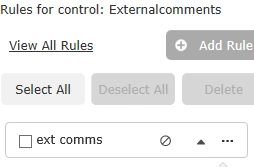
My rule is on the right controller :

3180iA856F2FDC9240544.png3181iA7BA12857AA048E5.png

I added 2 Calculated Values :

3182i403F2CAE250C8569.png3183i8E1159ABC24EBB6D.png

But nothing is displayed :

3184i6F3D966805611220.png

@SimonMuntz :

Actually, no. I have controllers with a little more complicated conditions and there working well.

I try to edit my item on IE, Edge and Chrome but they are no difference.

With 1 == 1, my controller is still show.

Oh, your right, i'm not on the good forum ! Where I can move my thread to it ?


Forum|alt.badge.img+9
  • Nintex Employee
  • July 17, 2019

@CanardNocturne 


The Office 365 forum can be found here if it is helpful:

https://community.nintex.com/t5/Nintex-for-Office-365/bd-p/Nintex_for_O365


Simon Muntz
Nintex Partner
Forum|alt.badge.img+23
  • Nintex Partner
  • July 17, 2019
"I have controllers with a little more complicated conditions and there working well."
Is this on the same form on the same list?
have you tried creating a new list and new form.
Do you see any errors in the browser console?

Forum|alt.badge.img+1

@nicksha > Oh I've mispeled, I meant : HOW I can move my thread to the Office 365 forum ?


I found why : One of my rule had a error (I forgot a parenthesis), so every rules under him in the rule list didn't work. I think it's a bug. Where I can report this bug ?


Forum|alt.badge.img+9
  • Nintex Employee
  • July 18, 2019

@CanardNocturne I am unsure if you can move the post itself to the Office 365 forum. You may need to copy, paste, and post again there if you would like to do that. 


If you believe this to be a bug in Nintex Forms for Office 365 I would suggest opening a ticket with support@nintex.com and explaining the issue so a proper investigation can occur.


Simon Muntz
Nintex Partner
Forum|alt.badge.img+23
  • Nintex Partner
  • July 18, 2019
Hi,
This is not a bug. If you code in any language and make a mistake it will affect your program.
Any formula you create is converted into JavaScript. If that formula is not formatted correctly it will cause issues.
In a future forms product comng soon we have introduced validation of formula's to stop this issue from occurring.