Nintex Community Menu Bar

SharePoint Dropdown Bug Issue

  • August 14, 2019
  • 5 replies
  • 22 views

Forum|alt.badge.img+2

Hi all,


i have an issue with dropdown list i use in my form.

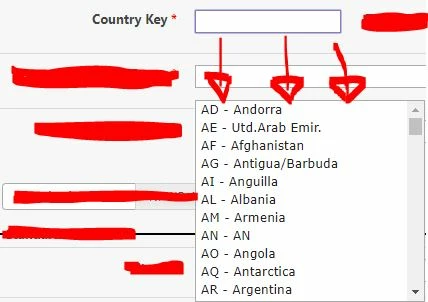
When i click the dropdown, the list will come down directly under the field. (Original Pict)

but if i scroll down/ scroll up/ scroll left/ scroll right/ zoom in / zoom out, etc, the dropdown will be remain still in that position, hence it looks like 'flying'. (After Scroll Down Pict).

Can someone help me with this?

thank you.
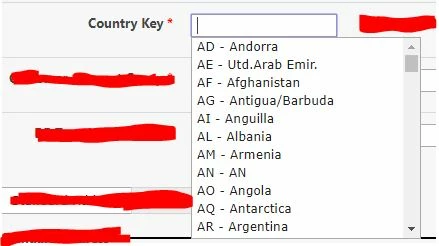


2271iB590729A167691A6.jpgoriginal2270iFC9401F1475B81E3.jpgafter scroll down

There is suggestion to use the AppendTo feature but i have no idea where to put.

                  var uniqueArrayList = uniqueArray(list);
                  var textbox = NWF$("#" + tbUsrResponIns);
                  textbox.autocomplete({}).bind('focus', function() {
                        textbox.autocomplete("search");
                  });

Where to put the AppendTo property if the condition is as above?

uniqueArrayList is the dropdown data coming from SAP.

thank you.

5 replies

Forum|alt.badge.img+11
  • Nintex Partner
  • August 27, 2019

Use the browser developer pane and check the CSS properties for the dropdown window. If you can pinpoint the cause to a CSS property locking the dropdown window to a fixed location, you could try to overwrite (using the !important property) it in the form's Custom CSS.

Also try to increase the dropdown field's height.

Your question implies you're filling the dropdown from code. If so, please provide us with the code snippet(s) that accomplish this, so all of us can check it as well


Forum|alt.badge.img+2
  • Author
  • August 27, 2019

Hi @jpmhuls 


below are the snippets.

thank you for responding! :)


will check the CSS and update here too..

thanks!


Forum|alt.badge.img+11
  • Nintex Partner
  • August 28, 2019

Hi @vincent_wee,

Hmmm, I can't seem to see anything wrong here.

NB: most of the time I append a .focusout() to a .val("")


Forum|alt.badge.img+2
  • Author
  • August 29, 2019

Hi @jpmhuls ,


attached are my CSS.

can you help identify whether there is something wrong with the CSS?

thank you.


Forum|alt.badge.img+11
  • Nintex Partner
  • August 29, 2019

Again, nothing out of the ordinary in the CSS either..... Have you tried to take the "overflow-y: auto;" out and test this?