Nintex Community Menu Bar

SharePoint Dropdown Bug

  • May 22, 2019
  • 7 replies
  • 21 views

Forum|alt.badge.img+2

Hi all,


i have an issue with dropdown list i use in my form.

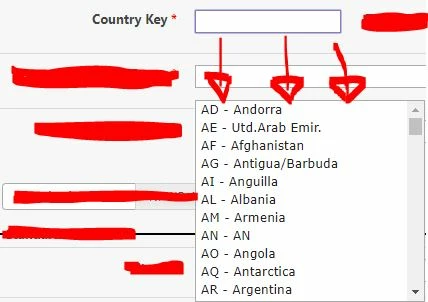
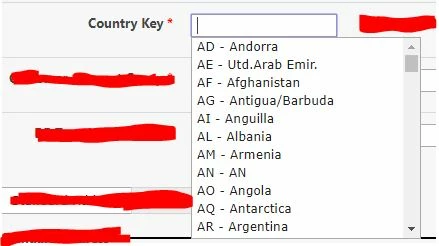
When i click the dropdown, the list will come down directly under the field. (Original Pict)

but if i scroll down/ scroll up/ scroll left/ scroll right/ zoom in / zoom out, etc, the dropdown will be remain still in that position, hence it looks like 'flying'. (After Scroll Down Pict).

Can someone help me with this?

thank you.


2271iB590729A167691A6.jpg2270iFC9401F1475B81E3.jpg

7 replies

Forum|alt.badge.img+4
Hi Vincent,

May i know where do you have placed the dropdown control on the form, is it within a panel. Also how the data is getting into that dropdown list.

Thanks.

Forum|alt.badge.img+2

Hi @rameshmusham ,


thank you for responding.

yes it is placed inside a panel.

Using the autocomplete jquery feature.


Is this information enough?

do you need any other information?

thank you.


Forum|alt.badge.img+14
  • Scholar
  • May 23, 2019

Forum|alt.badge.img+2
Hi Emha,

i've tried this solution:

.ui-autocomplete {
max-height: 200px;
overflow-y: auto;
/* prevent horizontal scrollbar */
overflow-x: hidden;
position: relative;
}

.fixed-height {
padding: 1px;
max-height: 200px;
overflow: auto;
}

but the list still not stick with the parent. is there anything wrong with my css?
thanks.

Forum|alt.badge.img+14
  • Scholar
  • May 23, 2019

that doesn't seem to be anything from the link I suggested...


the point is to configure appendTo property


Forum|alt.badge.img+2
  • Author
  • August 12, 2019

Hi @emha 


var uniqueArrayList = uniqueArray(list);
var textbox = NWF$("#" + tbUsrResponIns);
textbox.autocomplete({}).bind('focus', function() {
      textbox.autocomplete("search");
});


sorry can i ask where to put if the condition is as above?

uniqueArrayList is the dropdown data coming from SAP.

thank you.


Forum|alt.badge.img+2
  • Author
  • August 26, 2019

hi @emha ,


kindly help me on this.

try to add the AppendTo Property but still doesnt impacted.

can you help me on this, whether there is something wrong with my jQuery?

thank you.