Nintex Community Menu Bar

set permissions on sharepoint list items using site workflow

  • March 30, 2020
  • 5 replies
  • 15 views

Forum|alt.badge.img+5

Dear All,

I have a list which is having around 2000 items in which there are around 1500 items are in closed status, now i would like to set different permissions for all closed items.

Regards,

 

5 replies

Simon Muntz
Nintex Partner
Forum|alt.badge.img+23
  • Nintex Partner
  • March 30, 2020
Hi,

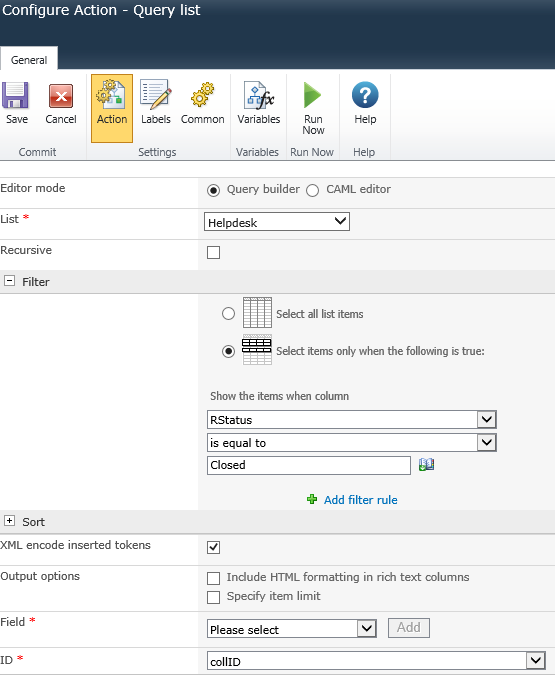
Use a query List Action to retreive all the items that have the status closed and store their ID's.
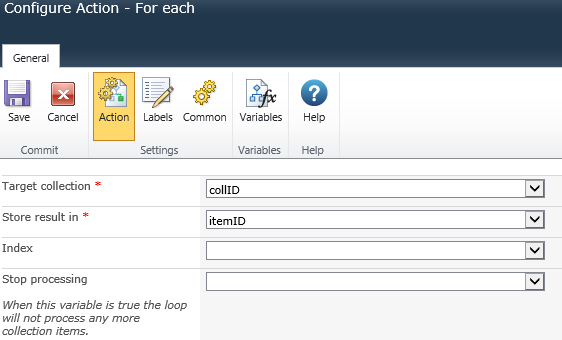
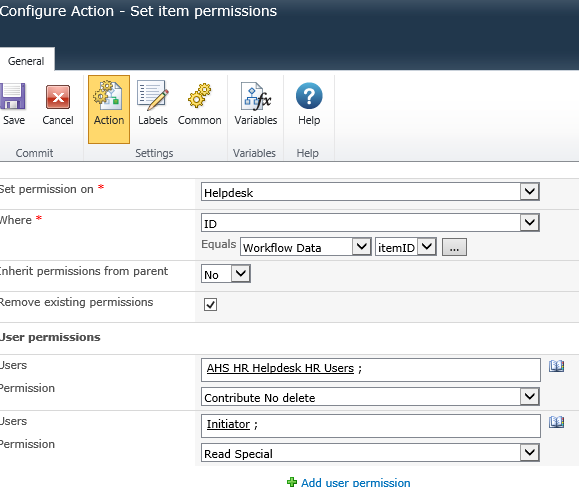
Then use a for each action to process the collection variable and a set item permissions action to se the item permissions based on the ID.

Forum|alt.badge.img+5

Hi Simon, 

As you said, i have created site workflow, below is my screenshots for each action. seems like it is not working.

7037i2412B1B5F3642422.png7038i7FE6218770F9BF10.png7039i166AC367259965B7.png


Forum|alt.badge.img+8
  • Novice
  • March 31, 2020

Hi @ramanjjilunaidu,

in your workflow history, is the "set item permission" action executed?

If not, your collection may not be populated and you should look at the query list action.


Forum|alt.badge.img+5
It is working fine, but the problem is that initiator is taking it as the one who created the workflow not item created by who is actually author right, thank you.

Forum|alt.badge.img+8
  • Novice
  • March 31, 2020

In this case, in your foreach loop, add a query list action


Query "HelpDesk"

Where ID = WFVaribable:ItemID

Field "Created By"


store in a new variable and use this instead of the Initiator when setting permissions