Nintex Community Menu Bar

Set Multi-Select field value based on Look Up List drop down value

  • July 13, 2020
  • 16 replies
  • 437 views

Forum|alt.badge.img+3

Hello,

I cannot seem to get this to work properly, I have patched together several other posts to get to where I am today, I feel like i must be missing something simple. I'm using SP 2013.


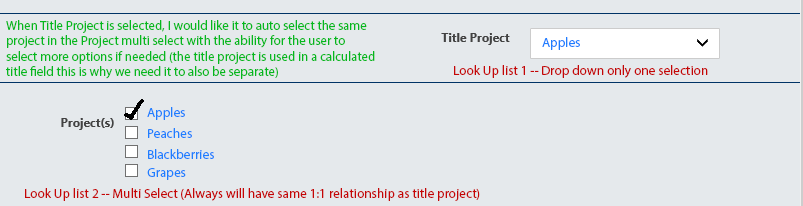
I want to use a look up list drop down to select a title project  -- Let's call it 'Apples'


I would then like it to populate a multi select field called Project with the value 'Apples' and then allow users to also select other options if they need to.... 


Here is what I have and its not working:  


NWF.FormFiller.Events.RegisterAfterReady(function () { NWF$('#'+varProjTitle).change(function(){ if (NWF$('#'+varProjTitle).val ("Apples")){ NWF$('#'+varProj).find('input[value="Apples"]').prop('checked',true) } }); });



16 replies

Forum|alt.badge.img+8
  • Novice
  • July 14, 2020

Hi @em-lu,

I think your issue is within your "if" statement . When I try to run .val() directly, it always returns "".

To read the selected element, I did this:

NWF$("#" + yourID).find("option:selected").val()

If you always want to preselect based on your selection in the lookup, you may also use something like this, instead of using multiple if statements.

var lookupVal = NWF$("#" + lookup).find("option:selected").val() NWF$("#" + mSelect).find("input[value='" + lookupVal + "']").prop("checked",1)


Forum|alt.badge.img+3
  • Author
  • July 14, 2020

Thank you for your response @Tarf 

I am quite a beginner, but I'm trying this from the code you suggested in the second piece and its still not working... probably something very simple I am missing.   

NWF.FormFiller.Events.RegisterAfterReady(function () { var lookupVal= NWF$("#" + varProjTitle).find("option:selected").val() NWF$("#" + VarProj).find("input[value='" + lookupVal + "']").prop("checked",1) }


Forum|alt.badge.img+8
  • Novice
  • July 20, 2020

Hi @em-lu,

in your scenario, the code would run once when the form is loaded.

First there is a typo in your variable, instead of varProj you have VarProj (capital V)


It would look something like this with a change event on varProjTitle. 

NWF.FormFiller.Events.RegisterAfterReady(function(){ NWF$("#" + varProjTitle).change(function(){ var lookupValue = NWF$("#" + varProjTitle).find("option:selected").val(); NWF$("#" + varProj).find("input[value='" + lookupValue + "']").prop("checked",1); } });


MegaJerk
Forum|alt.badge.img+14
  • Scholar
  • July 20, 2020

What type of Choice Control are you using? You specify that it's multi-select, but I'd like to know if it's a List type or a Checkbox type. Screenshots help. 

Additional Questions


  1. Does the Multiple Select Choice Control always contain the value of whatever you select from your Lookup Control no matter what the selection, or is it just sometimes?
    • That means if your Lookup Control contains the values
      - Apples
      - Blackberries
      - Oranges

      Your Choice Control will ALWAYS have those options available as well.

  2. What should happen if you change the value of your Lookup Control? Should *All* the fields of your Choice be cleared except for the now new Lookup Control Value?
    • Using the Choices I list above (fruits), if I first select "Oranges" on the Lookup Control, then Oranges will automatically be selected on the Choice Control. I then ALSO select Apples. My Choice Control now has both Apples and Oranges selected. If I then change my Lookup Control to Blackberries, what happens to the Choice Control selections? 

If you could answer these, it would be a big help in being able to help you to solve your problem. 


Forum|alt.badge.img+3
  • Author
  • July 20, 2020

@MegaJerk Hope this image helps.

8418iB9C7FBF129779624.png


Thank you for taking the time to help.

So up until Friday my multi-select was just a regular choice field but now we have had to make it a look up list so I can filter out old projects that go inactive without losing data if a form is edited.


To answer your questions:


Does the Multiple Select Choice Control always contain the value of whatever you select from your Lookup Control no matter what the selection, or is it just sometimes?


Answer: Yes, The Title Project field and the Multi Select project field will ALWAYS have exactly the same choices. 


What should happen if you change the value of your Lookup Control? Should *All* the fields of your Choice be cleared except for the now new Lookup Control Value?

  • Using the Choices I list above (fruits), if I first select "Oranges" on the Lookup Control, then Oranges will automatically be selected on the Choice Control. I then ALSO select Apples. My Choice Control now has both Apples and Oranges selected. If I then change my Lookup Control to Blackberries, what happens to the Choice Control selections? 
Answer:  I have the title project field locking after initial selection; and it is completely hidden in the edit form so I don't think this will be an issue if I'm following you correctly. 


Thanks again for all of your help.  Let me know if you need more info. 


MegaJerk
Forum|alt.badge.img+14
  • Scholar
  • July 20, 2020

In regards to your second answer (where you talk about locking the field), what I mean is, during the same session. 

Imagine you're a user and you pick Apples, and then check Blackberries and Grapes. BUT WAIT! You didn't mean to select Apples! You actually meant to select Peaches! So you change the Title Project from Apples to Peaches. 

My assumption is, when this happens, the Projects will change from whatever *was* selected to just *Peaches* being selected. 

Does this make sense? 


Forum|alt.badge.img+3
  • Author
  • July 20, 2020

Ok, Im following you now, I didn't even think of that, exactly as you described it would work! 


MegaJerk
Forum|alt.badge.img+14
  • Scholar
  • July 20, 2020

Alright. To save a little time, I'm going to be Reusing the NCU code and instruction found here in this post here


Additionally, I'm using the same method of solving the problem (using a Formatting Rule) as I did in that post, so please use those instructions to get you to the point where you've made a new Rule for the Multi-Choice Lookup Control (Project(s)). 

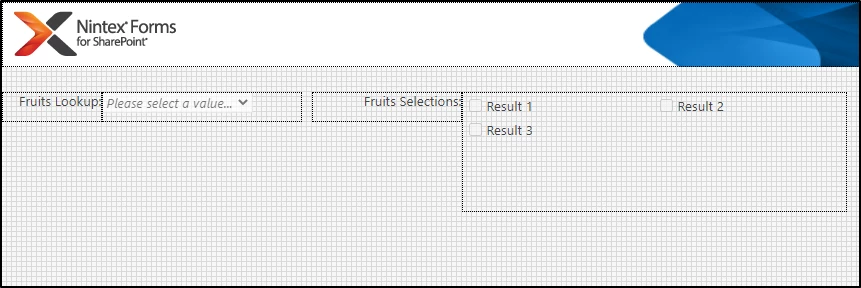
My Example Form:

8419i325786613A41216E.png


I have two Lookup Controls.


The first is a DropDown Lookup named "Control_FruitsLookup"

The second is a Multiple Select Lookup named "Control_FruitsSelection"


The Labels follow this naming scheme. 


If you've followed the instructions for the linked post, you should now have an Empty Rule for the Control_FruitsSelection control. If not, make one. 


The code we'll use is as follows: 

(function(formControlCall, titleProject) { "use strict"; var formControlID; var targetControl; var targetTable; var eventTargetContainer; var checkedControl; /* if the event is undefined, then we don't wanna run this rule */ /* if the form is in Display Mode, then we don't wanna run this rule */ if (event !== undefined && !NCU.FormVariables.formType.IsDisplayMode) { /* removes the id from the text value we get from the Title Project Control */ titleProject = titleProject.replace (/^d*;#(?=.*$)/,""); /* Boilerplate to get the control the rule is firing on */ formControlID = formControlCall.split("'")[1] || ""; targetControl = sourceContext.find("[formcontrolid='" + formControlID + "'].nf-filler-control"); /* The event that does fire this rule will also fire whenever we change the Project(s) Lookup Control as well! If that's the case we do not want to do anything. So we need a way of making sure to check and see if the control that is being targeted by the event is the same as the one we've assigned to the 'targetControl' variable above To do this we'll set a variable 'eventTargetContainer' to the closest parent of the event.target, that has the class of ".nf-filler-control", which is a class that can only be found on <div> elements that act as the container for any given Control. */ eventTargetContainer = NWF$(event.target).closest(".nf-filler-control"); /* Now we just make sure that they don't equal one another! If they did, then we would know that the control which invoked the rule is the same control as the one we are targeting, and therefore we do not want the rule to make any changes. */ if (eventTargetContainer[0] !== targetControl[0]) { /* If we've made it this far, then we simply need to go through the values of the MultiSelect. We want to accomplish a few things by doing this. 1: Uncheck any values that do not match our Default Value (titleProject) 2: Check the checkbox that *DOES* match the titleProject IF it isn't already checked */ targetControl.find("table [data-nfchoicevalue]").each(function(index, span){ /* make sure the span we're working on is a jquery object */ span = NWF$(span); /* grab the input element under it */ var input = span.find("input"); /* grab the TEXT value of the label under it */ var labelText = span.find("label").text(); /* If the label text does NOT equal the titleProject text AND The checkbox IS checked, then... */ if (labelText !== titleProject && input.prop("checked")) { /* uncheck it */ input.prop("checked", false); } else if (labelText === titleProject) { /* Otherwise... if the label's text DOES match titleProject... */ /* check to see if the input is unchecked */ if (!input.prop("checked")) { /* check it if it is unchecked */ input.prop("checked", true); } /* set the value of the 'checkedControl' variable */ checkedControl = NWF$(input); } }); /* Now that we're done messing with the control, we can manually trigger a "change" event on the control. This way, if any other Control or Rule(s) use this control as a dependency, it will also make sure that those things will update. */ checkedControl.trigger("change"); } } return false; }("{Control:Self}", Control_FruitsLookup))


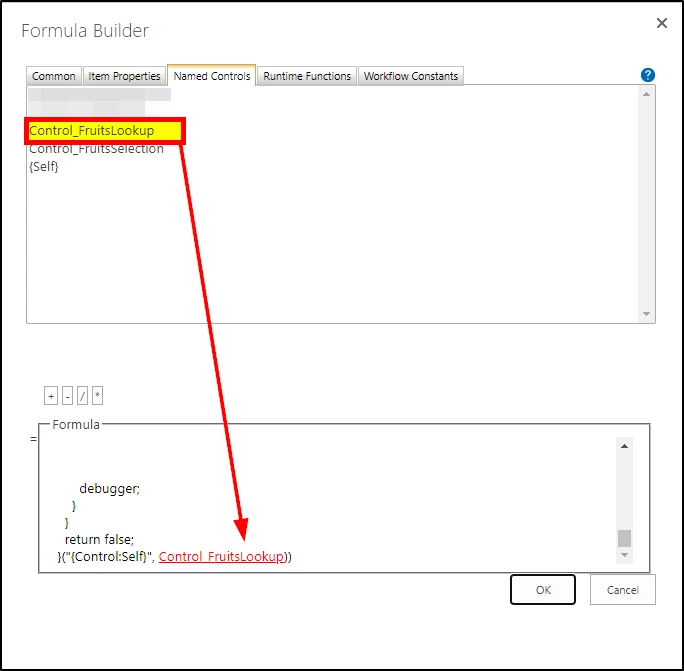
It should be noted that after you paste that code into the rule's formula dialog you will, like the other instructions show, need to replace the text of "Control_FruitsLookup" with the actual Named Reference. Here is an image showing you what I mean.

8420iD001E64ADE35F6D7.png


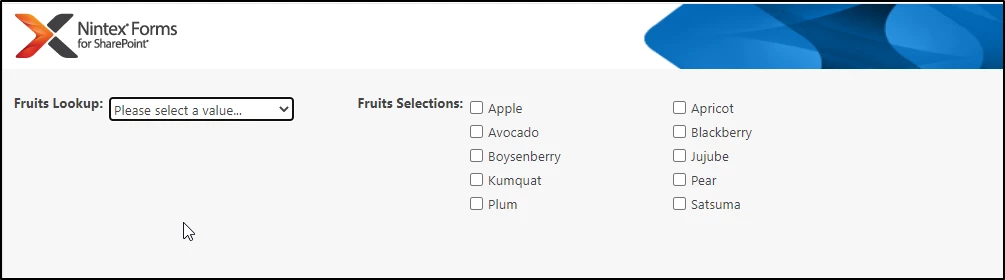
Once you have it looking like the picture, you should be good to go. Now when you change the value of your Title Project (or in this case "Fruits Lookup"), it will set the value of the Project(s) Lookup (or in this case "Fruits Selection").

8421iC249E25026E3BCE6.png8422i6E3EF598ED6D7849.png


Additionally if we make more than one selection...

8423iB3ECEBD25F0EC6C7.png


... and then change the value of the Lookup, it will make sure only that option is selected when changed!

8424i916FA6E54052AF98.png


I hope that this helps to solve your problem. If you run into any issues. just let me know. 


Forum|alt.badge.img+3
  • Author
  • July 20, 2020

Thank you so much again for helping me figure this out.


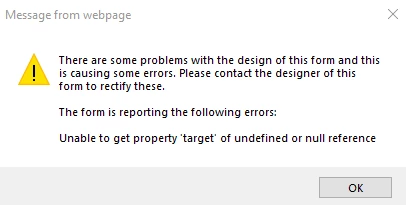
Im getting the following error: 

8426iAAB22DBDA5A3BC6D.png


Im in sp 2013 does that make a difference?


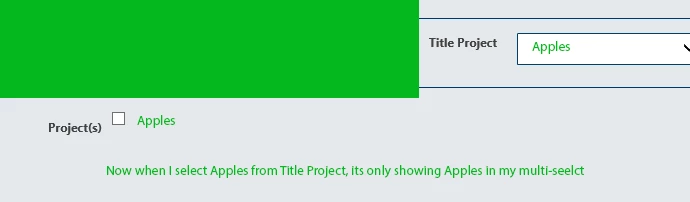
if I ignore the error its showing me ONLY the Title project as a selection now as an option for the multi selects.

As in the image below, 

8427i873132B547BC268D.png


MegaJerk
Forum|alt.badge.img+14
  • Scholar
  • July 20, 2020

Did add this code: 

var NCU = (function(NCU) { NCU.FormVariables = (function(FormVariables) { FormVariables.formType = (function(formTypeText) { formTypeText = formTypeText.replace(/([^/]*(?=/))/|..+/gi, ""); return { IsEditMode: formTypeText === "EditForm", IsDisplayMode: formTypeText === "DispForm", IsNewMode: formTypeText === "NewForm", IsPreviewForm: formTypeText === "PreviewNintexForm" }; }(_spPageContextInfo.serverRequestPath || window.location.href)); return FormVariables; }(NCU.FormVariables || {})); return NCU; }(NCU || {}));


Into your Custom Javascript as shown in the other post? 


Forum|alt.badge.img+3
  • Author
  • July 20, 2020

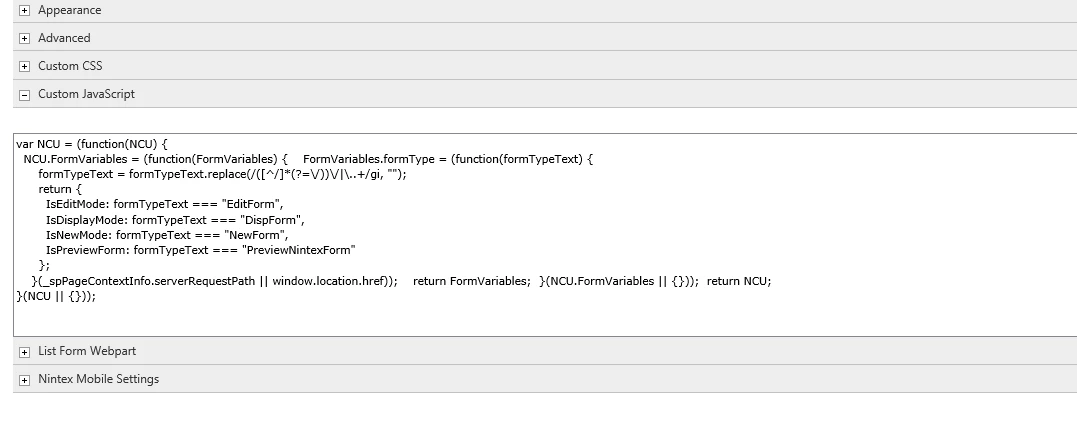
I added it at the top, i have other code at the bottom:

8428i7BAD0F04E6AB7E90.png


MegaJerk
Forum|alt.badge.img+14
  • Scholar
  • July 20, 2020

Alrighty. Well then you have the NCU code (that you have pictured) in the right place, however, if you added the code I posted here in this thread, that doesn't need to go there also. That needs to go into a Rule attached to the actual control. 

If you're familiar with using rules, please make a Formatting Rule on your MultiSelect Control, and that is where the code I posted to my answer here will go. 

If you need instructions on how to do this, please use the examples from the thread that I referenced in my original answer. 


Forum|alt.badge.img+3
  • Author
  • July 20, 2020

Thanks @MegaJerk  That's the way I have it set up, I must be missing something on my side, Im going to recheck again and see if I can figure out what the issue is.  Perhaps its because I have my controls connected? 


The code I have underneath your NCU js is separate, it catches returns so users dont submit the form in my nintex form webpart.  


MegaJerk
Forum|alt.badge.img+14
  • Scholar
  • July 21, 2020

Yeah that's interesting. Hard to say... 

I'll export my test form tomorrow (as well as show you how to recreate the simple test list I made for it), and hopefully you should be able to then see it working and poke around enough to better figure out where yours is different. 

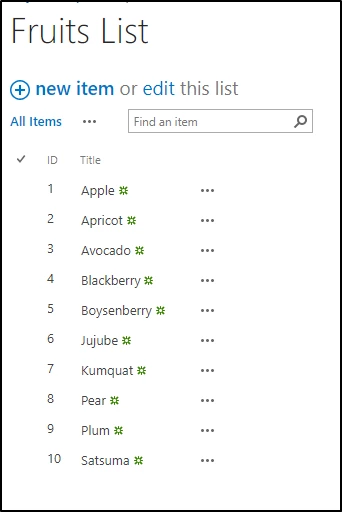
Edit: If you wanna go on and make a test list with the fruits (called Fruits List), you should be able to do so as the fruits are shown in my screenshot and are as follows: 

Apple
Apricot
Avocado
Blackberry
Boysenberry
Jujube
Kumquat
Pear
Plum

Satsuma


Forum|alt.badge.img+3
  • Author
  • July 21, 2020

Good Morning,  I made a new Fruits look up list new list mimicking your fruit list and another new list with a new form -- added two look up controls and attempted it there too, I am getting a different error. 

8438i6A44EDD25FEBAE84.png


If you get time to export your form so I can take a look that would be great...I appreciate your time and help so much.  If I cant get it working soon I may have to think out a different solution.


btw, we are using version 2.9.3.0 in sp 2013 -- not sure if that may be part of the problem.


MegaJerk
Forum|alt.badge.img+14
  • Scholar
  • July 21, 2020

Form is Attached. Note that it's in a zip archive because you can't directly attach xml files. 

Additionally here is a screenshot of the Fruits List list, included for completion 

8444i422E13E599BE7359.png