Nintex Community Menu Bar

Set default value based on selection

  • February 22, 2019
  • 6 replies
  • 21 views

Forum|alt.badge.img+2

Hi,

How to set default value to the field based on selection and the field is also can be editable.

E.g. If I choose work Location as office the field will set default as 8 hours and it can be editable in case the employee is on vacation/training.

Kindly assist and am new to Nintex and Javascript.


Thanks.

 

6 replies

Forum|alt.badge.img+12
  • Nintex Partner
  • February 22, 2019

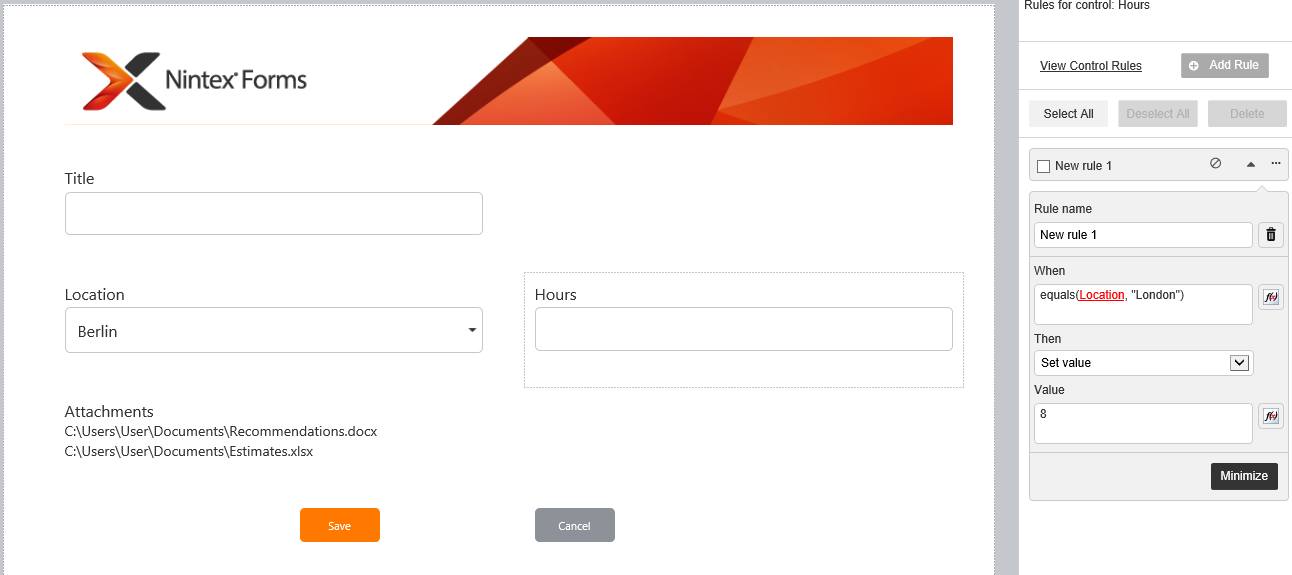
If you use responsive forms you can achieve this by using rules instead of JavaScript.


Use the set value rule on your hour-field and update the field after a selection happens in your location field.

158iFF1AFB00E736A07A.png

Unfortunately responsive forms can only handly set value rules for text fields. But the upcoming universal forms that will be launched soon will be able to set almost every type of field without using JavaScrip.


Hope this helps.

Best regards

Enrico


Forum|alt.badge.img+2
  • Author
  • Rookie
  • February 25, 2019

Thanks Enrico. I'm not using responsive form.


Forum|alt.badge.img
  • October 8, 2019

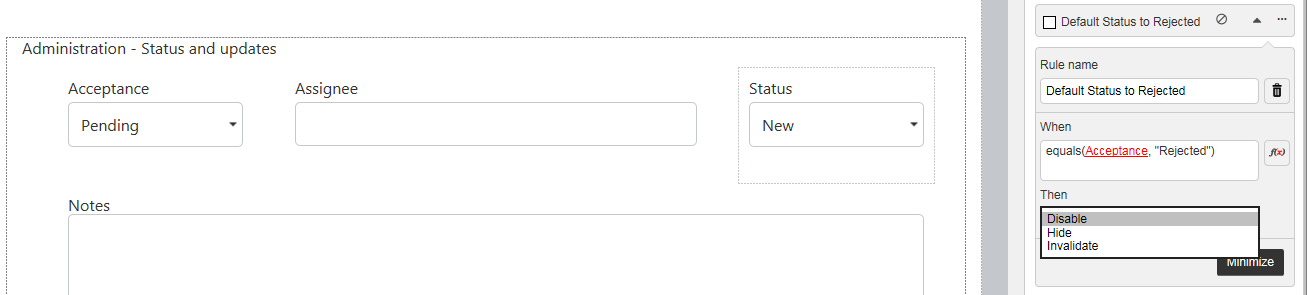
@praios81 I was so excited to see this answer for responsive forms but unfortunately, I don't see the option "Set value" - Do you have a solution when this happens? Thanks!


I am trying to add this rule to the Status field.

If Accepted is Rejected, Status should default to Rejected.

4908i618F7B1841224E41.png


Forum|alt.badge.img+12
  • Nintex Partner
  • October 8, 2019

Hey @Judyism,

Set value is only available when applying a rule to a single line text field. So it won't work in choice, people or other fields. 

The upcoming new responsive designer for SharePoint will allow you to apply values to all fields but it hasn't been released so far.


Best regards

Enrico


Forum|alt.badge.img
  • October 8, 2019
Thanks for the quick reply!

Forum|alt.badge.img+12
  • Scholar
  • October 8, 2019

@Judyism .....why you're not using the If condition? Also if possible use calculated control for Status field (if you're users are not modifying it and it's value is being control by other controls on the form or by workflow it makes more sense to use calculated control)


If(equals(Acceptance,"Rejected"), Status == "Rejected", Status == "New")