Nintex Community Menu Bar

Set background colour for dropdown list

  • April 25, 2019
  • 3 replies
  • 63 views

Forum|alt.badge.img+1

I have a dropdown list with 3 options Red, Amber & Green. When the user selects one of the options then I want the background color of the dropdown list to change to the relevant color. This was easy in InfoPath but as we are migrating to Nintex would appreciate any advice on how to achieve this.

3 replies

Forum|alt.badge.img+11
  • Nintex Partner
  • April 25, 2019

Use the browser developer pane to investigate the dropdown control and which CSS classes are linked with it. This you'll need in Custom JavaScript to change the background colour when the control's selected value changes. Hopefully this rudimentary info gets you going.


Forum|alt.badge.img+3

Hi @sp215 

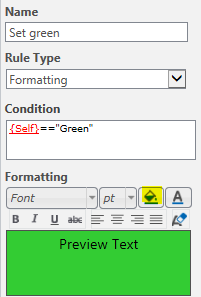
Another codeless way to achieve the same is to use formatting rules. Only for each color you need to create a separate rule:

1687i07989AB93251A961.png


Forum|alt.badge.img+1
  • Author
  • April 26, 2019

Many thanks - the rule works but it fills the border with the correct color rather than the background of the dropdown.