Nintex Community Menu Bar

Run Site workflow in batches

  • February 13, 2020
  • 7 replies
  • 43 views

Forum|alt.badge.img+3

HI There, 

i have 15K items in the list and have a Site workflow to run against themt o change some metadata. I would like this to run in btaches, so say 100 at one time? how can i approach this?


please advise?

7 replies

Simon Muntz
Nintex Partner
Forum|alt.badge.img+23
  • Nintex Partner
  • February 13, 2020

Hi,

It sounds like you are looping through your 15K items.

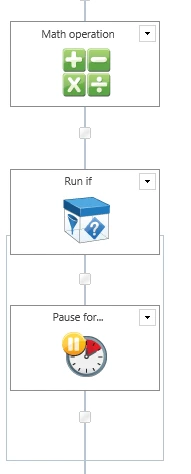
You could add the following to your workflow to pause every 100 items.

6474i9BCF238C315EEAFF.png


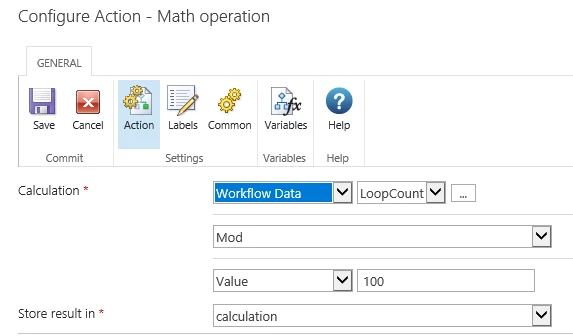
Math operation looks at the loop count and divides it by 100.

6475iFA21996AA1C4C37C.png

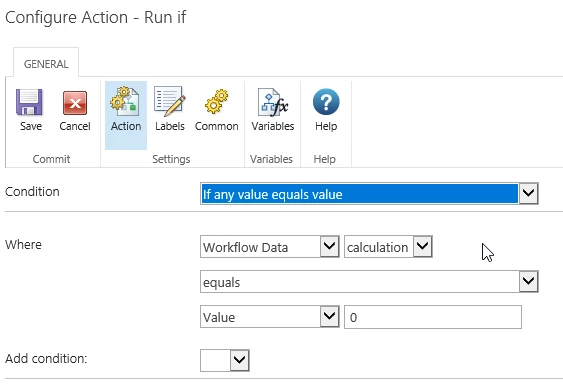
If the calculation has zero remainder then the run If will run.

6476i3AAA69FB0921B537.png


Forum|alt.badge.img+3
  • Author
  • Rookie
  • February 14, 2020

thanks for your message, i am new to nintex so can you please advise where to place these actions, before query list or after and what will be the type of loopcount and calculation variables? please advise? 


my workflow screenshots are attached. 


thanks 


Forum|alt.badge.img+3
  • Author
  • Rookie
  • February 14, 2020
It would also be better to target id 1-100 at one time as this workflow will run for ages?
If user can direct the workflow to pick up id 1-100 at one time and than the next lot and than next.
What do you recommend? Thanks

Simon Muntz
Nintex Partner
Forum|alt.badge.img+23
  • Nintex Partner
  • February 16, 2020
Hi,

Hard to point you in the right direction based on a bunch of random pictures of your screen. Basically the actions I suggest would go at the end of your for each loop. The variables would be of type number as they will be holding a number.

Forum|alt.badge.img+3
  • Author
  • Rookie
  • February 17, 2020
great thanks. i will give this a try but will that mean the workflow will be running until all the item have been updated?

Simon Muntz
Nintex Partner
Forum|alt.badge.img+23
  • Nintex Partner
  • February 18, 2020
Yes the workflow will run until all will be updated.
If this is not desired you could record the last item id that was processed and then start the workflow again quering from the next item ID. This may not work as it will look like a recursive workflow to SharePoint.
You could maybe use a parent child workflow to avoid the recursive workflow issue.


Forum|alt.badge.img+3
  • Author
  • Rookie
  • February 18, 2020

Thanks, i am trying to get start IDs and end id in the start of the workflow but it runs find for smaller chunks not for larger number.