Nintex Community Menu Bar

Refer to Repeating section field using javascript

  • May 7, 2020
  • 3 replies
  • 16 views

Forum|alt.badge.img+7

I would like to give each row in the repeating section an id. The id is generated with the javascript Math.random().toString(36).substr(2, 10)

I want to populate the row id field with the random letters,  when a new row is added.


--How to code the new row add event?

--How to refer to the id field in each row? When I used the client id, it always went to the first row.


I didn't find documentation on how to use javascript to handle the fields in the repeating section .


Thanks.


Sean


Sean

3 replies

Forum|alt.badge.img+8
  • Novice
  • May 7, 2020

Hi Sean,


I´d suggest giving the control a css class (e.g. myClass).

Then you can access the control using

NWF$(".myClass:last")

As for the event, you can use

NWF.FormFiller.Events.RegisterRepeaterRowAdded(function(){/*your_stuff*/});

Forum|alt.badge.img+12
  • Scholar
  • May 8, 2020

@lcha / @Tarf .....do you really need to use JavaScript to get the row # of a repeating section?


Since you're using the repeating section, you can add a calculated control and name it ctrl_calc_rep_sec_row_no. Always hide this control. 


Add another calculated control using your random letters and named control of the above-calculated control to build your string.


Forum|alt.badge.img+8
  • Novice
  • May 11, 2020

Hi @lcha@kunalpatel


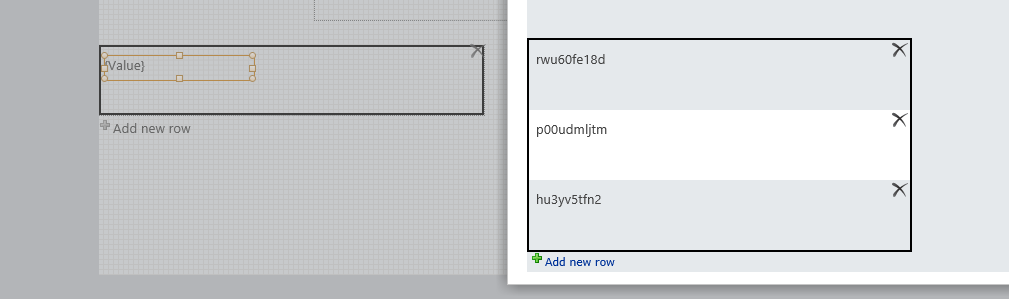
you could also use the js as the formula of a calculated value control within the repeating section to achieve the same result:

7756i9D93F9CEE76A1E5F.png