
Nintex Community Menu Bar

Query XML Error: Invalid Token

  • January 16, 2020
  • 11 replies
  • 130 views

kelliganp
Forum|alt.badge.img+10

Hi Folks,


I have what I hope is a simple issue. I am trying to learn the Call Web Service action so that I can use it to act with high level credentials on behalf of the workflow initiator. I have a CWS action that uses the GetListItems method and returnes what seems like good XML from the target list. When I query the XML, however, I get the following error...

The execution returned an unexpected error.
'/defaultNS:listitems/defaultNS:rs:data/defaultNS:z:row/@ows_ID
' has an invalid token.

The souce/returned XML (redacted) that I am querying is as follows:

<?xml version="1.0" encoding="UTF-8"?>
<listitems 
xmlns="http://schemas.microsoft.com/sharepoint/soap/" 
xmlns:dt="uuid:C2F41010-65B3-11d1-A29F-00AA00C14882" 
xmlns:rs="urn:schemas-microsoft-com:rowset" 
xmlns:s="uuid:BDC6E3F0-6DA3-11d1-A2A3-00AA00C14882" 
xmlns:z="#RowsetSchema">
   <rs:data ItemCount="1">
      <z:row 
		ows_ID="34" 
		ows_Field1="34.0000000000000" 
		ows_EmpID="****" 
		ows_FirstName="Patrick" 
		ows_LastName="Kelligan" 
		ows_MiddleInitial="S" 
		ows_FullName="Kelligan, Patrick" 
		ows_LeidosEmail="****@****.com" 
		ows_AKOEmail="****@mail.mil" 
		ows_UserID="****" 
		ows_EmpIsSupervisor="1" 
		ows_Gender="Male" 
		ows_StartDate="2010-08-30 00:00:00" 
		ows_FPCard="1" 
		ows_HomeOfRecord="****, NC" 
		ows_KuwaitDL="0" 
		ows_HeavyDL="0" 
		ows_PickupDL="0" 
		ows_IssuedPhone="0" 
		ows_CellNumber="****" 
		ows_IssuedLaptop="0" ows_Active="1" 
		ows_Status="PDY" 
		ows_Clearance="2.00000000000000" 
		ows_Org="1.00000000000000" 
		ows_Position="18.0000000000000" 
		ows_Section="6.00000000000000" 
		ows_Supervisor="81.0000000000000" 
		ows_CAC_YesNo="0" 
		ows_LinkToWAD="https://vector.leidos.com/ASP/_layouts/FormServer.aspx?XmlLocation=/ASP/WorkAuthDoc/WAD_411191_Sarraga-Nieves_Hector_26June2016.xml&amp;OpenIn=browser" 
		ows_NewFlag="1.00000000000000" 
		ows_ContractName="ASP" 
		ows_PhysicalLocation="****, NC" 
		ows_ContractExpDate="2020-02-29 00:00:00" 
		ows_TimeBank="1" 
		ows_LastPaidAirfare="2014-06-02 00:00:00" 
		ows_SharePointEditor="Kelligan, Patrick S." 
		ows_SharePointAuthor="****" 
		ows_SharePointModifiedDate="2015-11-19 23:25:00" 
		ows_SharePointCreatedDate="2014-04-03 17:56:00" 
		ows__Level="1" 
		ows_MetaInfo="34;#" 
		ows_owshiddenversion="149" 
		ows_Created="2015-11-23 22:11:35" 
		ows_PermMask="0x7fffffffffffffff" 
		ows_FileRef="34;#ASP/PMO/AdminWebDB/Lists/tbl_Westerners/34_.000" 
		ows__ModerationStatus="0" 
		ows_UniqueId="34;#{677AB0AA-30E5-4454-85C8-7274C3A3C326}" 
		ows_FSObjType="34;#0" 
		ows_Created_x0020_Date="34;#2015-11-23 22:11:35" 
		ows_Modified="2019-12-19 19:38:59" 
		ows_FileLeafRef="34;#34_.000" 
      />
   </rs:data>
</listitems>

I used the Xpath builder and the Tree view to select and apply the ows_ID node. Here is the XPath that resulted from "Apply"...

/defaultNS:listitems/defaultNS:rs:data/defaultNS:z:row/@ows_ID

The XPath throws an error in both preview and publish.

Any assistance would be greatly appreciated.


Thanks and Regards,

Patrick Kelligan

 

@gbone02 


11 replies

kelliganp
Forum|alt.badge.img+10
  • Author
  • Rookie
  • January 16, 2020

Hi @TomaszPoszytek and @cju,

I saw that you have successfully answered XPath questions in the past and there does not seem to be a great deal of activity on the community lately so I linked you into this hoping that you could offer some advice.

Do you have any ideas on the question/issue posted here?


Thanks an Regards,

Patrick


TomaszPoszytek
Forum|alt.badge.img+17

Hey Patrick!


I hope you are well. 


I woud try with the following xpath query, since the namespace in that XML is required, but is not defined:


//*[local-name()='row']/string(@ows_ID)


If you need this for Nintex for Office 365 however, not on-premise, I also encourage you to abandon parsing XML and instead try using regular expression. My experiences are that regex is faster than xml parsing. 

If this is your case too, try with the following regex expressions:


(?<=(ows_ID=""))[0-9]+(?="")

I hope it will help you. Keep warm and have a good day.


Regards,

Tomasz


kelliganp
Forum|alt.badge.img+10
  • Author
  • Rookie
  • January 17, 2020

Hi @TomaszPoszytek!


Great to hear from you again. I am using on-prem. Your solution gave me the following errors...

In preview mode...

The execution returned an unexpected error.
&amp;#39;//*[local-name()=&amp;#39;row&amp;#39;]/string(@ows_ID)
&amp;#39; has an invalid token.

...and in publish...

Error processing XML. '//*[local-name()='row']/string(@ows_ID)' has an invalid token.

Any adjustments you can think of?

Also, why do you suppose my XML is returning without the proper namespace? Is that common?


I will try the parsing with RegEx but would like the Query XML to work if we can make it happen as I will be leaning on this solution in many places if I can get it working and am not good with regex. I will let you know.


Thanks and warm regards,

Patrick


TomaszPoszytek
Forum|alt.badge.img+17

Can you post a screenshot of how this action is configured?

I think you copied the xpath with additional characters. Can you try to copy and paste is as a plain text? First removing all characters?


kelliganp
Forum|alt.badge.img+10
  • Author
  • Rookie
  • January 17, 2020

Hi @TomaszPoszytek,

Thanks for the quick response! First, the parse worked great. I simply had to add a collection operation to get the value ourt out the manditory collection variable (extract method used of course).

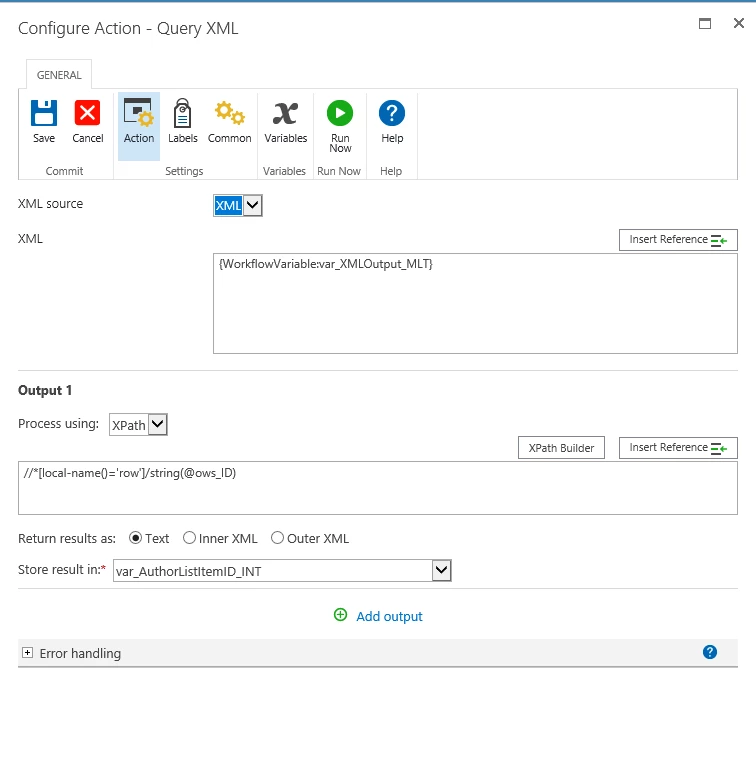
Here is a screen of the Query XML configuration...

6200i0CD2922347E3C675.png

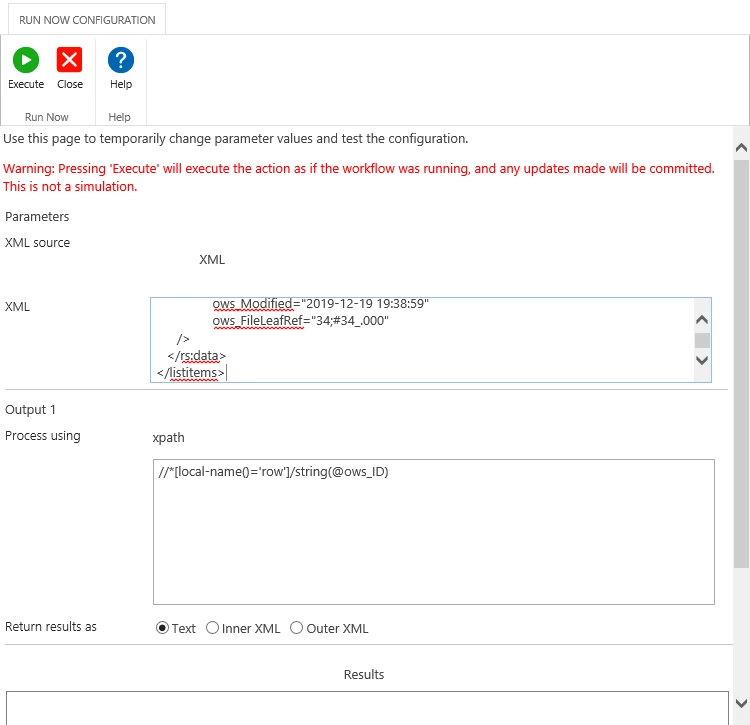
Here is the exact XML I paste into the "Run Now Configuration" follwed by a screen of the run now config...

<?xml version="1.0" encoding="UTF-8"?>
<listitems 
xmlns="http://schemas.microsoft.com/sharepoint/soap/" 
xmlns:dt="uuid:C2F41010-65B3-11d1-A29F-00AA00C14882" 
xmlns:rs="urn:schemas-microsoft-com:rowset" 
xmlns:s="uuid:BDC6E3F0-6DA3-11d1-A2A3-00AA00C14882" 
xmlns:z="#RowsetSchema">
   <rs:data ItemCount="1">
      <z:row 
		ows_ID="34" 
		ows_Field1="34.0000000000000" 
		ows_EmpID="****" 
		ows_FirstName="Patrick" 
		ows_LastName="Kelligan" 
		ows_MiddleInitial="S" 
		ows_FullName="Kelligan, Patrick" 
		ows_LeidosEmail="****@****.com" 
		ows_AKOEmail="****@mail.mil" 
		ows_UserID="****" 
		ows_EmpIsSupervisor="1" 
		ows_Gender="Male" 
		ows_StartDate="2010-08-30 00:00:00" 
		ows_FPCard="1" 
		ows_HomeOfRecord="****, NC" 
		ows_KuwaitDL="0" 
		ows_HeavyDL="0" 
		ows_PickupDL="0" 
		ows_IssuedPhone="0" 
		ows_CellNumber="****" 
		ows_IssuedLaptop="0" ows_Active="1" 
		ows_Status="PDY" 
		ows_Clearance="2.00000000000000" 
		ows_Org="1.00000000000000" 
		ows_Position="18.0000000000000" 
		ows_Section="6.00000000000000" 
		ows_Supervisor="81.0000000000000" 
		ows_CAC_YesNo="0" 
		ows_LinkToWAD="https://vector.leidos.com/ASP/_layouts/FormServer.aspx?XmlLocation=/ASP/WorkAuthDoc/WAD_411191_Sarraga-Nieves_Hector_26June2016.xml&amp;OpenIn=browser" 
		ows_NewFlag="1.00000000000000" 
		ows_ContractName="ASP" 
		ows_PhysicalLocation="****, NC" 
		ows_ContractExpDate="2020-02-29 00:00:00" 
		ows_TimeBank="1" 
		ows_LastPaidAirfare="2014-06-02 00:00:00" 
		ows_SharePointEditor="Kelligan, Patrick S." 
		ows_SharePointAuthor="****" 
		ows_SharePointModifiedDate="2015-11-19 23:25:00" 
		ows_SharePointCreatedDate="2014-04-03 17:56:00" 
		ows__Level="1" 
		ows_MetaInfo="34;#" 
		ows_owshiddenversion="149" 
		ows_Created="2015-11-23 22:11:35" 
		ows_PermMask="0x7fffffffffffffff" 
		ows_FileRef="34;#ASP/PMO/AdminWebDB/Lists/tbl_Westerners/34_.000" 
		ows__ModerationStatus="0" 
		ows_UniqueId="34;#{677AB0AA-30E5-4454-85C8-7274C3A3C326}" 
		ows_FSObjType="34;#0" 
		ows_Created_x0020_Date="34;#2015-11-23 22:11:35" 
		ows_Modified="2019-12-19 19:38:59" 
		ows_FileLeafRef="34;#34_.000" 
      />
   </rs:data>
</listitems>

6201i72E989B47065F7AC.png

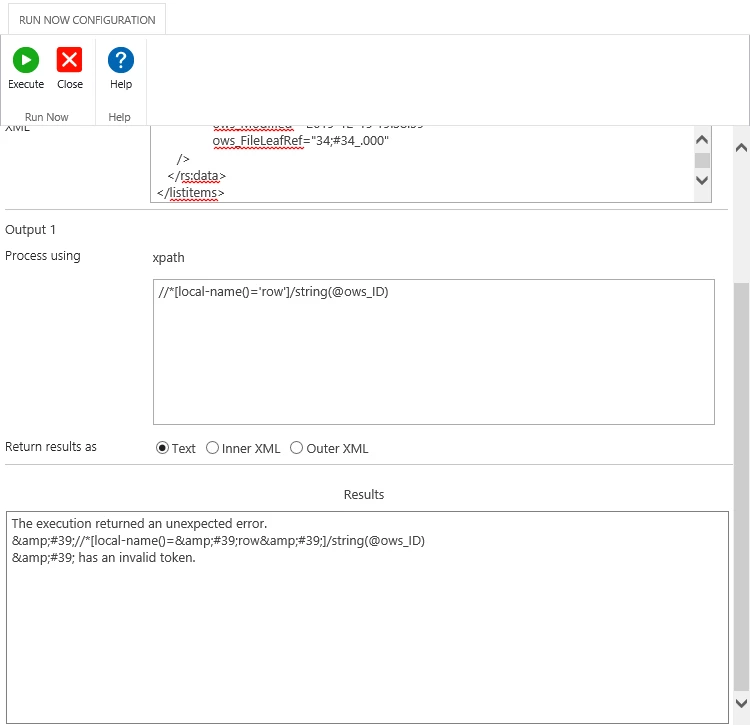
Here is a screen of the Run Now Execution...

6202i52BD8423CFF978D2.png

See anything that I should correct?

Thanks again!

Patrick


TomaszPoszytek
Forum|alt.badge.img+17

Maybe try to replace ' with "? As well remote string() function for another test.


Regex is working fine right?


kelliganp
Forum|alt.badge.img+10
  • Author
  • Rookie
  • January 17, 2020

@TomaszPoszytek, Yes, RegEx works well.


I tried the following 3 variations from your first XPath string...

//*[local-name()="row"]/remote string(@ows_ID)
//*[local-name()='row']/remote string(@ows_ID)
//*[local-name()="row"]/string(@ows_ID)

All three came up with the same error. Where the edits I made what you intended me to try?


TomaszPoszytek
Forum|alt.badge.img+17

I meant remove :)


And this one: 

//*[local-name()="row"]/@ows_ID


I am really running out of ideas :( 


kelliganp
Forum|alt.badge.img+10
  • Author
  • Rookie
  • January 17, 2020

@TomaszPoszytek,

That one worked great! Thanks so much for the help!


Can you offer me some clarification/education on what was going on so I can apply similar logic in the future?


Regards,

Patrick


TomaszPoszytek
Forum|alt.badge.img+17

I'm glad it works :)


So my undestanding was that string() expression might not be implemented in parse XML engine.

Then, I think single quotes are special character used by the parsing enging. So that your xpath expression is surrounded by single-quotes and if it contains them inside they cause error because script fails.

This is just a guess, but seems legit.


Regards,

Tomasz


kelliganp
Forum|alt.badge.img+10
  • Author
  • Rookie
  • January 17, 2020

@TomaszPoszytek,


I think that makes sense. Once again, you pull me out of the ditch!

Much thanks and massive KUDOS! It saddens me that the community is not as busy and vibrant as it once was when Frank was involved.


Take care!

Patrick