
Nintex Community Menu Bar

Pick some letters from string to fill field username (SHP 2013 workflow)

  • April 9, 2019
  • 6 replies
  • 29 views

SteveJonasson
Forum|alt.badge.img+3

Hi guys,


I'm stucked at kind of tricky thing. I have a field in the form (person or group). If someone fill the field with a person from AD, my workflow does convert it to a plain text. Then I get "Steve Jonasson" from it, for example. Then, I have another field (one line of text(empty - filled with workflow afterwards)) and I need to put above mention name to this field, but adjusted like this:

5 first letters from Surname.

3 first letter from Name.

= JonasSte

How can I do it via Nintex workflow? Can you redirect me to some tutorial with pictures (at the best) or video tutorial? Should I use regular expression? Some function? Anything can help me.


Thank You


Steve

6 replies

Forum|alt.badge.img+9
  • April 9, 2019

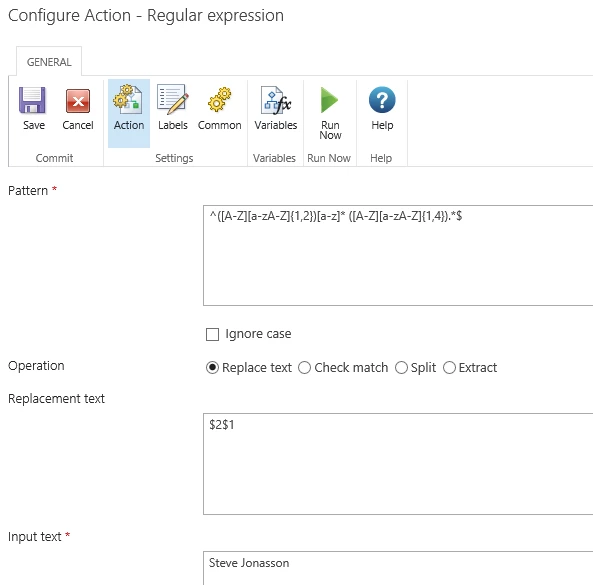
use regular expression action and store result in a single line text variable:

1402iCF730F0DD5DAB387.png

here is the pattern as text:

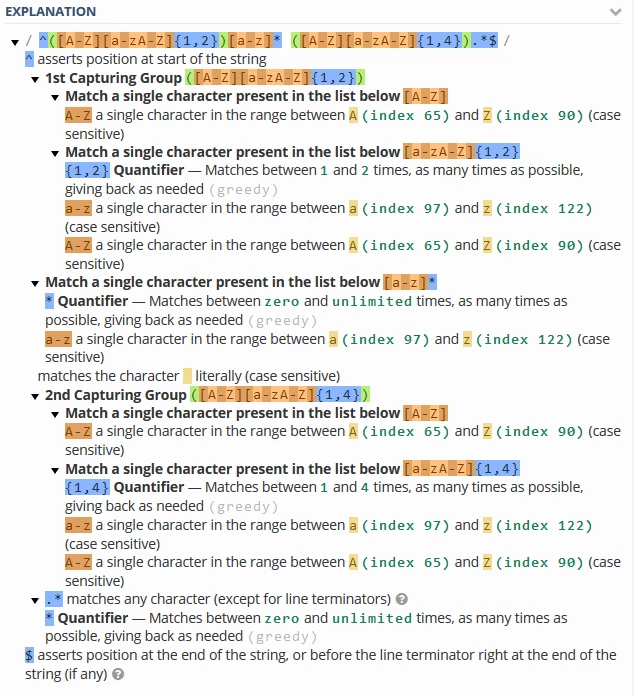
^([A-Z][a-zA-Z]{1,2})[a-z]* ([A-Z][a-zA-Z]{1,4}).*$


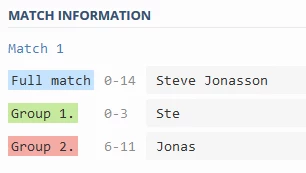
and the explanation:

1404i8DA0B83E12BCFE3D.png

1405i121CDC2E6FE0C9D5.png


SteveJonasson
Forum|alt.badge.img+3

Thank you very much for your response and viable screens and manual.

Probably, I'll have to study about the scheme you sent me. I hope I will solve the problem out with variables.

Edit: It does not work for me right now.

Edit 2: I already got it (I mean the system how it works). But it needs some precise work. Thank you for your pattern mlauer, but now what? I've pasted the pattern in "Pattern zone" and it still does not work. It shoud all be set correctly. Do not I need to put some "fn-replace" or something in front of the pattern? I also used Nintex tutorials to find awesome "RegExr" editor. It helped me a lot.

Edit 3: Your solution is working, but only when I use specified text, in our case, "Steve Jonasson". But I need to put into the field, where Steve Jonasson is, variable.


Check the attachement to see more. I'm going to try to solve it out by myself with variables, but every piece of advice may help me :)


Thanks.


Steve


Forum|alt.badge.img+9
  • April 15, 2019

Your screenshot looks good. Please note that for a test with "Run now" no variables can be used, because they are only available when starting the workflow.


SteveJonasson
Forum|alt.badge.img+3
I know, I know. It would be perfectly working without having "accents and diacritics" in my name, colleagues name etc… The variable takes name, for example, Štěpán Petržel and put it to regular expression and it does not work. I need something to replace diacritics in names - Czech and Slovak.
Is there a pattern to use for it? Or not?
Thank you very much and sorry for late response.

Forum|alt.badge.img+9
  • May 6, 2019

You can extend the character classes enclosed in [] by unicode characters, e.g.

[x{00C4}-x{00C9}] matches range between Ä (index 196) and É (index 201)

see also List of Unicode characters


SteveJonasson
Forum|alt.badge.img+3

We do not understand each other.

Our language has accented letters/characters = ěščřžýáíéúůŠČŘŽÝÁÍÉÚŮ

The pattern doesn't accept it. I'm trying to reach the state when "Sežer Hřbet" will be put in collection like: "Sezer Hrbet" with no accent. At the final state, with your pattern, stored in collection "HrbetSez", it would be great.


Does anything like this exist? Can I do it with regex (regular expression)?