Nintex Community Menu Bar

Orphan error, in error profile

  • May 20, 2008
  • 6 replies
  • 35 views

Forum|alt.badge.img+3
No instance is associated with the error, how can I remove an orphan error from all error profiles.  It got created when I picked the wrong workflow instance on retry in Visual Studio that errored out.


6 replies

Forum|alt.badge.img+9
  • Nintex Partner
  • May 21, 2008
I believe you can just delete it off if you don't need the instance anymore.  You can go to the Management Console -> Processes.  Right click and select Manage Process Instances.  From here, search for your error process instance and you have the option to delete it.

Forum|alt.badge.img+3
  • Author
  • May 21, 2008
What's the best way to go about connecting an error in error profile to an instance of that workflow?

Forum|alt.badge.img+9
  • Nintex Partner
  • May 22, 2008

Normally, I would set the Folio value to some unique value.  e.g. The process name followed by a unique number or the datetime string.  So for a Leave Request process, it might be LR-002345 or LR-1500608-1354.


This will allow you to easily search for the instance you are working with.


Forum|alt.badge.img+3
  • Author
  • May 22, 2008

I need this for an infopath workflow.  Where would you put this logic?


Forum|alt.badge.img+3
  • Author
  • May 22, 2008

Okay I created a Server event at the beginning of the workflow which get's the identity created for the row created in the database, then did the following for the folio in the event.


// code that get's Id from table in db 


K2.Synchronous =

true;


// Folio already has some metadata defaulted/set in the designer, so appending the Id


K2.ProcessInstance.Folio += string.Format(" - {0}", Id);


Forum|alt.badge.img+9
  • Nintex Partner
  • May 22, 2008

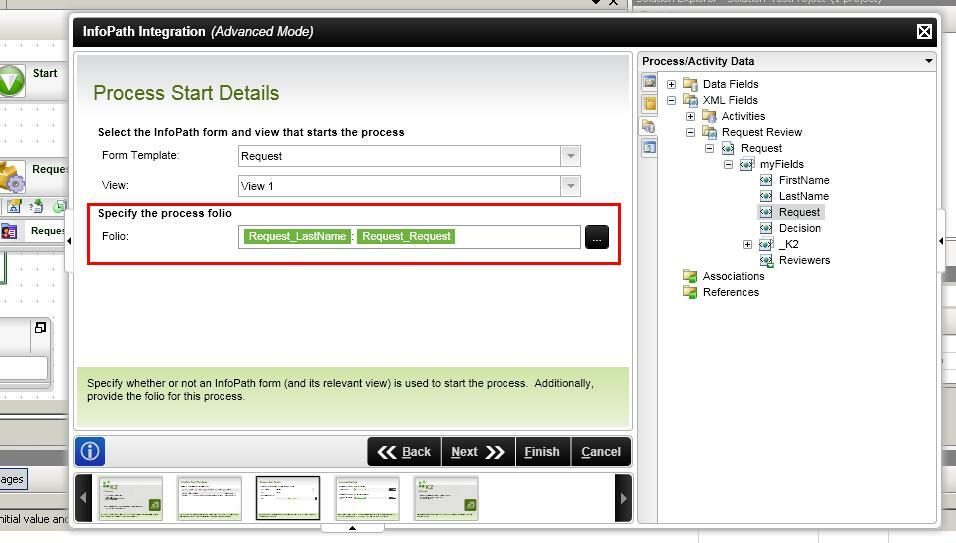
If the data you wish to include witin the Folio resides within the XML of the InfoPath form, you can do this directly from the InfoPath Properties Wizard (see attached screenshot)


12640iF5F2A2EC0717E574.jpg