Nintex Community Menu Bar

Not able to connect repeating section with Column

  • October 10, 2019
  • 6 replies
  • 35 views

Forum|alt.badge.img+3

I have created a multi-line textbox control in Nintex Forms and a multi-line text column in SharePoint List. But I am not able to connect them. Would you able to help? Please share pictures and/ or exported files since that's will help to understand.

6 replies

Simon Muntz
Nintex Partner
Forum|alt.badge.img+23
  • Nintex Partner
  • October 10, 2019

Hi,


The title mentions a repeating section but your question talks abliut Multi Lines of Text (MLT) columns and controls?


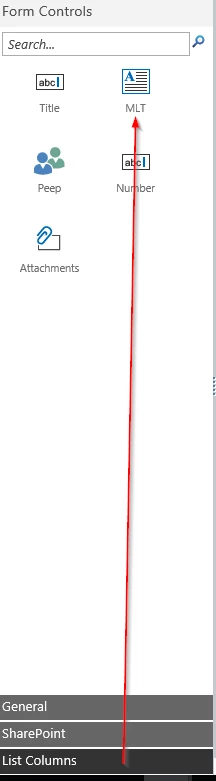
If you just want to connect the MLT column just drag the control from the List columns section of the tool box onto your canvas.  The control will be automatically connected.

4929i67B2DC24B1AA4228.png

If you do want to connect a repeating section control to a MLT you first have to make sure that the MLT column in SharePoint is configured as Plain Text and not Rich text.


Open your nintex form and delete the Multi Lines of Text Control that will appear by default.

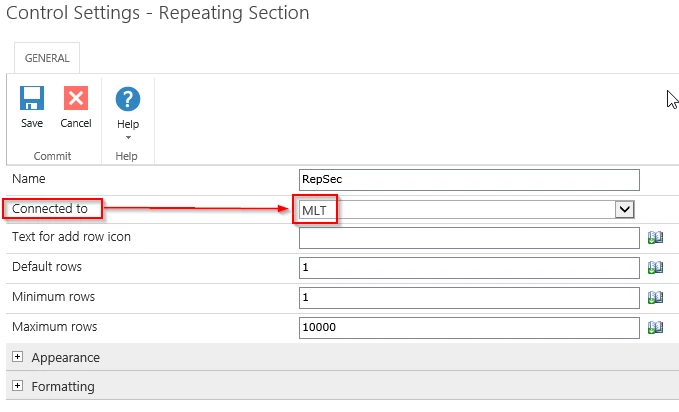
Add a repeating section control and open its configuration and connect it to the MLT.

4930i48255CDB0B6B6160.png

Add your controls to the repeating section.

Now when you submit a form you will see XML in the MLT column which will be the structure of the repeating section.


Forum|alt.badge.img+3
  • Author
  • October 12, 2019

This works! Thank you very much. 


I have another issue though. I entered 3 updates (update 1,2,3) using Nintex Forms. Repeating Section of MLT in the Nintex Forms is connected to Plain Text Col1 in SharePoint List. Along, with updates that I entered manually, it shows me auto-generated XML code which I don't want because it's confusing to my audience and doesn't bring any worth. How can I turn off this automatic generation of XML script in Sharepoint Column? Please refer to attachment: (1) Data entry using Nintex Forms (2) Data as seen in the Sharepoint List. Please advise. Thank you again!


Simon Muntz
Nintex Partner
Forum|alt.badge.img+23
  • Nintex Partner
  • October 13, 2019
Hi,
Just diconnect the Repeating section from the SharePoint column.
The XML will not show but the form will still work.
Or
Remove the column from the View in SharePoint.

Forum|alt.badge.img+3
  • Author
  • October 14, 2019

Hello,


If I disconnect the Repeating section from the SharePoint column: 

1. I cannot connect the Multi-Line Textbox control to the Multi-Line Text SharePoint column. I can only connect the Repeating section to the Multi-Line text Column. Please refer to the attached screenshot.

2. If I don't connect the repeating section to the column, then when I create a new item, whatever I enter in the multi-line textbox control is not written in the Sharepoint column. That is not what I desire.


Your second suggestion- Remove the column from the View in SharePoint:
1. My audience and myself would still like to see what's being entered in the repeated section of a multi-line textbox control. 
I have attached Form.xml. Please refer to the repeating section in this form. Please advise. 
 
Thank you !


Simon Muntz
Nintex Partner
Forum|alt.badge.img+23
  • Nintex Partner
  • October 15, 2019
You could use a workflow to parse the XML into a nice table using XSLT as per this guide and then update a multi lines of text column with a the table.
http://www.vadimtabakman.com/nintex-workflow-xsl-transformation.aspx

Forum|alt.badge.img+3
  • Author
  • October 16, 2019

I tried downloading and opening the workflow present in the link that you shared but it's not working on my end. Could you please create and send workflow to me so that I can look through it and can tailor it to my needs? I referred to lots of posts on how to parse the XML but I am stuck with this part.


I have a multi-line textbox control in Nintex Form and would like to show the text entry with no XML script in a SharePoint Column. It would be helpful if you can create a simple form and workflow and if you can share it with me.