Nintex Community Menu Bar

Nintex Online for O365 - Basic Send Email when item is created

  • December 13, 2019
  • 13 replies
  • 19 views

Forum|alt.badge.img+5

I have a very basic workflow that I started with for testing.  It is to start when an Item is Created and then Send an email.

It does not run and when I try to run it manually I get the message:

Something went wrong.  To try again, reload the page and then start the workflow.

I'm just trying to see what the email will look like and thought it was a pretty basic workflow.

Any ideas?

Thanks

Kim

13 replies

Forum|alt.badge.img+12
  • Scholar
  • December 13, 2019

@kwilliams .....can you delete the workflow and re-create it? You can export your current workflow, delete the workflow and then import again and publish it.


Forum|alt.badge.img+5
  • Author
  • December 13, 2019

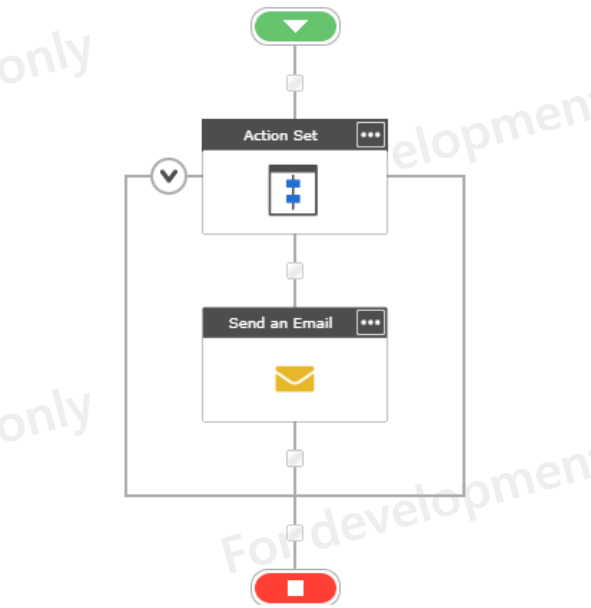
I did that. I originally just had the Send Email action, but then thought it needed something else, so I put it in an Action Set and still nothing.


I have other workflows that are working without any issues.


Forum|alt.badge.img+12
  • Scholar
  • December 13, 2019

@kwilliams ....What are the changes you made other than adding an Action Set? Will it be possible for you to share your workflow screenshot?


If it's just the action set, then can you publish the previous version of the workflow and re-try?


Forum|alt.badge.img+5
  • Author
  • December 13, 2019

5949i66638F0629473C1A.png


Forum|alt.badge.img+12
  • Scholar
  • December 13, 2019

@kwilliams ....May I know the reason for adding send notification action inside action set? 


The logical use of action set is either you want to run w/f as an owner instead of an initiator or if you want to group lot of actions and minimize the display size !!!!


Forum|alt.badge.img+5
  • Author
  • December 13, 2019
I tried without it and just had send email and it didn't work, so I was trying something else.

Simon Muntz
Nintex Partner
Forum|alt.badge.img+23
  • Nintex Partner
  • December 16, 2019
Looks like an issue with the list itself based on the informtion provided.
Can you run a SharePoint designer worklfow on the list?

Forum|alt.badge.img+5
  • Author
  • December 16, 2019

I tried a SPD workflow and no luck.  The only thing that works is Flow.


Forum|alt.badge.img+12
  • Scholar
  • December 16, 2019

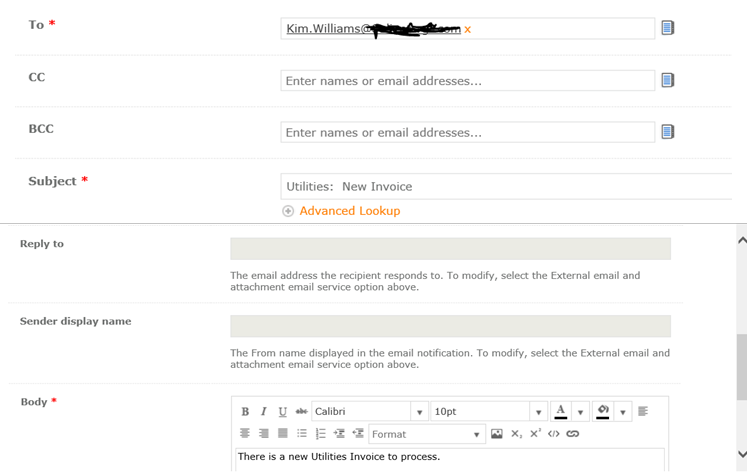
@kwilliams ....can you share your email configuration?


Is To/CC/BCC fields are using correct values?


Are you attaching something?


Is there anything in the email body that is causing an error?


I will also recommend moving this topic to the O365 forum....just in case someone had a similar issue !!!!


Forum|alt.badge.img+5
  • Author
  • December 16, 2019

It is very basic just to get it working.5963i40894D64C7FB7B85.png


Simon Muntz
Nintex Partner
Forum|alt.badge.img+23
  • Nintex Partner
  • December 17, 2019
As the SharePoint designer workflow is not running either there is an issue with the list.
If you create the same workrflow on another list does that work?

Forum|alt.badge.img+5
  • Author
  • December 17, 2019

@SimonMuntz I created a test list and added a workflow to start when new item is added and to send an email (like what I wanted on my other list) and it worked.  Not sure what the difference is, except my list was copied from another site and then I added a Nintex form.


Simon Muntz
Nintex Partner
Forum|alt.badge.img+23
  • Nintex Partner
  • December 17, 2019
Its possible the list is corrupt or has brought along some other event receivers or something.