Nintex Community Menu Bar

Nintex Forms RegEx Checking for Single Character

  • April 4, 2019
  • 4 replies
  • 36 views

Forum|alt.badge.img+3

Hello,


I'd like to check for only an "@" symbol in Nintex Forms for a text field. This is for email address, and I'd only like to check to make sure they put an "@" somewhere in the string. That's all I need.


I'm getting the feeling it's something simple but I'm not sure what I'm doing wrong. I'm trying:

@

and

/(@)/g

but neither will validate.


Would anyone have thoughts on what I'm doing wrong?



4 replies

Forum|alt.badge.img+14
  • Scholar
  • April 5, 2019

the first one '@' should work, or even simply single '@'.


note that regular expression validation is only applied if control is not empty. so apert from pattern validatio you should make it mandatory or assign it a validation rule so that empty value is not acce[ted.


Forum|alt.badge.img+3
  • Author
  • April 8, 2019

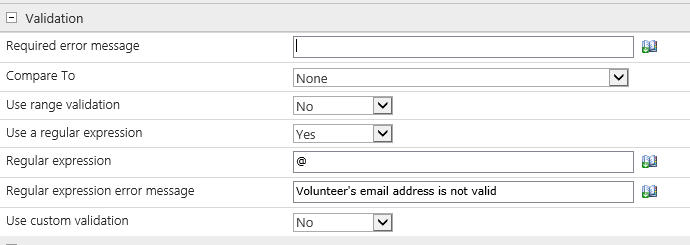
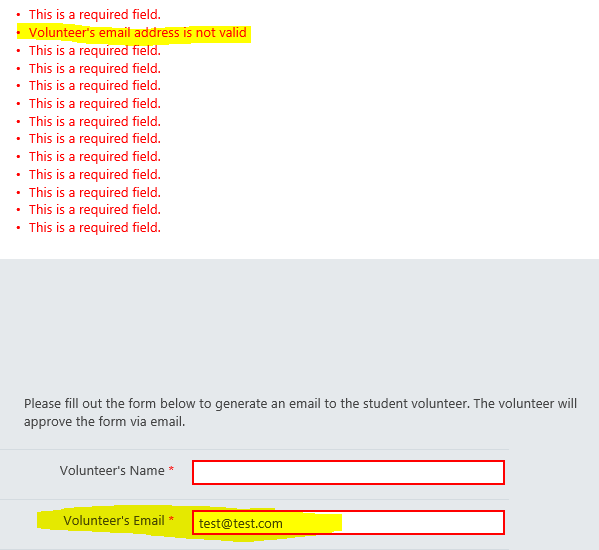
Thanks for your reply! I've tried both, '@' and '@' and it still won't validate. Here are my settings. I'm not sure what I'm missing.


1370iA1DED86C0B74203F.png1371i0F08B357D87C1AF3.png


Forum|alt.badge.img+14
  • Scholar
  • April 9, 2019

whole regular expression should look like 

.*[@].*


or better (avoids inputs like 'test@' or '@test.com'

.+[@].+

you have to declare some characters may be before and after the '@' sign.

I understood you only ask how to use '@' sign within the expression...


Forum|alt.badge.img+3
  • Author
  • April 9, 2019

This works perfectly, thank you! I should've mentioned that I'm not very familiar with regular expressions.


Thanks again!