Nintex Community Menu Bar

Nintex Forms (O365) - Responsive Design: How to Reference "This" or "Self" in formulas?

  • July 8, 2019
  • 2 replies
  • 19 views

Forum|alt.badge.img+5

I have a multitude of calculated fields. I would like to hide each if their respective value is 0 or null/empty. Instead of creating twelve rules for all 12 of them, I'd like to create one rule for all of them instead. Something like:


"or( [THIS] == 0,IsNullorEmpty([THIS]))" then Hide.


However, I can't find any way to reference the field's value using a keyword such as "This" or the old {Self} from previous Nintex versions. Any ideas how I can do this?


EDIT: I have tried using {self} in the one-rule-to-rule-them-all, but it doesn't work. They all remain hidden regardless.


2 replies

Simon Muntz
Nintex Partner
Forum|alt.badge.img+23
  • Nintex Partner
  • July 8, 2019

Hi.


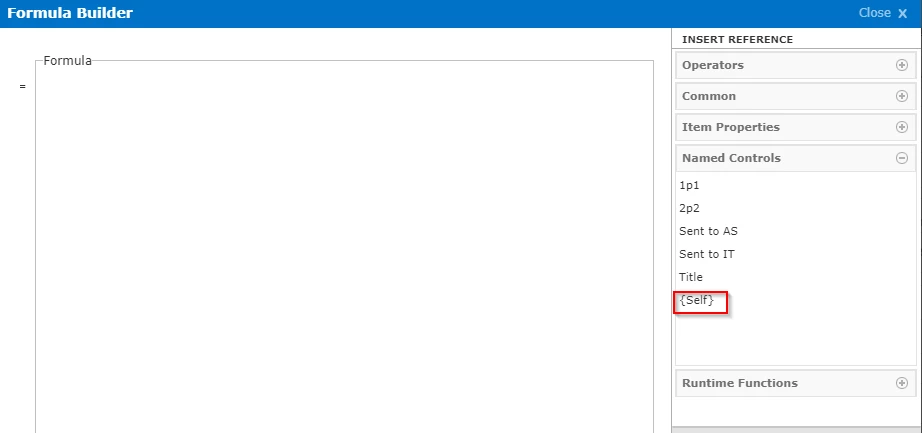
The {Self} reference does exist in the Named Controls section when creating a rule.

3075i73E68C7ED7AD888F.png


Forum|alt.badge.img+5
  • Author
  • Novice
  • July 9, 2019

Thanks! I must have missed it. Though it didn't work when typing it in manually, I'll give it another go using the reference directly from the right pane and see if that works.