
Nintex Community Menu Bar

Nintex Forms - If Box is Checked, Clear Associated Number Fields to Equal '0.'

  • September 3, 2019
  • 2 replies
  • 61 views

cjwilson1009
Forum|alt.badge.img+4

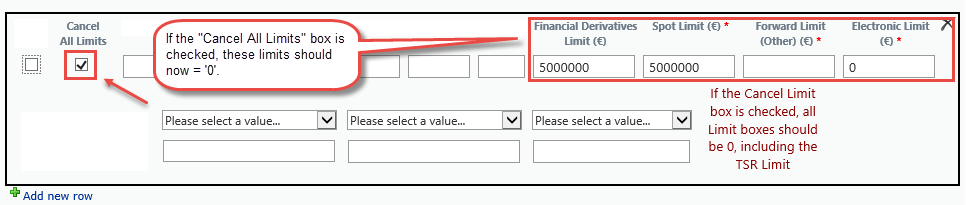
I have a Nintex Form (SharePoint 2013 On Prem). I have a check box that says, "Clear All Limits." If this box is checked on the form, there are 3 fields that should be cleared out, or to show '0' instead of whatever number(s) were in those fields before the box is checked. 

Is there a formula I can use that says, if box is checked, then make fields X1, X2, and X3 = '0'? 
4229i283951885DC6B06B.png


2 replies

Simon Muntz
Nintex Partner
Forum|alt.badge.img+23
  • Nintex Partner
  • September 4, 2019

Hi,
The screen shot is showing a classic form.  The only way to acheive this functionality in a classic form would be with custom Javascript.

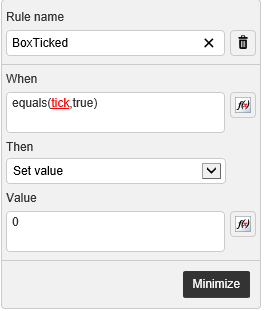
In Responsive forms you can use a rule to set the value of the text Boxes to zero if the checkbox is ticked. 

4232i4C7B565369F196A8.png


For Classic forms the JavaScript would look like:

NWF$(document).ready(function () { 

var opt= NWF$("#" + Yes); 
opt.change(function(){ 

if(opt.prop('checked')) 

   NWF$('#'+Text1).val(""); 

   NWF$('#'+Text2).val(""); 

   NWF$('#'+Text3).val(""); 
}); 
});

I have attached a sample classic form with the JS for you to look at if you require.


cjwilson1009
Forum|alt.badge.img+4
  • Author
  • September 4, 2019

Thank you!