Nintex Community Menu Bar

Nintex Form List Form Web Part

  • February 10, 2017
  • 11 replies
  • 35 views

Forum|alt.badge.img+7

Is it possible to get a Nintex form to load on a page for people to fill out and submit without having to go to the list first?

We have just transitioned over from InfoPath where we were able to get our forms to load on a page for a user to fill out and submit. I am looking to do this with my Nintex form and have been trying to use the Nintex Form List Form Web Part to add a new form to the page but I can not get it to work.


11 replies

rhia
Nintex Partner
Forum|alt.badge.img+15
  • Nintex Partner
  • February 10, 2017

Hi there!

I've just done this to ensure it's functional and there are no changes. Let me show you how I've added mine, and maybe you can tell us where it might differ on your end:

1)  Add the Nintex Forms > List Form web part:

198725_pastedImage_1.png

2) Edit the Web Part:

198726_pastedImage_2.png

3) Fill out the List Form Settings:

198727_pastedImage_3.png

4) Apply & Save (it won't display if it's currently in Edit Mode)

Mine appears well!


Forum|alt.badge.img+7
  • Author
  • February 10, 2017

Thank you Rhia!

the part I was struggling with was filling out the settings. Your screenshot really helps! I will try again and see if I can get it to work.


rhia
Nintex Partner
Forum|alt.badge.img+15
  • Nintex Partner
  • February 10, 2017

No problem! If that gets you to where you need to be, please mark the above as correct!

The weird part in that web part, I feel, is the "Site URL" ... it doesn't actually want the site URL, it just wants the last directory that the library resides in. So if it's in the Administration site, and the name is Reports, it just wants "administration".

Content type - be sure that you choose the one that's connected to the form! And you can just type it in, in full.


Forum|alt.badge.img+7
  • Author
  • February 11, 2017

I am also a little confused about content type. I don't have context types turned on for my list. Is that something I need to do?


rhia
Nintex Partner
Forum|alt.badge.img+15
  • Nintex Partner
  • February 12, 2017

I think in that case it will be the default "New Document" (if it's a library)

Let me know if that works out for you!


Forum|alt.badge.img+7
  • Author
  • February 13, 2017

This is the error I keep getting. Any thoughts?

198766_pastedImage_1.png


rhia
Nintex Partner
Forum|alt.badge.img+15
  • Nintex Partner
  • February 17, 2017

I'd need to see a screenshot of your web part configuration to be sure, but, I'm guessing that either you do not need that first "/", or, you need %20's to present the spacing! 


if you can provide a screenshot I'll be able to help more .. helpfully. wink.png 


Forum|alt.badge.img+7
  • Author
  • February 17, 2017

I actually just got it to work this morning!

I had to add the parent site to the URL and then I used the list ID rather than the list name. Also, since I do not have content types turned on, I just made the content type "Item" since it is a list. I think if it had been a library you would want to use "new document" if you didn't have content types turned on.

I appreciate all of your help!

199549_pastedImage_1.png


rhia
Nintex Partner
Forum|alt.badge.img+15
  • Nintex Partner
  • February 17, 2017

Ah ha, I see! Very good grin.png 

If any of my answers helped you along the most, please mark it correct - otherwise, we'll let another mod come in and mark your final answer correct!

Well done, didn't realize it was a list haha. Cheers!

Rhia


Forum|alt.badge.img
  • November 9, 2017

Yes it is possible to create a page that will allow people to fill out and submit without having to go to the list first. However, I had a lot of trouble with the settings as well. I kept receiving the error message, "There is no Web named". Below are the settings I used:

  • Form Mode = New
  • Site URL = Blank
  • Redirect URL = Blank
  • List Name = The name of the list. Do not include view. The name of my list was Training Signup
  • Content Type = Item. I do not have content types turned on my list.

The Nintex Forms webpart is on its own page and it works perfectly.


Forum|alt.badge.img+1

Hi,

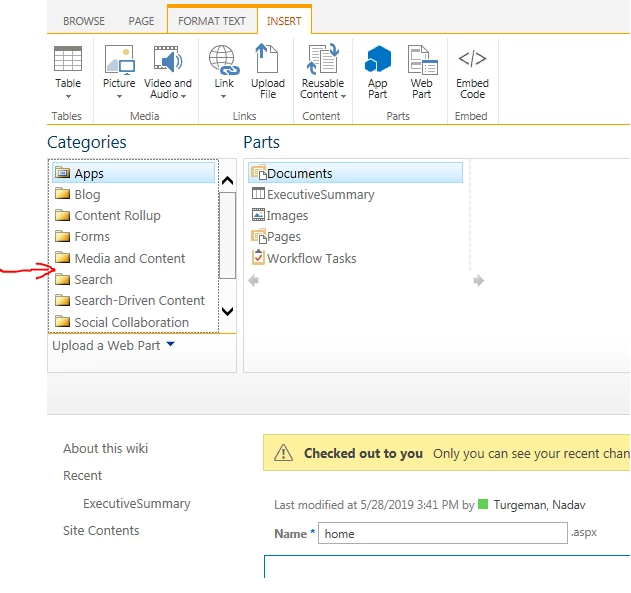
I saw your example and I wonder if you know why I can't see the Nintex Forms under "Categories".

please see the following picture:

2319i7569F07498FCCEAB.png

BR,

Nadav