Nintex Community Menu Bar

Nintex form is not opening

  • March 8, 2019
  • 1 reply
  • 125 views

Forum|alt.badge.img+6

Hello,

I had a list and there we were using SP OOB form , now i have created a nintex form on the list but still when i go to capture the data New,Edit then OOB form is opening. 


Is there any setting I need to do inorder to open Nintex form ?


Thanks

1 reply

Forum|alt.badge.img+7
  • March 8, 2019

What version of SharePoint are you using?

Are you sure you're using a native SharePoint form, or is it an InfoPath form? Or, by chance, was there ever an InfoPath form on this list?


The reason I ask is because, natively, if you create a Nintex Form and Publish it, the form will automatically replace the original SharePoint form. HOWEVER, if you have an InfoPath form on the list, a Nintex Form will NOT automatically replace it. You'll need to follow these steps:

  1. Go into List Settings from the Ribbon
  2. Click the Form Settings link
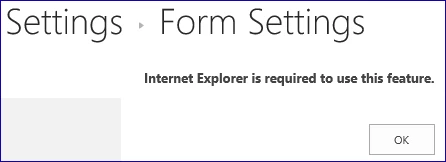
  3. You will see "Internet Explorer is required to use this feature.", even if you are using IE.424i3BE95ACAD46CD977.png
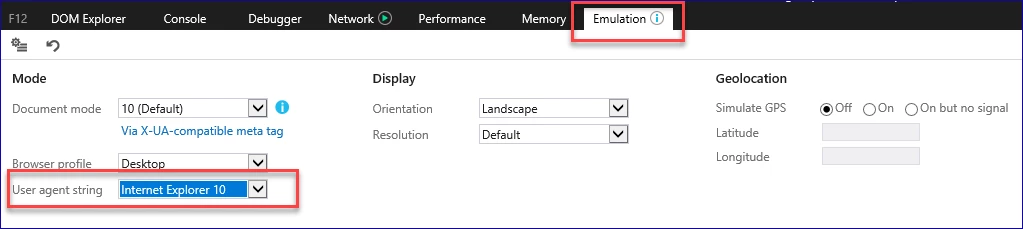
  4. Press F12 on your keyboard to open the Developer Console
  5. Click the Emulation Tab, and then change the "User agent string" drop down to Internet Explorer 10.426i36D1FFDA28BA32C9.png
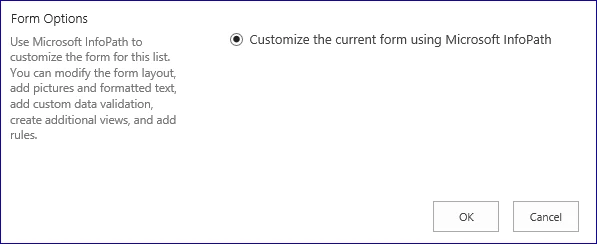
  6. The Internet Explorer window should refresh and give you a screen similar to this:425i04752CA37C95A69C.png
  7. If you've published a Nintex Form and are using an InfoPath form, there should be another option on this screen go back to default or something similar. (I don't have a good example for a screenshot right now.)

Try these steps to see if if it gives you the additional option.