

Nintex Community Menu Bar

Nintex Form: Data in these controls will not be saved to a field

  • January 28, 2020
  • 3 replies
  • 40 views

Forum|alt.badge.img+2

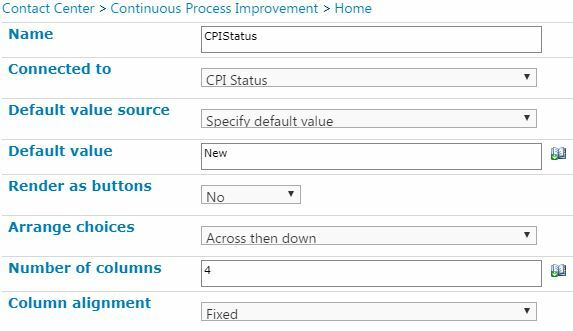
When publishing a form it warns me, "Warning: Data in these controls will not be saved to a field."  And "Control 'CPIStatus' is connected to field 'CPI Status' on layouts:

  • Desktop"

On testing, it indeed does not save.  CPI Status is a Choice control and it is connected to matching column.  If I delete the control and recreate it by dragging it from the List Columns bar the result is the same.  We are on SP 2013 and Forms 2.11.5.20
6281i8D82DFC5E79A70D2.jpg

3 replies

Simon Muntz
Nintex Partner
Forum|alt.badge.img+23
  • Nintex Partner
  • January 28, 2020
Hi,

If you dont specify a default value does it work then?

Forum|alt.badge.img+2
  • Author
  • Rookie
  • January 30, 2020

I tried with the column's default setting and that did not make a difference.  FYI, this form built on a content type and not on a list.  I'm going to try rebuilding the form on a list to see if that makes a difference.


Forum|alt.badge.img+2
  • Author
  • Rookie
  • January 30, 2020

I create a new test list and add the content type for the form that was discussed in the origional post.  I test it and the CPI Status stays blank when I set it - so broken in the same way.  Previously I was editing the form as it was associated with the content type starting from site settings.  This time I start from list settings and edit the form.  I see the CPI Status control is not associated.  I associate it with the matching column.  When I publish there is no warning and it works as desired when I test it.


TLDR Conclusion:

There is a bug with Nintex forms created on content types that prevents association with some columns.  I am willing to provide a copy of my form, content type and any other helpful information to those fixing this bug.



