Nintex Community Menu Bar

Nintex Form calculated field if statement

  • December 11, 2019
  • 8 replies
  • 109 views
  • Translate All

Forum|alt.badge.img+3

Hi Everyone,


I have a question relating to a calculated field in a Nintex for SP2013 environment.


I have several drop down fields with numeric values which are summed together in a calculated field called 3TotalValue.


I then have another calculated field called 3TotalRatingText which I am trying to auto populate with a text value, which is determined based on the value in the first calulated field 3TotalValue.


I am currently using the forumula shown below:
=IF(3TotalValue>=45, "Large", IF(3TotalValue>=26, "Medium", IF(3TotalValue<=25,"Small")))


But when loading the form or previewing it, the whole form is blank, so obviously something is seriously wrong.


I also have a second set of logic I need to apply, being that if any of the individual drop down values used to origionally determine 3TotalValue are > 4, the value of 3TotalRatingText should be changed from Small to Medium. Of course if 3TotalValue is already >=26, it is Medium, and if >=45, it is Large.


Does all of this make sense?


Can anyone help?


Your assistance, as always, is much appreciated. 

 

8 replies

Forum|alt.badge.img+12

@dean_white ....your formula is wrong. It should be "If" and not "IF" and in last If it's missing what if false.


Also the logic is not correct too, because, let's assume "3TotalValue" = 80

  • 1st condition - 3TotalValue >= 45 is true and also 3TotalValue>=26 is also true
  • Are you using correct operators for comparison?


If you're using 3 condition then you only need 2 If statements....


If(condition1, True, If(condition2, True, False)) - So for 3rd condition outcome will be taken care by false part of If statement.


Also, if you're logic on the form is controlling the value and don't want users to modify it, I'll recommend to use calculated control and connect it to SLT list column in SP.

Translate

Forum|alt.badge.img+3

I am gettings closer in the first stage.

So far I have this below, but I also need to add in the clause that if it is 45 or greater, it is "Large".


Can anyone assist with adding that bit in?


if(greaterThan(3TotalValue,25),"Medium","Small")


Once I have this sorted I can move on to the next bit.


Thanks


Translate

Forum|alt.badge.img+12

@dean_white .....I did mention before....your conditions are not correct....there are 2 situations where your values have 2 conditions true i.e. 3TotalValue >=26 and also 3TotalValue >= 45....for e.g. 3TotalValue = 50 in this case will it be medium or large?


I think you need below condition......since I'm not sure about your requirement and process, I just guessed here.....


If(3TotalValue <= 26, "Small", If(and(3TotalValue > 26, 3TotalValue <=45), "Medium","Large"))

Translate

Forum|alt.badge.img+3

Hi kunalpatel,

Thanks, and thankyou for your patience. This is something I am doing amongst other work and do not have a lot of time to dedicate to it, but of course, it is still expected to be done :-)


This formaula for "RiskSizeValue" ended up being:
If(3TotalValue<=25, "Small", If(and(3TotalValue>25, 3TotalValue<=45), "Medium","Large"))


I now have another value which I need to integrate in to this to force a minimum of a "Medium" outcome. The name of the value is "3IRSmallOverride", and if this value equals "TRUE", it needs to force the value of "RiskSizeValue" to "Medium", even if the value of "3TotalValue" is <=25. This of course should not prevent a value of "Large" if the value of "3TotalValue" exceeds 45.


Your assistance is much appreciated.

Translate

Forum|alt.badge.img+3

Hi All,


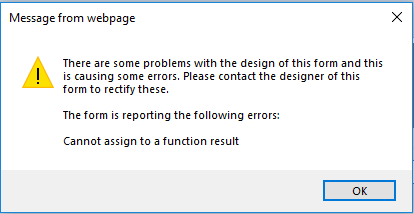
I have replaced "TRUE" with "OVRY" in the statement below in case that was causing some issues, but when the form loads, I am getting the message shown below. Can anyone please provide some suggestions on where I am stuffing this up?


if(3TotalValue>=45,"Large",if(or(and(3TotalValue>25,3TotalValue<=44),3IRSmallOverride="OVRY"),"Medium","Small"))

5996i2A6EDDD7EBD45908.png

I have it working in Excel with the formula below, but just cannot get it working in Nintex:

IF(B9>=45,"Large",IF(OR(AND(B9>25,A9<=44),C9="OVRY"),"Medium","Small"))

Translate

Forum|alt.badge.img+3

Correction,  formula that works in excel is:


IF(B9>=45,"Large",IF(OR(AND(B9>25,B9<=44),C9="OVRY"),"Medium","Small"))

Translate

Simon Muntz
Nintex Partner
Forum|alt.badge.img+23
  • Nintex Partner
  • December 18, 2019

= is for assigning a value == is for comparing so your formula should be:

if(3TotalValue>=45,"Large",if(or(and(3TotalValue>25,3TotalValue<=44),3IRSmallOverride=="OVRY"),"Medium","Small"))


Translate

Forum|alt.badge.img+3

@SimonMuntz thanks so much for your assistance, and also to @kunalpatel for your assistance and patience!

Translate