Nintex Community Menu Bar

Need a Yes/No Checkbox to be required based off column list field selection

  • August 28, 2019
  • 19 replies
  • 329 views

Forum|alt.badge.img+3

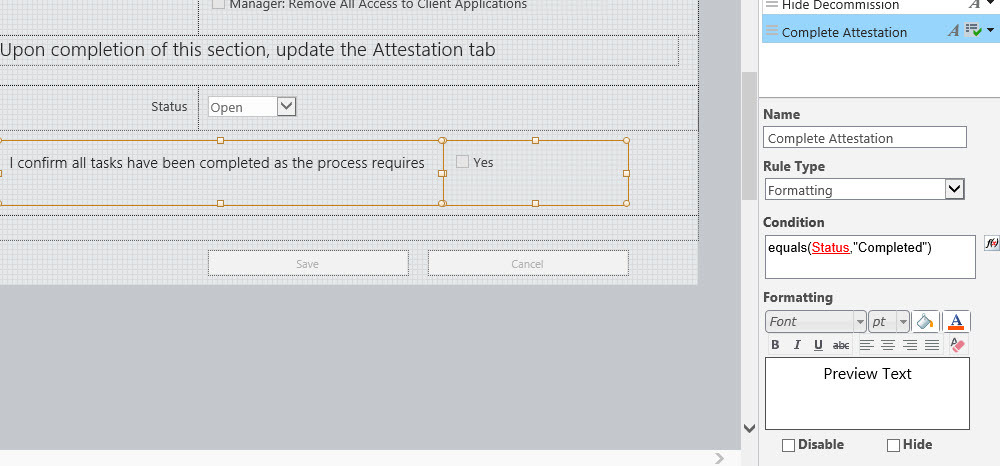
I created an onboarding form in Nintex which I need to have a checkbox (outlined in the below) be required when the user changes the form status from Open to Completed. 
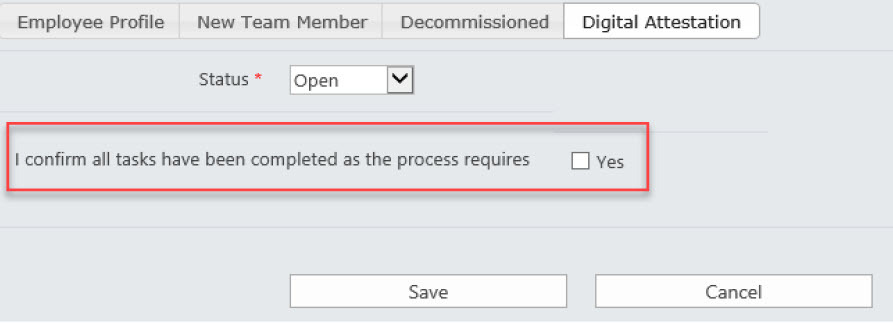
4149iF23E4848195EDD93.jpg

19 replies

Simon Muntz
Nintex Partner
Forum|alt.badge.img+23
  • Nintex Partner
  • August 28, 2019

Hi,

All that would be required would be to have a rule on the Check Box. In my rule "Status" is the name of the control which has the choice.

equals(Status,"Completed")

Please see my sample form attached if required.


Forum|alt.badge.img+3
  • Author
  • Nintex Partner
  • August 28, 2019

I added that into a rule for the checkbox, but it doesn't make it required if the status equals Completed.  It still allows me to save the form without checking it.


I wasn't able to open your example, but I've included a screen shot of the rule I setup as you recommended.  Clearly, I am missing something. :)

  4156i448FDAC9F03A86B7.jpg


Simon Muntz
Nintex Partner
Forum|alt.badge.img+23
  • Nintex Partner
  • August 28, 2019
Hi,
The rule type needs to be Validation and not Formatting.

Forum|alt.badge.img+3
  • Author
  • Nintex Partner
  • August 29, 2019

Hi again,


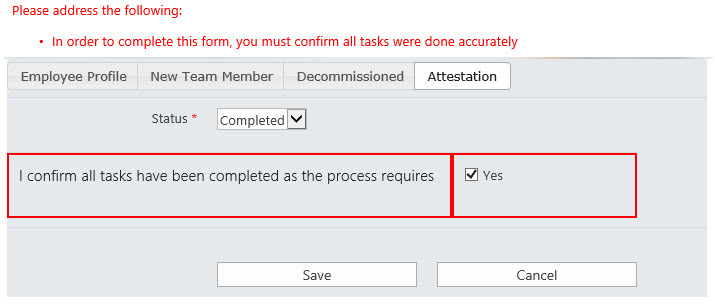
Thanks for the clarification.  I switched it to validation and then added an error message for users.  It triggers appropriately on the form, but won't let me save it once I check the Yes box.  Screen shot included.


4169iD360A3720EE4C65A.jpg


Simon Muntz
Nintex Partner
Forum|alt.badge.img+23
  • Nintex Partner
  • August 29, 2019
Hi,
What is the rule that you are using now?
What was the issue importing my test form?
Can you provide an export of your form?

Forum|alt.badge.img+3
  • Author
  • Nintex Partner
  • August 30, 2019

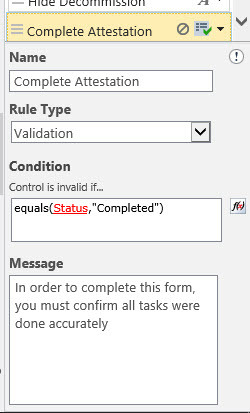
Hi - below is a photo of the rule.  When I tried to open your zip file it opened as an HTML and I couldn't decipher what it was saying.


4180iD46F01DFED81F208.jpg


Simon Muntz
Nintex Partner
Forum|alt.badge.img+23
  • Nintex Partner
  • August 31, 2019
Hi,
To view my sample form you will need to unzip it.
Then in SharePoint open the Nintex forms designer and select Classic Form.

From the ribbon click import and then import the file you extracted from the zip.
You can now bring up the rules panel and see how I have configured things.
Preview the form to test or publish and test on your list.
Your rule looks correct but it may not be associated to the correct control.
Following the process above you can open your form in the Nintex forms designer and click the Export button from the ribbon to export your form. Save it and zip it and attach it to a post on this thread and I can look at it for you.

USMCdave
Forum|alt.badge.img+3
  • August 31, 2019

The green check to the right of the rule name indicates it's associated with any controls selected on the left.  If any field other than the checkbox is selected, it won't work (even if the checkbox is ALSO selected).

Try deleting the rule, then selecting the checkbox only, them recreating the rule.


Forum|alt.badge.img+3
  • Author
  • Nintex Partner
  • September 3, 2019

Hello,


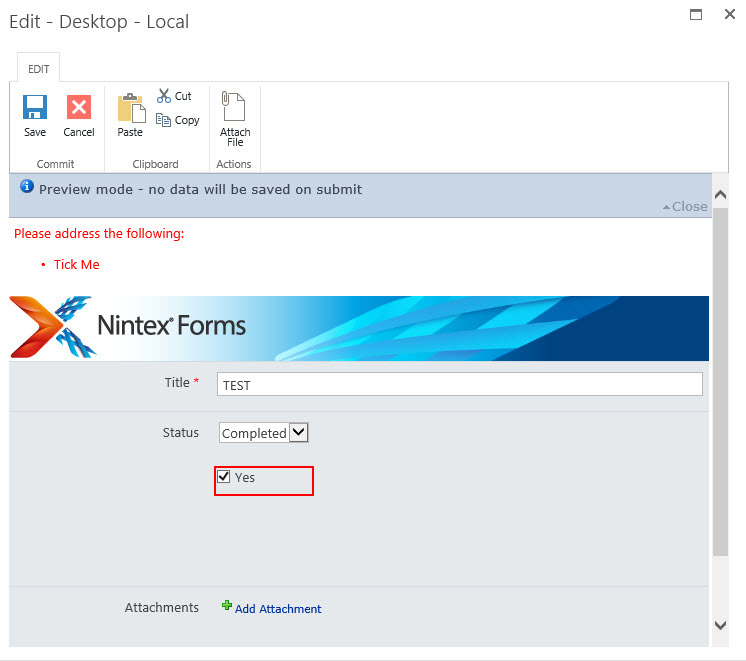
I was able to import your example; however, I still had the same issue with the form not saving even if I check the Yes box.  You can see in the screen shot below that even when I select Completed for the Status and check the Yes box, it still shows as an error and won't save the form.


4230iBDCA4EF66F537364.jpg


Forum|alt.badge.img+3
  • Author
  • Nintex Partner
  • September 3, 2019

Hello,


The rule is only associated to that checkbox.


Thanks


Simon Muntz
Nintex Partner
Forum|alt.badge.img+23
  • Nintex Partner
  • September 3, 2019

Hi,


The rule only needs to be associated with the text box as this is the requred control.

I have redone the test form.  I made a mistake where I was only looking at the choice control and forgot to look at the checkbox as well.


Forum|alt.badge.img+3
  • Author
  • Nintex Partner
  • September 4, 2019

Hi Simon,


I was able to import your Checkbox Validation and it works as designed; however, I am still not able to get my form to work.  I've attached the export file to this thread for you to review. Let me know if you need anything else.


Thanks,
Katie


Forum|alt.badge.img+16

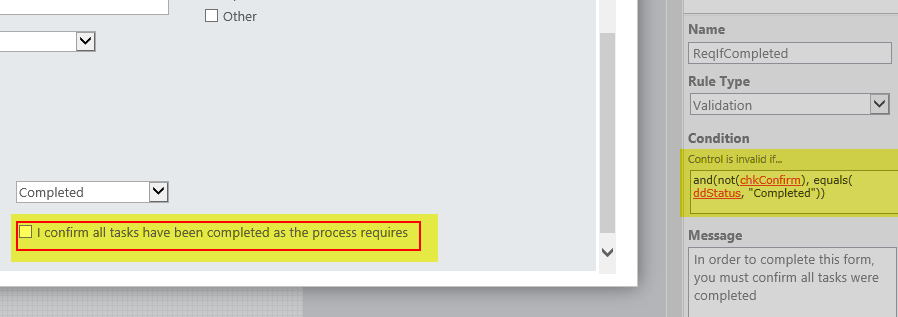
I think your issue is that you are validating when Status = Completed only.  You need to be validating when Status = Completed AND checkbox is unchecked:

and(not(chkConfirm), equals(ddStatus, "Completed"))

4251iBB0B441AFD833A4D.png


Forum|alt.badge.img+3
  • Author
  • Nintex Partner
  • September 4, 2019

Can you explain what the chkConfirm and ddStatus mean?  I entered this into my form exactly as you wrote it and it still isn't working as I would like it to :(


Simon Muntz
Nintex Partner
Forum|alt.badge.img+23
  • Nintex Partner
  • September 5, 2019

Hi,


Your rule was not working because you still had custom validation in the control configuration itself which was overriding the rule. Also the "Yes" in your rule was not red so it looks like it was not referenced.

I fixed it up and attached your form.


Forum|alt.badge.img+3
  • Author
  • Nintex Partner
  • September 9, 2019

It works!!!  Thank you so much!


Forum|alt.badge.img

Hi,

I am trying to check yes/no box whenever users click on choice drop down. Please see the screen shot.


Simon Muntz
Nintex Partner
Forum|alt.badge.img+23
  • Nintex Partner
  • January 23, 2020

@vishalshyam unless you use Javascript and a classic form you cannot check a Ye/No control based on a Choice control in Nintex forms on-premise.


USMCdave
Forum|alt.badge.img+3
  • January 24, 2020

Others are correct, that you need JavaScript in classic forms.  However, it looks like, from your screenshot, your check box is an affirmation by the user.  Kind of like a terms of service agreement.  In this case, automatically checking the box will nullify the purpose of it.  Unless I misunderstand the purpose...