Nintex Community Menu Bar

Multiple Entries in People Picker control for Document library only shows 2 entries

  • December 15, 2016
  • 1 reply
  • 6 views

Forum|alt.badge.img+4

I am modifying Edit form for a document library. I have a people picker control which is configured to allow multiple entries. This works fine in standard sharepoint Edit form. As soon as I apply K2 Appit, the same people picker field only allows 2 entries. In another document library, it only allows 1 entry


What did I miss?

1 reply

Forum|alt.badge.img+9
  • Nintex Partner
  • October 25, 2017

Hello,


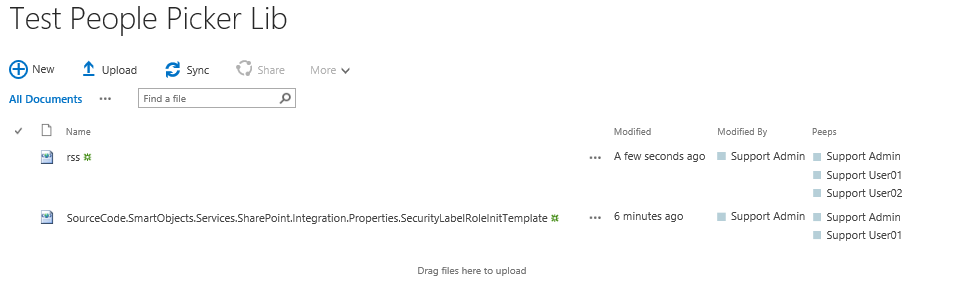
I have attempted the same on my end with multiple entries within the people picker for both a K2 Smartform and SharePoint form. Only customization added to my document library was a Person/Group column in sharepoint. I've been able to add multiple entries to this field even more than two. See below:


15309i13D75964D3DF7619.png


Could you confirm that within the actual settings for the column within SharePoint Library settings, that we have selected the option YES for Allow Multiple Selections? Additionally, make sure that once we have updated this library setting, that we go into the K2 app and regenerate the K2 Smartobjects for this library. Any changes made to the Library or List Structure will require a regeneration of the K2 SmartObjects.


Thanks!
Evan