

Nintex Community Menu Bar

Meet Condition of Invalidate (to End Invalidation) in Responsive Form

  • January 31, 2020
  • 3 replies
  • 25 views

Forum|alt.badge.img+1

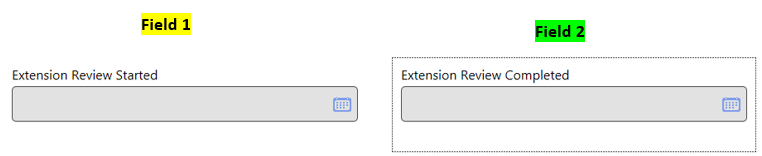
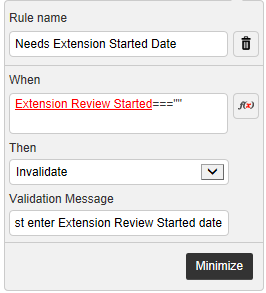
What I'm trying to set up in a Responsive form is that if an empty first field invalidates entry into a second field, then meeting the condition of the second field (i.e., entering something) ends the invalidation of the first field. In this case, I want people to enter a Started date before entering a Completed date. So if they enter Field 2 first (and Field 1 is empty), then Field 2 is invalidated.
6337iDFFA635E5201FFB3.png


6339i3DA4D65B5B011ACB.png


6340i0756EA1FDCBB2012.png


However, while I can Invalidate something, even if I meet the condition of the rule (e.g., I enter a Started date), the Invalidate doesn't end and I can't save. I've also explored other rule options (such as isNullorEmpty(ExtensionReviewStarted) and I can still make the Invalidate work, but I can't stop it. Is there any way in the responsive form to essentially "end" the Invalidate if the condition of the rule is met?


 

3 replies

bamaeric
Nintex Partner
Forum|alt.badge.img+15
  • Nintex Partner
  • January 31, 2020

How about using a rule to disable Field 2 until a date is entered into Field 1? When a date is entered into Field 1, then Field 2 becomes enabled and a date can be entered into it.


Forum|alt.badge.img+1
  • Author
  • January 31, 2020

My team's tried it and I can verify disabling works.


What I'd like to figure out is if there's a way to work with the Invalidate function specifically (so getting that red flag in there). But definitely we can fall back on the disable approach if needed.


Simon Muntz
Nintex Partner
Forum|alt.badge.img+23
  • Nintex Partner
  • February 3, 2020
Hi,

How about
and(isNullOrEmpty(date1),!isNullOrEmpty(date2))




