Nintex Community Menu Bar

Make calendar entries visible depending on their status.

  • June 11, 2019
  • 12 replies
  • 16 views

Forum|alt.badge.img+3

Hello everybody,


I have the following fundamentals:

  • A SharePoint calendar in which I can enter lecture slots.
  • In a second SharePoint list I have the fields Speaker, Topic and Appointment.


My first steps:

  • I have linked the SharePoint calendar to the SharePoint list.
  • Now I can use a lookup field in a drop down to display the appointments I have previously created in the calendar.


What I am missing / my question to the community:

  • How can I build a filter that only allows me to see the available dates of the SharePoint calendar?

12 replies

Forum|alt.badge.img+14
  • Scholar
  • June 11, 2019

how do you determine 'available dates'?


Forum|alt.badge.img+3
  • Author
  • June 12, 2019

I have set that when you select a date from the drop down, the status changes to Booked.

I want that the drop down list only shows the not booked dates.


Forum|alt.badge.img+14
  • Scholar
  • June 12, 2019

create a view on the list that show only not booked items.

configure the view name into 'Source view' lookup control configuration option.


Forum|alt.badge.img+3
  • Author
  • June 12, 2019

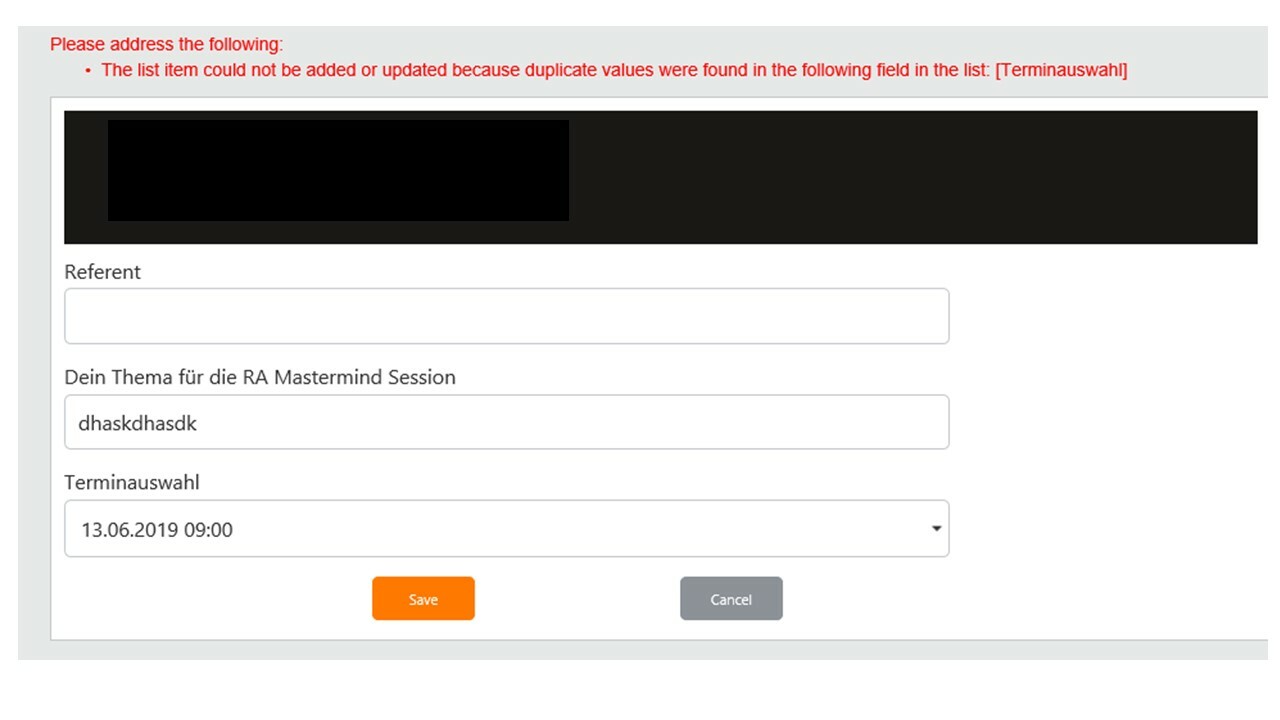
The problem is that when I work with a list lookup I always get an error message.

2534iA25E58862276FB56.png


Forum|alt.badge.img+3
  • Author
  • June 12, 2019
  • I'll try to explain it better.
  • I have set a look up field on a calendar in the form for the appointment selection, so that in a drop down all appointments I have created in the calendar are displayed.
  • In addition, I have specified that each appointment can only be assigned once, as you can see from the error message.
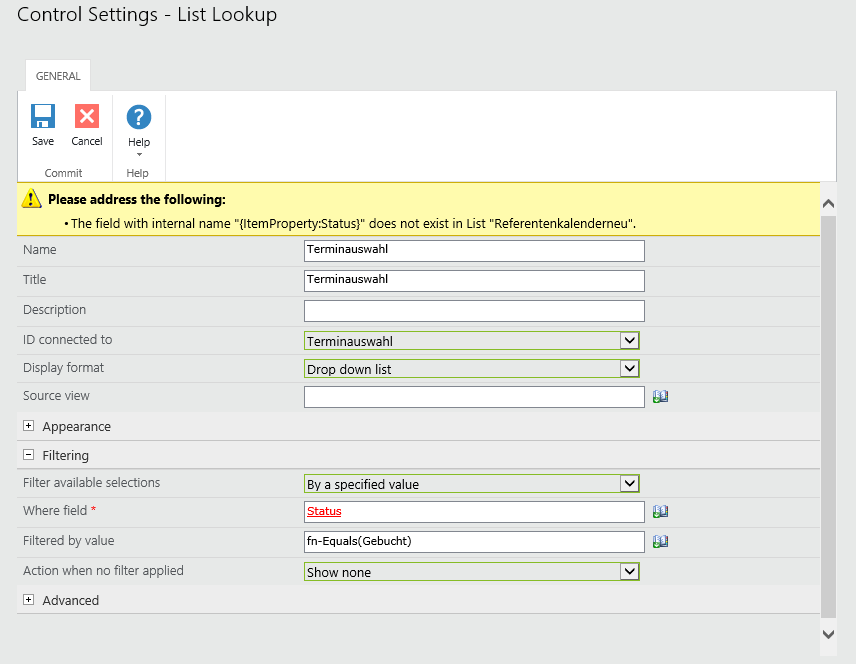
  • How do I get it that only those appointments are displayed in the drop down that have not already been booked? 

2536iFE6FDC917265A9F6.jpg


Forum|alt.badge.img+14
  • Scholar
  • June 12, 2019

have you seen my previous post, I think it satisfies your requirements.

or doesn't it suit you for any reasons?


Forum|alt.badge.img+3
  • Author
  • June 12, 2019

Thank you for the information that works. :smileyhappy:


In a second step, how can I arrange that the selected date from the drop down will change after saving the form the calendar appointment automatically to booked?


Forum|alt.badge.img+14
  • Scholar
  • June 12, 2019

create a workflow that strart on item create and that updates respective entry in calendar list


Forum|alt.badge.img+3
  • Author
  • June 19, 2019

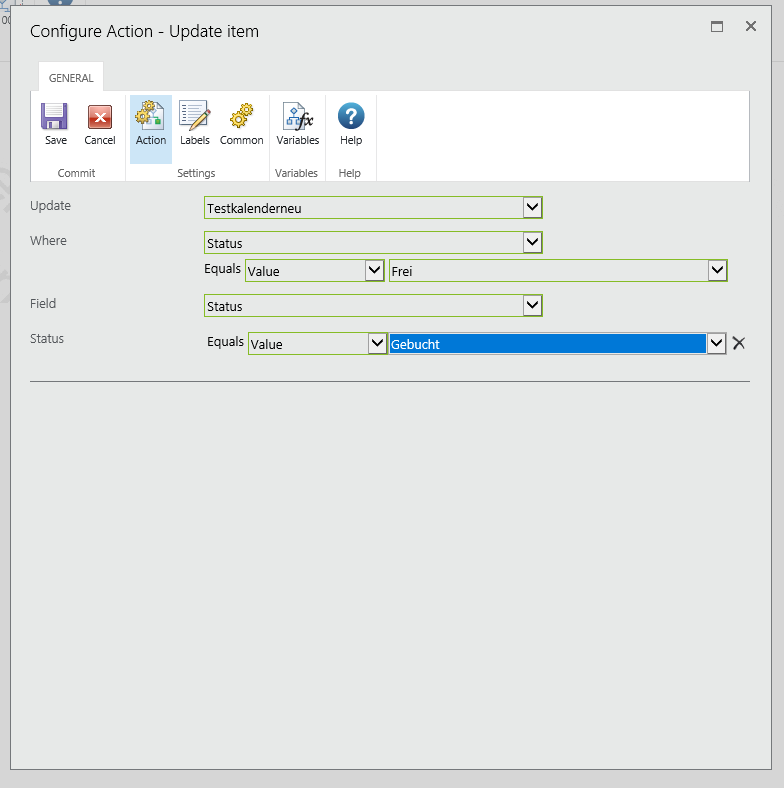
I tried it, but it always updates the first item and not the selected date.
2664i2F0AAF90E4C92F9C.png


Forum|alt.badge.img+14
  • Scholar
  • June 19, 2019

where condition should identify the calendar item that you previously selected on the form. it has to identify just SINGLE calendar item, preferrably by item ID, not all the items with status 'Frei'


Forum|alt.badge.img+3
  • Author
  • June 26, 2019

Can you please explain to me what you mean?
How would you implement that?


Kind Regards,


Florian 


Forum|alt.badge.img+14
  • Scholar
  • June 26, 2019

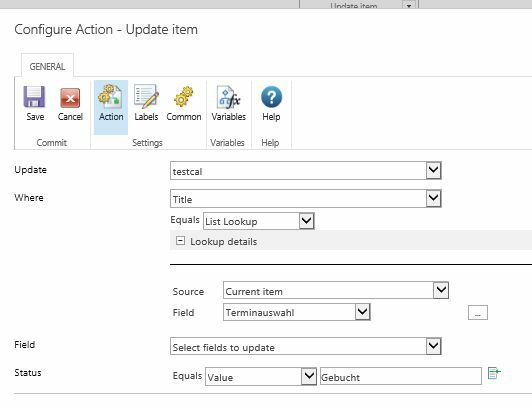
on the current item, the workflow is running on, you've populated/selected a lookup field from calendar list.

so you have to take that field's value and search for matching item in calendar list. the best/most reliable would be to search by item ID, but nintex by default search for match by 'value' field. in my example bellow I used Title field. if you used a different field you'll need to customize it accordingly.


so the update action might look like


2854i91C5DF568304A709.jpg