Nintex Community Menu Bar

LookUp to a list based on 2 columns and then return the value

  • August 8, 2019
  • 17 replies
  • 283 views

Forum|alt.badge.img+11

Hello

I am strugling with my current task!

I am using a Calculated Value (on the form) with the formular:

lookup("OptionsGuidance", "Options",Q1_Option,"Guidance")

but it does not work well because it has no reference to which question your option is relying to.

The Q1_Option is a [List Lookup] on the form.


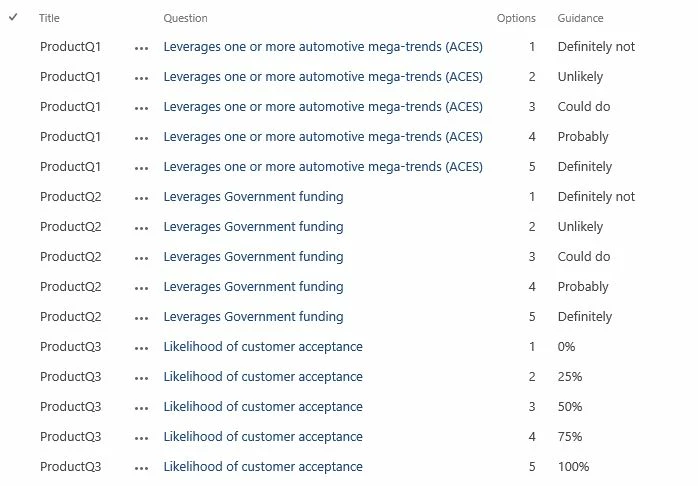
Below you see the list, where it is looking at:
3875iBB64BB3F68F3B052.jpg

Hint: the above list uses a vlookup for the QUESTION from a different list.


How do I get this done ?

17 replies

DimaHijazi
Nintex Partner
Forum|alt.badge.img+5
  • Nintex Partner
  • August 8, 2019

Try this formula 

lookup("OptionsGuidance", "Options",parselookup(Q1_Option),"Guidance")


Forum|alt.badge.img+11
  • Author
  • August 8, 2019

@DimaHijazi Pershendetje :)


The formula will always fetch the results from the first row, however; in my case, I need to show the options for each question.


In other words, the lookup needs to compare the Question and also the options with the list.


Forum|alt.badge.img+11
  • Author
  • August 13, 2019

Can anybody assist me with this, further please?

The list, you see above is a combination of another list using lookup such as the Questions.


The idea is that I can show the relevant "Guidance" meaning for each option when selected.

As such, I thought I can use the lookup but this only works with first five sections ...


lookup("OptionsGuidance", "Options", Q1_Option, "Guidance")

With the above, I cannot get all the relevant guidance info pulled up for each seperate option.
Not sure how to do this ... or maybe I need to use IF statements ??


Please advise ...


Cheers


Forum|alt.badge.img+11
  • Nintex Partner
  • August 13, 2019

Lookup normally does return 1 result. Unless you add a 5th parameter with value true to allow it to return multiple results (see also the Help page on this function, and yes there's is also a 6th paramater you could use). If Q1_Option holds the value of a selected dropdown lookup value, please follow @DimaHijazi's advice and use parselookup(Q1_Opton) which returns the display value of selected lookup value (adding false as a 2nd parameter will return the list item ID of the selected lookup value). I've not used it often myself, but it should be possible to nest lookups (see I cannot get nested lookups working in forms).


Forum|alt.badge.img+11
  • Author
  • August 13, 2019

@jpmhuls 


Thanks for the feedback.

I am trying to follow the logic of the suggested formula...


lookup(“Guidance”, “Options”, parseLookup(lookup("Guidance","Options",Q1_Option,"Guidance",true), “Guidance”) 

The calculated value shows #Value! which indicates that something is not right.

@emha any ideas?


Forum|alt.badge.img+11
  • Nintex Partner
  • August 13, 2019

For one, there is 1 closing bracket missing (for the parselookup). In case of nesting, the inner lookup should return only 1 result, which then is used to filter the outer lookup which may return multiple results.


Forum|alt.badge.img+11
  • Author
  • August 13, 2019

@jpmhuls 


Adding another ) to close the parseLookup leads to the form being blank, not load.
As per your inner lookup etc. you lost me there ... looking at the picture in first topic, what is the right way of nesting if you would do that ?


lookup(“Guidance”, “Options”, parseLookup(lookup('Guidance','Options',Q1_Option,'Guidance',true)), “Guidance”) 

Forum|alt.badge.img+11
  • Author
  • August 15, 2019

Hi


Is there anybody who can assist?


Forum|alt.badge.img+11
  • Nintex Partner
  • August 16, 2019

Hi @bimi82,

If I'm not mistaken, a lookup can only filter on 1 value. The lookup in your parseLookup is set to return multiple values, which then are to be used (assuming parseLookup can handle multiple values) in the outer lookup. So, I would switch the lookups in order to retrieve only 1 result.


Also, it may help if you could provide an example of what you try to achieve.


Forum|alt.badge.img+11
  • Author
  • August 16, 2019

Hi @jpmhuls 


I have tried to visualise what I like to achieve.
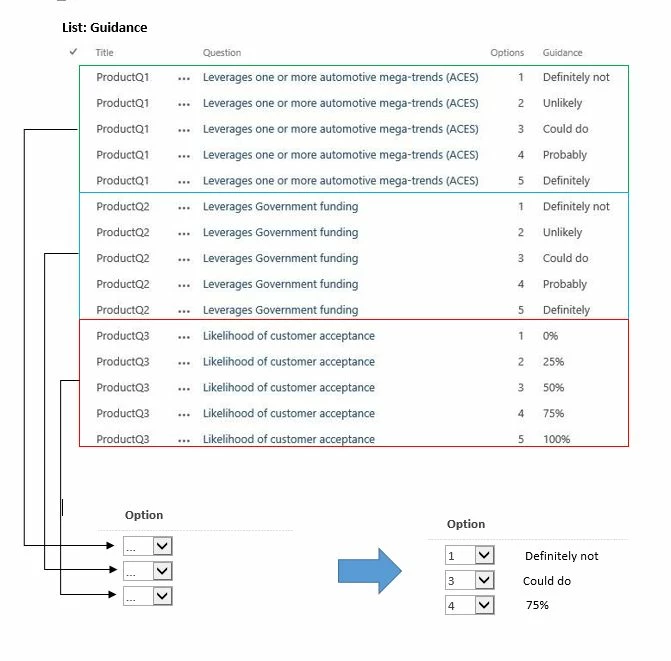
Basically the Guidance list contains the information (which uses lookup to select the question) and then give the relevant definition to it eg. what 1 means for each set of questions.


Now, in the form, I have the lookup field which looks at the list and says "pull me the option list for when Title is == ProductQ1 etc. Now, the next step was to show the definition (guidance) for each option when selected for each question ... if that makes sense :)


By doing this, then i have single point of change in the list and it pulls the info. from there.

3956iF79B966776666D6B.jpg


Note: I can achieve this by using nested IF's but wonder if the nested lookup works as it would be much efficient without having to update the form everytime the definition changes.


Forum|alt.badge.img+11
  • Nintex Partner
  • August 16, 2019

Hi @bimi82,

The way i would do this is to add a calculated column (e.g. GuidanceLU) to the Guidance list merging Title and Options (e.g. into ProductQ1_1 etc.). In you submission form you'll have your question title and the selected Option. I assume you use cascaded dropdowns for Title and Option, where the Option dropdown is filtered by the selected Question Title.


The lookup then would look like:

lookup("Guidance", "GuidanceLU",Title+"_"+parseLookup(Option),"Guidance")

(NB: concatenation may be with &...)

Hopefully this is of help to you resolving your challenge :smileyhappy:


Forum|alt.badge.img+11
  • Author
  • August 19, 2019

@jpmhuls 


On the Guidance list, there is no cascade lookup for the options.
It is rather a free field to manually type in 1 - 5.


However, on the form the question a simple lookup calculated value.
Whereas the option uses the "List Lookup".


Where as the formular, shows "blank" there is no result.

lookup("Guidance", "GuidanceLU",Title+"_"+parseLookup(Q1_Option),"Guidance")

Forum|alt.badge.img+11
  • Author
  • August 19, 2019

@jpmhuls 


For some reason the below formula does not show the result and remains blank. I suspect because the lookup does not know or not does not parse the correct field.

Instead, I manually defined the title name and this seems to be working

lookup("Guidance", "GuidanceLU","ProductQ1"+"_"+parseLookup(Q1_Option),"Guidance")


I am not sure why the "Title" is not fetching the information from the list.
Assuming the title may change in the future, then again the form needs to be manually updated again.


ahhhhrrrrrghhhh...


Forum|alt.badge.img+11
  • Nintex Partner
  • August 19, 2019

Hi @bimi82,

Have you tried to put the filter:

  1. between () brackets or
  2. in a form variable and use the form variable as the filter in the lookup. In this case you could also add a calc field to show the value of the form variable.

Kind regards,

Jean-Pierre

NB: if I do not respond immediately it's because I'm occupied otherwise. Sometimes I takes a few days before I've time to respond.


Forum|alt.badge.img+11
  • Author
  • August 19, 2019

@jpmhuls 


Not sure what you mean by "between () brackets" . However, using the "Form Variable" to identify the Title and use it in the calculated value > will work most likely :) but I tried to get it work in one line as you suggested.


Hmmm, I guess need to compromise and will defined the Title name in the lookup directly:

lookup("Guidance", "GuidanceLU","ProductQ1"+"_"+parseLookup(Q1_Option),"Guidance")


Cheers for your time


Forum|alt.badge.img+11
  • Nintex Partner
  • August 19, 2019
With the first suggestion the lookup would look like:
lookup("Guidance", "GuidanceLU",("ProductQ1"+"_"+parseLookup(Q1_Option)),"Guidance")
By putting it in () the expression will be processed first before using its result as the filter.

Forum|alt.badge.img+11
  • Author
  • August 19, 2019

@jpmhuls 


I think that filter you are implying, more or less, does the same as I already suggested:

lookup("Guidance", "GuidanceLU","ProductQ1"+"_"+parseLookup(Q1_Option),"Guidance")


unless there is a difference and I cannot see through it :)