Hello,
I have a list (Risk Appetite Matrix) which as a [Single line of text] index in the form of a number e.g. 12 or 34.
I have a nintex form with two fields which are Number dropdowns, each is 1-4
I want to lookup in the first list the concatenation of the two values so that for instance:
Risk Impact: 2 Risk Likelihood: 4 allows me to find the list record "24" (to retrieve a color)
For this I use:
lookup("Risk Appetite Matrix", "Risk Index", parselookup(RiskImpact) + "" + parselookup(RiskLikelihood), "Risk Color")
This works perfect upon edit mode right after selecting the two dropdown values, confirmed in the Console:
[Risk Appetite Matrix-8deff7b9-6d54-404e-9bc9-39acb8579b1f] - Querying SharePoint for list item data: Query [<View><Query><Where><Eq><FieldRef Name='Risk_x0020_Index' /><Value Type='Text' >24</Value></Eq></Where></Query><RowLimit>1000</RowLimit></View>]
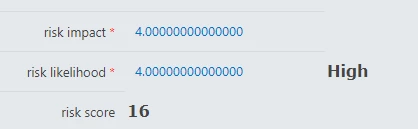
But in Display mode, or upon entering Edit mode with existing values, it doesn't work. The Console reports a silly number of zeroes polluting the string even though I have set the Decimal to zero on the fields:
[Risk Appetite Matrix-a0cd2ca2-3f41-44b2-bba9-374b89dcbc93] - Querying SharePoint for list item data: Query [<View><Query><Where><Eq><FieldRef Name='Risk_x0020_Index' /><Value Type='Text' >2.000000000000004.00000000000000</Value></Eq></Where></Query><RowLimit>1000</RowLimit></View>]
Any advice ? I could not find a formula like Int() or something similar.
Thanks!