Nintex Community Menu Bar

Looking for How-To, on List (not task) to send 3 Reminders

  • February 20, 2019
  • 11 replies
  • 32 views

Forum|alt.badge.img+2

I'm new to Nintex Workflows and looking for a How-To on creating a Reminder email, using an out of the box SP (2013) custom list. I would like a reminder to trigger 30, 60 and 90 days after the create date. I'd like it to terminate if the Completed field is toggled to YES. 

List Columns are:

Title  |  Col A |  Col B | Completed | Due Date | AssignedTo

Text     Text     Text        Y/N             Date          Person


I learn visually, so thank you in advance for those posting either detailed steps with screen shots or a training video.


 

11 replies

Forum|alt.badge.img+14
  • Scholar
  • February 20, 2019

Forum|alt.badge.img+2
  • Author
  • Rookie
  • February 20, 2019

Thank you for your reply. Unfortunatly it's not the same. That reference would be good for something like setting up a Document Retention schedule and notifying the user their file is about 3 months from action such as a purge.


I see Assign To-do Task, Assign Flexitask, and Task Reminder. Don't these have reminder functions? In my case, I don't have an approve/reject scenario so I would assume Flexitask would not work for me. However the other 2 -Assign To-Do and Task Reminder might work. Are you aware of any training on either of these? I've seen manual references that basically indicate; "This field is for..." and "This field is for..." But I've not run across any working samples either here on on YouTube where I can see how the fields are populated.


Forum|alt.badge.img+17
  • February 20, 2019

I would recommend using the Assign Flexi Task, configure the original task and then set the reminders to 3 with a 30-day range between each task. 


Take a look at the attachment, unzip to find the ".nwf" and import to use what I started.


Forum|alt.badge.img+14
  • Scholar
  • February 21, 2019

you're right, some task actions have possibility to configure reminders. 

but these reminders are quite limited in functionality. they are only able to send notifications on regular intervals and always based on date when task action started.


so, if you eg. needed to send notification on irregular intervals (eg. 15, 60, 100 days) you would not be able with OOTB reminders.

similarly, if a task had a DueDate and you'd like to send out reminders few days before the date, you wouldn't be able either.


in your specific scenario, if it may happen that 'Completed' is set to YES, but task is not responded/closed (yet) you would not be able to stop notification.


site workflow reminder approach is much more flexible and robust. it gives you posibiliity to implement whatever notification logic you might need. take it as an idea/example how to structure such a workflow, not that you have to implement it just the same  way.

you can even use the approach in situations when you need to remind someting but tasks are not being created.


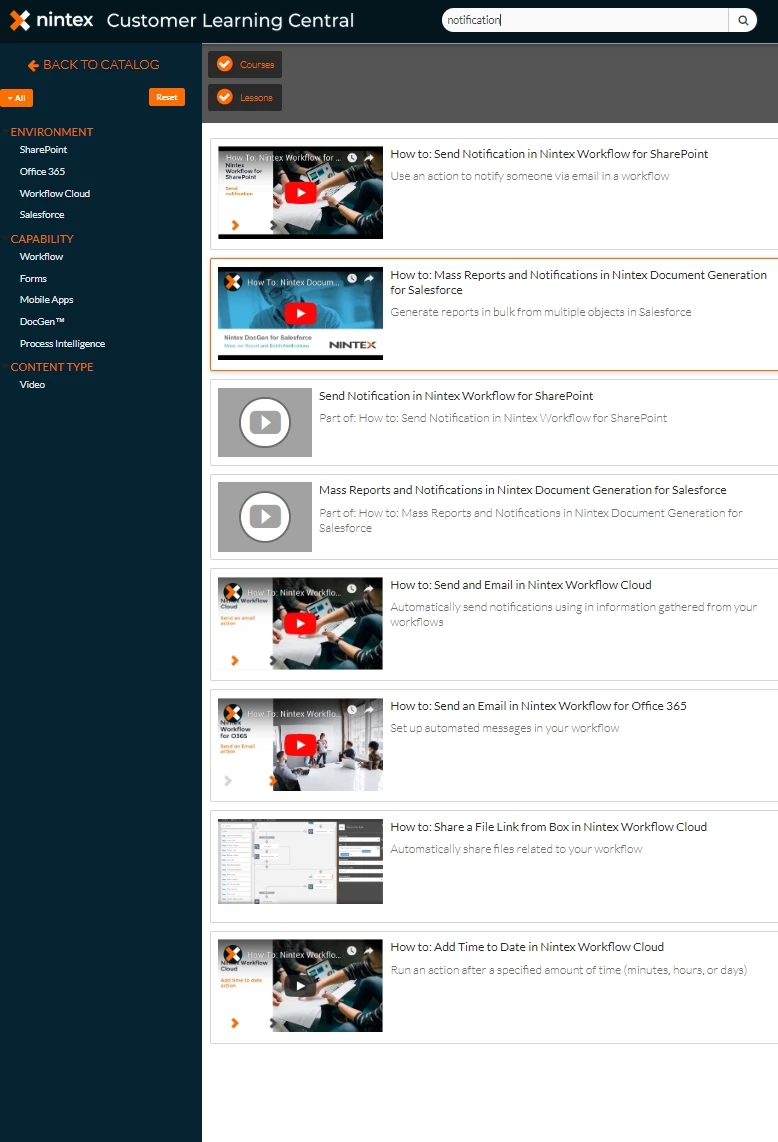
reg. trainings - there is a link to 'Learning centrral' on the left toolbar. try to browse there, there are quite good resources for beginners.

see eg. what was found for 'notification' topic

140iD74DD9E52F777558.jpg


Forum|alt.badge.img+17
  • February 21, 2019

@emha  - Thanks for the response and pointing to the learning resources, definitely great content there to peruse and discover. Just a few things to clarify here so that readers don't get confused.


The specific question posted here was around static or set reminders;  therefore the recommended solution provided a way to achieve that specifically.


When you mentioned that reminders are limited, I would disagree on the term "limited". By design, a reminder is a notification of the originating task notification. It is designed to do just that, send out a notification of something the user should already have received and can even be customized differently. 


As explained in the video, you can take the date, and then calculate whatever date is needed for the task actions off of, thus making them dynamic and even taking user input into the list item to be used in task reminders later on. Again all of this was outside the scope of what was requested, and therefore not mentioned.


A few things I'd like to correct so users don't get the wrong approach or see something as a limitation:


similarly, if a task had a DueDate and you'd like to send out reminders few days before the date, you wouldn't be able either.


Within the workflow, you can set up actions and dates that are dynamic and create notifications that are sent out a few days before the due date. Bear in mind, a "reminder notification" is after the task has started, so it is the users' discretion on when its sent, but the idea behind this is to create a static set of reminders, hence the number of reminders drives the interval or occurrence of the reminders.


in your specific scenario, if it may happen that 'Completed' is set to YES, but task is not responded/closed (yet) you would not be able to stop the notification.


In this specific case of using the Flexi-task, what you describe would not be an outcome of a running workflow. If the user responds to the task marking it as "Yes or No", that action, based on the how this was set up, would complete the task. This would take the workflow logic down the correct outcome branch and no more reminders would be sent because the task was responded to.


Thanks for responding and helping our users and adding other thoughts on how workflows and notifications can be addressed.


Forum|alt.badge.img+14
  • Scholar
  • February 25, 2019

@eharris04, originally there was no mention the process would be managed by workflow task(s). 

neither there is anywhere expressed CompleteFlag field would anyhow depended on a task and/or its outcome. the only requirement was to stop notification once the flag is set.

hence I suggested general approach with site reminder workflow.


task actions were mentioned just in later discussion. I didn't tell task actions' reminder functionality is not usable in this specific case or in general. but since the overall process/requirements weren't defined very clearly I just wanted to explain what should have been taken into account if they are used, pointing on "features" and existing functionality that might have caused problems.


Forum|alt.badge.img+2
  • Author
  • Rookie
  • March 4, 2019
Thank you. This is what I was looking for. I've read the comments thread and understand the limitations. This should work for our needs. I can't thank you enough for the video. Wow... just wow.. Great service.

Forum|alt.badge.img+2
  • Author
  • Rookie
  • March 4, 2019
Thank you for all of the information and points. As I learn I can see studying the different approaches will expose the limitations and benefits of each. Great information. Thank you

Forum|alt.badge.img+2
  • Author
  • Rookie
  • March 4, 2019

One small issue, hoping this is super easy. I've been trying to read online before asking... (tough being a rookie)

· I let it send 1 email, then I let it send 2 reminder emails. After each test, I maked it complete and it stopped the workflow perfectly.

· In my last test, I let all 3 email reminders go out. They did, but I then realized I didn't have a way to stop the workflow. It stays in the IN PROGRESS mode.

I understand why, I don't have anything telling it to auto-stop. 


So my question is, is there a best practice way to stop the email. Ex:

· 3 Reminders have been sent - Stop, or

· Look at the Due Date. If the due date = today (or greater?) stop the workflow (Side note, if the workflow stops because of the due date, but a reminder is in the queue, that's ok. If the user hasn't marked it complete, they should get a notification even if the due date has passed. ) 


Forum|alt.badge.img+17
  • March 4, 2019

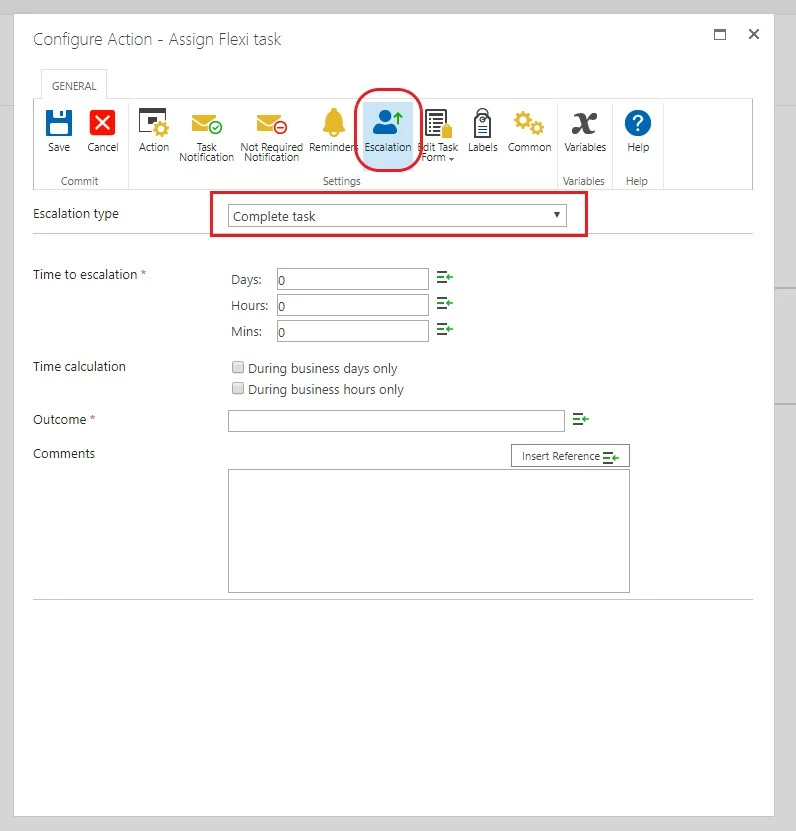
For this one, the purpose of the task is the get a response. The reminders are there to help prompt for a response to the original task. 


If the user does not respond to the original task or the reminders you could do have it auto-complete and set a specific outcome using functionality built into the task action:339i12B150815AB26F74.jpg


You could then mark that as incomplete and provide a report of all incomplete task for a given user so that they can understand what they should or shouldn't be doing regarding their task. 


Forum|alt.badge.img+2
  • Author
  • Rookie
  • March 4, 2019
Oh that looks great. Thank you.