Nintex Community Menu Bar

List Lookup

  • January 14, 2020
  • 8 replies
  • 17 views

Forum|alt.badge.img+3

Hello,

I am trying to do a lookup on another list using the Nintex form and cannot figure this one out. 


I have a list called concession, which my workflow is running against. When the user is filling out the form, they need to select an Account Name. I have another list on the site named "Accounts". I would like a control to be able to either search the Accounts list or have a drop down with the account names to make a selection. The account name also has a corresponding account number that I need to populate on the form as well. 


What control would I use to look up the account information. I first tried to use the "List Lookup" control but could not figure out how to populate the account number once the Account was selected within the control. 


Your help is greatly appreciated!

8 replies

Forum|alt.badge.img+12
  • Scholar
  • January 14, 2020

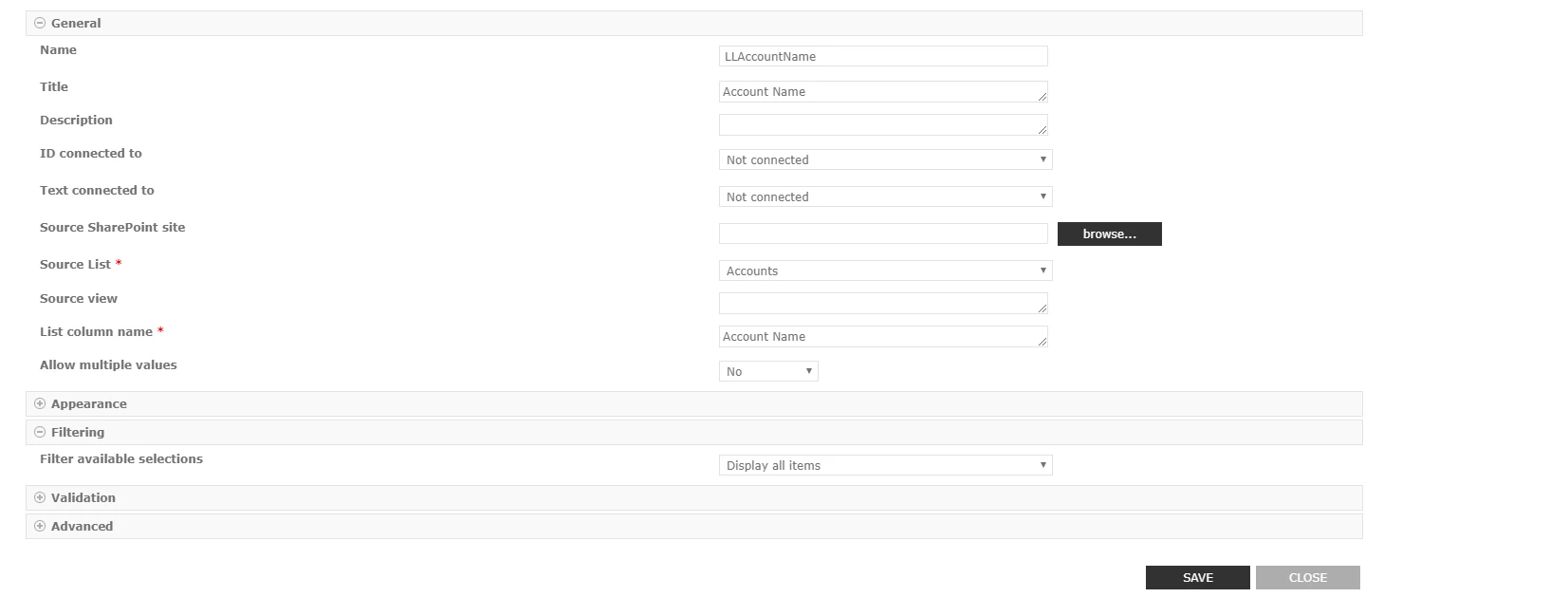
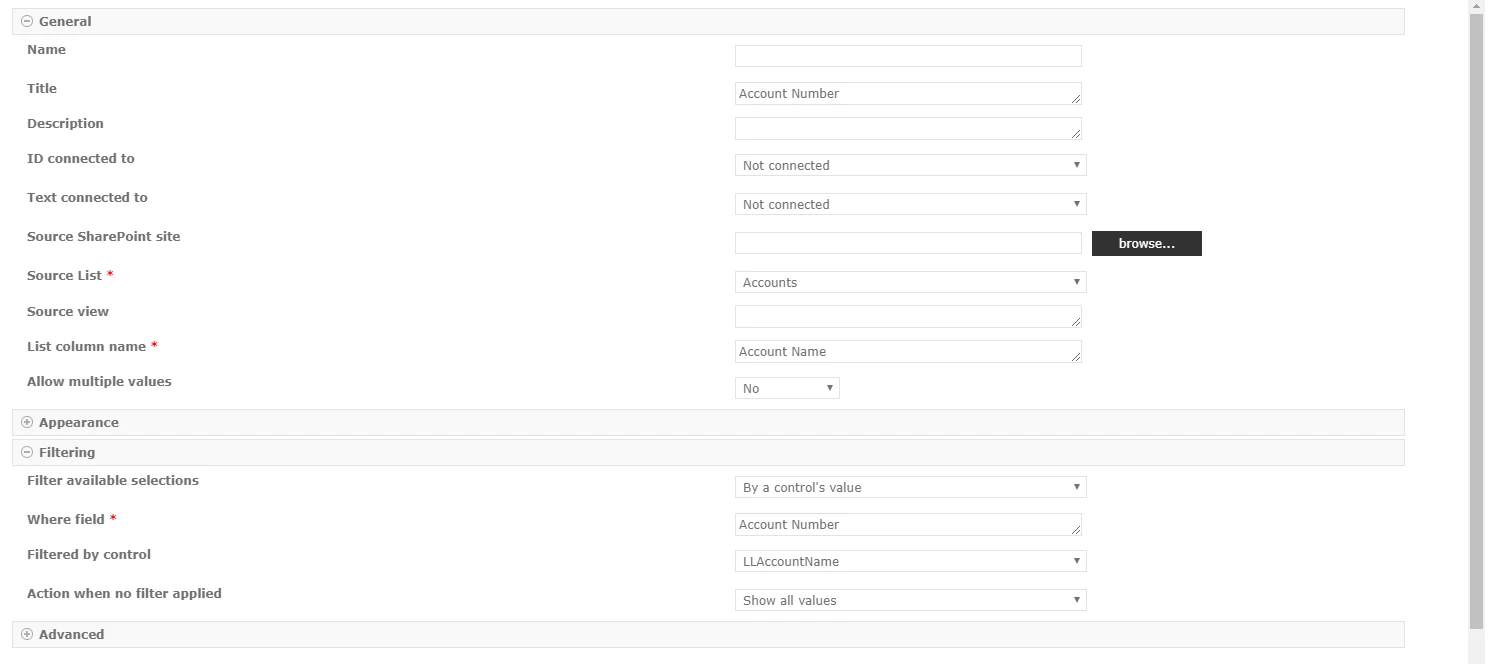
@callison ....Thing you're trying to achieve is called cascading. You need 2 lookup controls. First lookup will list your account name (this has to be unique values) then you need to configure 2nd lookup control but over here you need to use 1st lookup control's named control as a filter.


Forum|alt.badge.img+3
  • Author
  • January 14, 2020

Thanks for the explanation. Do you have a screenshot of how the second control would be configured?


Forum|alt.badge.img+3
  • Author
  • January 14, 2020

Attached are screenshots of how I have the controls configured. 


The Account Name control populates the values as expected but when I select a value from the list, it does not populate the Account Number.6143iC258B0607F629C06.png


6144iEFEB6BC64D1126FC.png


Forum|alt.badge.img+12
  • Scholar
  • January 14, 2020

@callison ....You need to select "text connected to", also what kind of columns are they?


Simon Muntz
Nintex Partner
Forum|alt.badge.img+23
  • Nintex Partner
  • January 14, 2020
Hi,

You need to set your lookup lists correctly. Yes I said Lists and not list.
See this tutorial for how to cascade correctly. https://community.nintex.com/t5/Nintex-for-SharePoint/Cascading-drop-downs-and-Nintex-Forms-for-SharePoint/td-p/86140

Seeing as there will only be one option for the account number I think doing a cascade is not needed. Instead, use a Calculated value control that has a lookup() runtime function that filters off of the Lookup control that chooses the account.

Forum|alt.badge.img+3
  • Author
  • January 15, 2020

They are strings (single line of text) columns for both the account name and the account number. 


Forum|alt.badge.img+3
  • Author
  • January 15, 2020

Simon,

Thanks for the feedback. What would the calculation/script look like for the calculated value?


Simon Muntz
Nintex Partner
Forum|alt.badge.img+23
  • Nintex Partner
  • January 15, 2020
lookup("Accounts","Account Name" ,LLAcountName, "Account Number")