Nintex Community Menu Bar

Issue with Publishing Nintex WF

  • October 9, 2019
  • 3 replies
  • 22 views

Forum|alt.badge.img+4

Hi All,

I have an issue with Publishing WF, for instance, if I use Assign Flexi task or Request Approval I am getting below eerror messgae. However I can publish the WF if I use something like Send Notification.
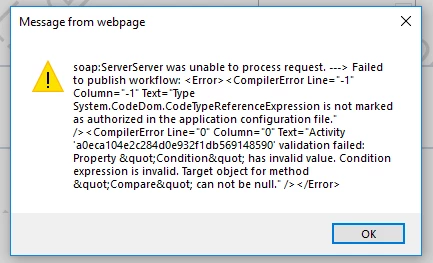

4915i7E84E370EA649E56.png

3 replies

Simon Muntz
Nintex Partner
Forum|alt.badge.img+23
  • Nintex Partner
  • October 9, 2019
Hi,

Looks like Microsoft CU's have been installed onto your environment that break the workflow engine that Nintex also uses.

Please see the knowledge base article which discusses this issue.
https://community.nintex.com/t5/Technical-Issues/Workflow-Failed-to-Run-Failed-to-Publish-Workflow-Workflow-stuck/ta-p/90012

Forum|alt.badge.img+4
  • Author
  • October 10, 2019

Thanks Simon, 

Do you know which CU is causing this issue, after applying your recommended solution, I can now use SP designer, however Nintex WF still broken.

Regards 


Simon Muntz
Nintex Partner
Forum|alt.badge.img+23
  • Nintex Partner
  • October 10, 2019
The KB article has a link to the Microsoft article which lists the CU's.
We have seen the odd case where some CU's are removing these lines from the web.config again.

Based on your error make sure you have this reference in your web.config file as this is specific to 3rd party workflows such as Nintex.

<authorizedType Assembly="System, Version=4.0.0.0, Culture=neutral, PublicKeyToken=b77a5c561934e089" NameSpace="System.CodeDom" TypeName="CodeTypeReferenceExpression" Authorized="True" />

If you are using SharePoint 2010, use this instead:

<authorizedType Assembly="System, Version=2.0.0.0, Culture=neutral, PublicKeyToken=b77a5c561934e089" NameSpace="System.CodeDom" TypeName="CodeTypeReferenceExpression" Authorized="True" />




