Nintex Community Menu Bar

Issue Tracker HTML Message Display Error

  • October 22, 2019
  • 4 replies
  • 16 views

Forum|alt.badge.img+2

I am having an issue in nintex forms where I have an issue tracker rendering a "Click for help about adding basic HTML formatting" message in the middle of one of my rich text boxes when using Google Chrome. When I use Internet Explorer, this issue does not occur as seen in the screenshots.


Please let me know if anyone has any recommendations. Thanks!

4 replies

Simon Muntz
Nintex Partner
Forum|alt.badge.img+23
  • Nintex Partner
  • October 22, 2019
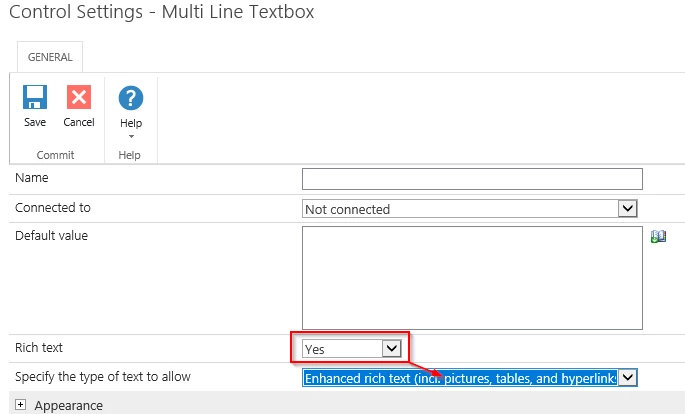
Use Enhanced Rich Text instead of Rich Text and you will not see the message in chrome.

Forum|alt.badge.img+2
  • Author
  • October 23, 2019

I do not have a control for "enhanced rich text" as you can see if the attached screenshot. Is Enhanced Rich Text a setting or is it just a control I am missing?


Simon Muntz
Nintex Partner
Forum|alt.badge.img+23
  • Nintex Partner
  • October 23, 2019

Hi,

Its a setting on the Multi Lines of text control configuration.

5054i19CCB422EFC9AB61.png


Forum|alt.badge.img+2
  • Author
  • October 24, 2019

The box that the text is currently in is a Rich Text Box not a multi-line text box. The screenshot is attached.


Thanks!