Nintex Community Menu Bar

Imported Workflow cant find imported Form

  • July 15, 2019
  • 6 replies
  • 12 views

Forum|alt.badge.img+4

Hi Nintex Community

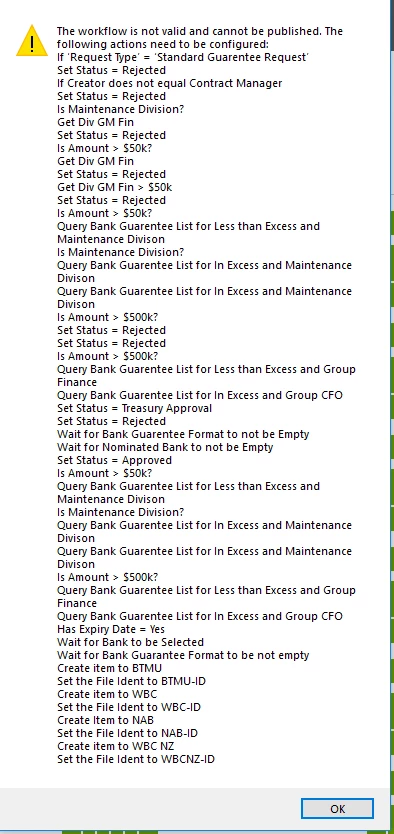
I have some issue with my Nintex Workflow on live environment, as i dont want to touch the prod environment and i have export both Nintex WF and Form to test environment, my issue is when i want to publish the Nintex WF it give me a lots of error messages, and basically its saying it cant find the Nintex Form.3141i44EC1E31303AAD97.png Can you please help.
6 replies

Simon Muntz
Nintex Partner
Forum|alt.badge.img+23
  • Nintex Partner
  • July 15, 2019
Hi,
The errors do not appear to have anything to do with a form.
They are just saying that some of the actions need to be reconfigured.
This is expected behavior if the two environments are not eyedentical. The workflow cannot find columns on a list or other lists that may be referenced in the wokflow. If any of your actions have yellow triangles on them they will need to be reconfigured and all these errors will disappear.

Forum|alt.badge.img+4
  • Author
  • July 15, 2019

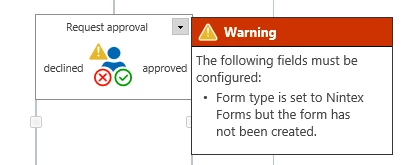
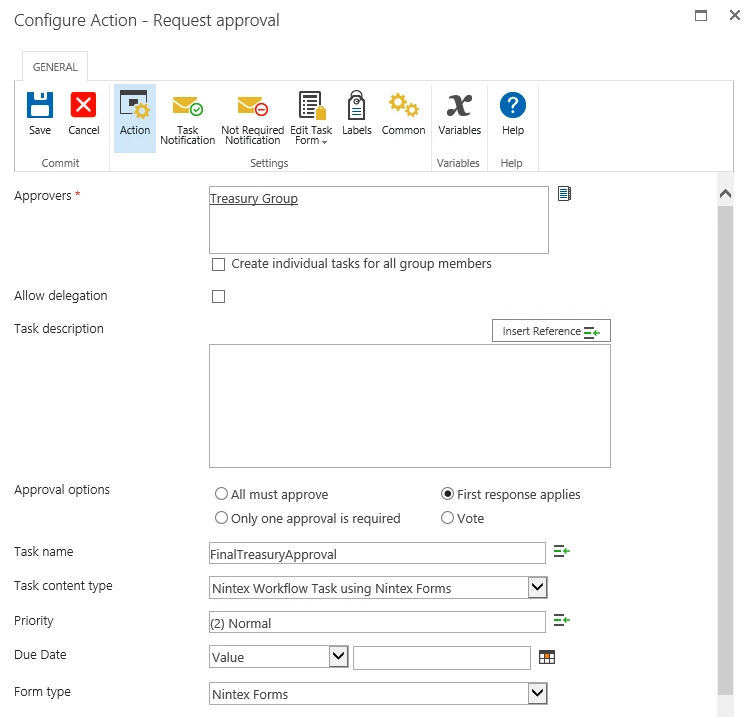
Hi SimonMuntzthanks for your reply, can you please help me to underestand the below warning too, basically what i have done is replacing existing Request Approval with the 3142i0F57A4543DDAA0E6.pngnew one. the form is exist and i have been using it for few months now.3143i3403476E688B4BAD.png


Simon Muntz
Nintex Partner
Forum|alt.badge.img+23
  • Nintex Partner
  • July 15, 2019
Either change the Form Type to Default or edit the form and try importing the task form from the source environment.

Forum|alt.badge.img+4
  • Author
  • July 15, 2019
thanks SimonMuntz
can you please let me know where can i find the task from source environment.
I have access to the source environment and i just dont know where to find it.
Regards

Simon Muntz
Nintex Partner
Forum|alt.badge.img+23
  • Nintex Partner
  • July 15, 2019
Hi,
Open the workflow in the source environment.
Go to the task that has the task form you want and edit its configuration.
Click on the edit task form with Nintex forms from the ribbon.
The Forms designer will open.
Click export to export the form.

Now that you have your task form go to your destination environemnt and do the same but except for export click import.

In general the forms should export with the workflow so not sure why it has not in this instance. Does the destination environment have Nintex Forms installed?

Forum|alt.badge.img+4
  • Author
  • July 15, 2019
Thanks :)