


Nintex Community Menu Bar

How to use SharePoint Online Context in Nintex Form

  • March 13, 2019
  • 13 replies
  • 121 views
  • Translate All

maxime_ouellet
Nintex Partner
Forum|alt.badge.img+3

How can we use SharePoint Online context in a Nintex Form?

  • _spPageContextInfo.userId
  • _spPageContextInfo.webAbsoluteUrl
  • etc ...


This code not working and return a undefined for _spPageContextInfo, so what Nintex Form use to commit form fields to sharepoint list and keep users informations alive in the nintex form?


var pollSP;
NWF.FormFiller.Events.RegisterAfterReady(function () { console.log("*** NintexForms.js RegisterAfterReady: " + BusinessUnitClientID); pollSP = setInterval(checkSPLoad, 500); try { if (ExpirationDateClientID != "") { SetDefaultExpirationDate(); AttachEventOnChangeInput("input[id='" + ExpirationDateClientID + "']", "SetDefaultExpirationDate();"); if (CollaborationTypeClientID != "") { AttachEventOnChangeInput("select[id='" + CollaborationTypeClientID + "']", "SetDefaultExpirationDate();"); } } } catch (err) { console.log("!!!!!!!!!!!!!!!!!!!!!!!!!!!!!!!!!!!!!!!!!!!!!!!!!!!!!!!!!"); console.log(err); console.log("!!!!!!!!!!!!!!!!!!!!!!!!!!!!!!!!!!!!!!!!!!!!!!!!!!!!!!!!!"); } }); function checkSPLoad() { if (clientContext) { window.clearInterval(pollSP); onSPLoad(); } } function onSPLoad() { try { console.log("*** onSPLoad called "); var userId = _spPageContextInfo.userId; console.log("*** onSPLoad Current User = " + userId); } catch (err) { console.log("!!!!!!!!!!!!!!!!!!!!!!!!!!!!!!!!!!!!!!!!!!!!!!!!!!!!!!!!!"); console.log(err); console.log("!!!!!!!!!!!!!!!!!!!!!!!!!!!!!!!!!!!!!!!!!!!!!!!!!!!!!!!!!"); } }

To all technicals nintex evangelists, If it's not possible, doe not hesitate and please confirm it to me, so i can stop losing my times with nintex form and do it easiest with an SPFx components.


cheers!

 

13 replies

Forum|alt.badge.img+17

@maxime_ouellet, Can you share what you are trying to do with SharePoint Online Context?


Wihtin Nintex forms you can use calculated value controls and labels to show information from the context of the form such as initiator, current date, time, etc. You can also pull information from the User Profile as well. 

Translate

EuanGamble
Nintex Employee
Forum|alt.badge.img+13
  • Nintex Employee
  • March 18, 2019

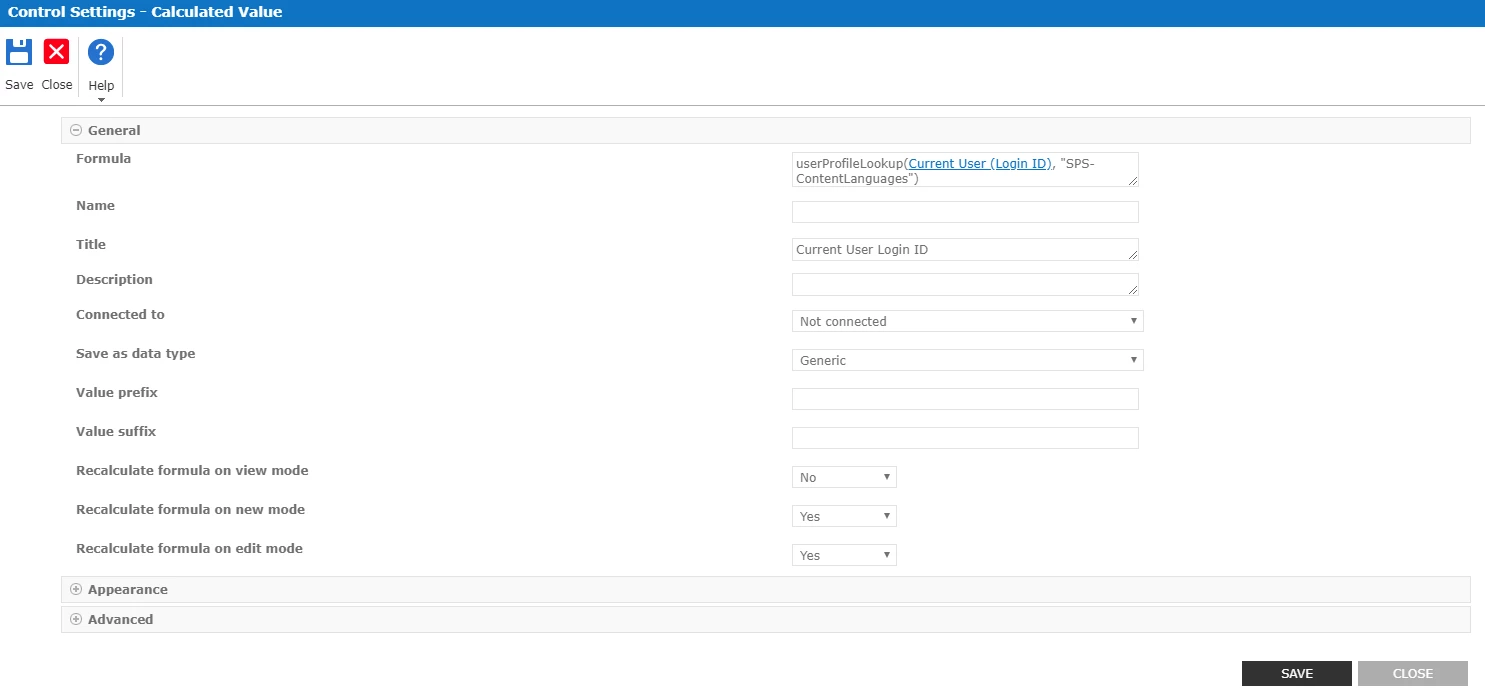
As @eharris04 mentioned, the userprofile function can pull data back from the user profile service for the logged in user. This example below is pulling back the preferred language property as an example.


1010i5900F8BC2D376CCD.png

Translate

maxime_ouellet
Nintex Partner
Forum|alt.badge.img+3

I'll try it with current user login id, previously i used Email and it's unfortunately always return "ui-ui" as a value 

Translate

maxime_ouellet
Nintex Partner
Forum|alt.badge.img+3

@eharris04 , i just want to do everything that i can do with an spfx form, like complex ajax call on list /or search result, multiples updates in multiple list with complex criteria rules... i just want to make nintex more powerfull with my client needs :)

Translate

maxime_ouellet
Nintex Partner
Forum|alt.badge.img+3

@EuanGamble ,  it's only return ui-ui as a value.


<div style="top:35px;left:235px;z-index:100;overflow:hidden;background-color:;height:25px;width:165px;" class="nf-form-hidden nf-filler-control nf-filler-highlightonvalidationerror" formcontrolid="c7af2b34-318b-4d2a-be6b-2946f0a93f05" data-controlname="__UserLanguage" data-uniqueid="c0a89c70-0781-4bd4-8623-f73675005e17" data-controlid="c7af2b34-318b-4d2a-be6b-2946f0a93f05" data-formcontroltypeid="c0a89c70-0781-4bd4-8623-f73675005e17" data-enabled="True"><div class="nf-filler-control-border"><div class="nf-filler-control-inner"><div style="overflow:hidden;width:100%;" class="nf-calculation"><label class="nf-calculation-control" style="vertical-align:inherit;">ui-ui</label><input name="ListForm$formFiller$FormView$ctl102$ctl20$d2ef08eb_5286_40ac_8562_50b2f0672d7c" type="hidden" id="ListForm_formFiller_FormView_ctl102_ctl20_d2ef08eb_5286_40ac_8562_50b2f0672d7c" class="nf-calculation-control-value" data-type="string2" formcontrolid="c7af2b34-318b-4d2a-be6b-2946f0a93f05" value="ui-ui"></div></div></div></div>

Translate

maxime_ouellet
Nintex Partner
Forum|alt.badge.img+3

1178i95F5261AAECA8BE5.jpg

Translate

EuanGamble
Nintex Employee
Forum|alt.badge.img+13
  • Nintex Employee
  • March 25, 2019

Hi @maxime_ouellet,


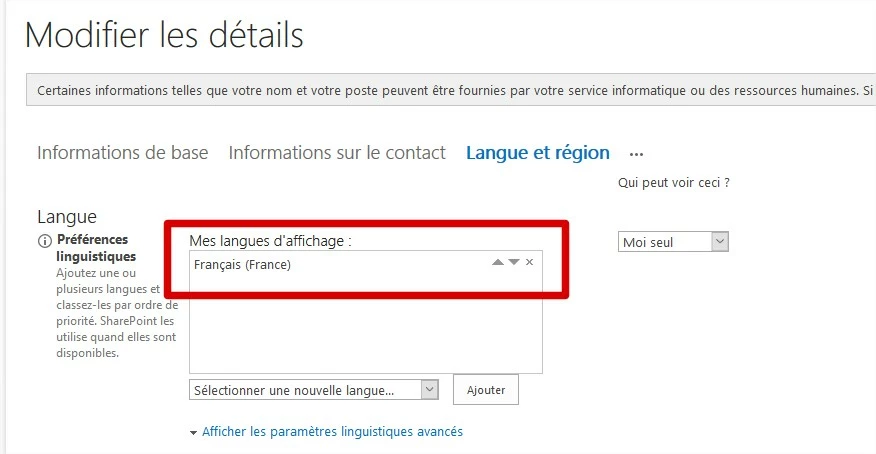
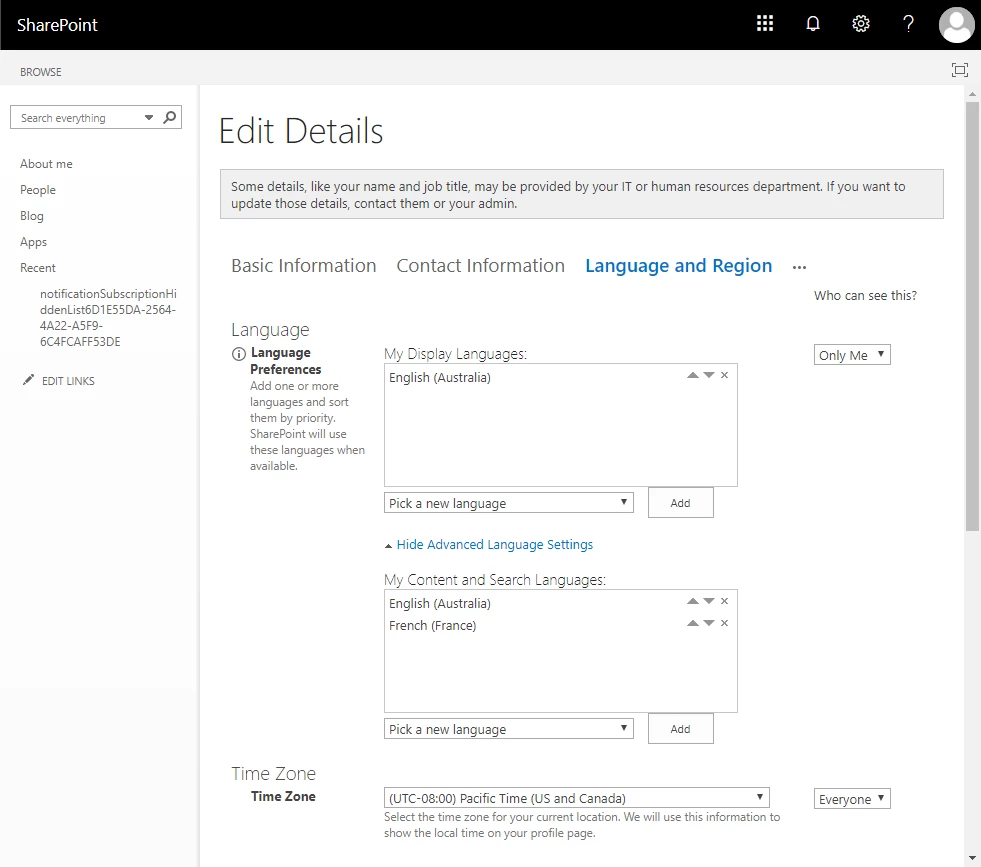
I have tested it on my 365 environment successfully. Are you sure you have your language set in editprofile.aspx


1180iBA4BF4E461D128DF.png

Translate

maxime_ouellet
Nintex Partner
Forum|alt.badge.img+3

Hi @EuanGamble , yes i'm sure, we're on european tenant...


1181i94E06E5431FBB64D.jpg

Translate

maxime_ouellet
Nintex Partner
Forum|alt.badge.img+3

@EuanGamble , can you try the same in a classic form? I must use classic to do some complex validation and default selection that isn't exist in modern ui ....

Translate

EuanGamble
Nintex Employee
Forum|alt.badge.img+13
  • Nintex Employee
  • March 26, 2019

Hi @maxime_ouellet,


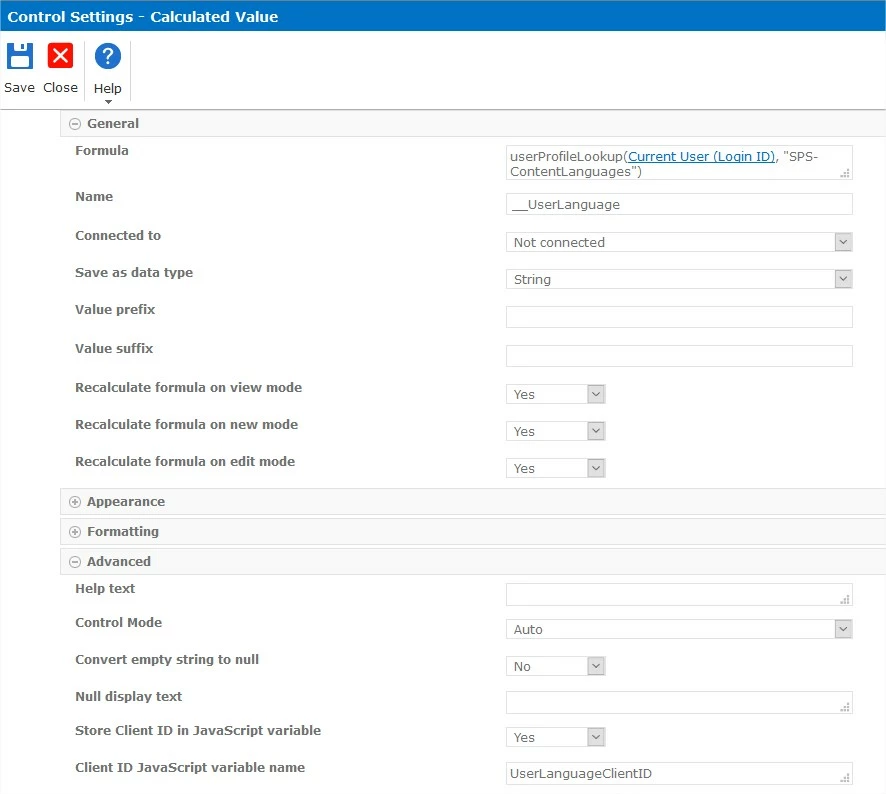
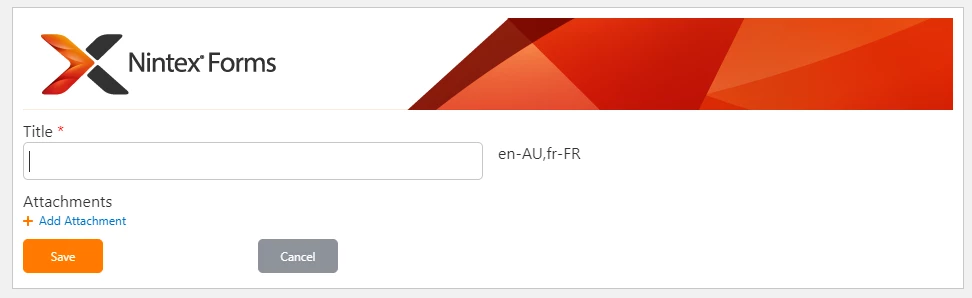
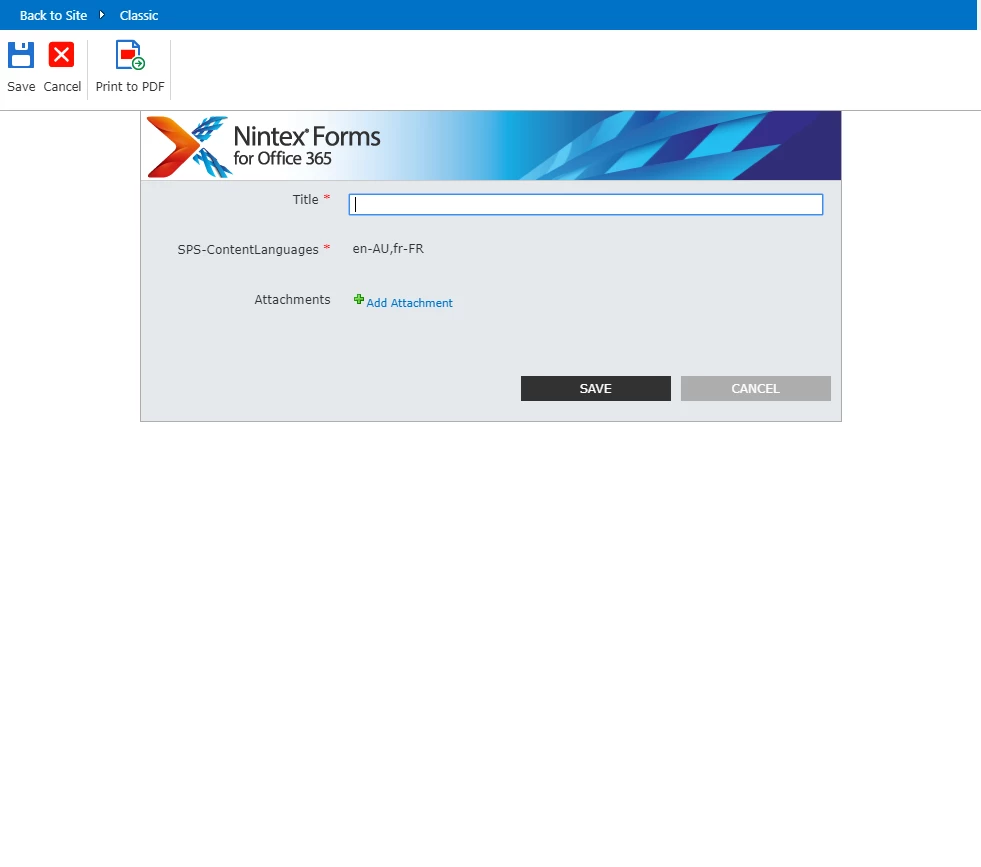
Here is my Classic Nintex Form and my configuration. Hope this helps?


1198i86C23284898819CF.png1197iD279E2A5A674DA54.png

Translate

maxime_ouellet
Nintex Partner
Forum|alt.badge.img+3

@EuanGamble 


oh my.... oups, i was mapping the wrong property for user language :s 


==> it must be: userProfileLookup(Current User (Login ID), "SPS-MUILanguages")


thx a lot! it answer a part of my request :) :) :)

Translate

EuanGamble
Nintex Employee
Forum|alt.badge.img+13
  • Nintex Employee
  • March 27, 2019

Hi @maxime_ouellet,


I am glad we were able to solve it in the end. I hope your solution is successful!


Cheers,

Euan

Translate

maxime_ouellet
Nintex Partner
Forum|alt.badge.img+3

@EuanGamble 


Yes, as i said, it's partially answer a part of it :) Now i can made my form multilingual more easiest.

But, I also need to be able to manipulate SPcontext into a nintex form like we do in others solutions

Translate