Nintex Community Menu Bar

How to get attachment URL to base64?

  • August 1, 2019
  • 8 replies
  • 197 views

Forum|alt.badge.img+9

I have had Vadim's custom action since past two years, and it has worked before but now i cannot get it to work now. Also @vadim_tabakman's blog post has not been updated in years. I am not sure whether it is still working.

I get below error, and i am able to get attachment URL's properly.

Error Getting List Item Attachment. Object reference not set to an instance of an object.


Is there any way we can convert the list attachments, or even a document as base64 with nintex workflow?


8 replies

Simon Muntz
Nintex Partner
Forum|alt.badge.img+23
  • Nintex Partner
  • August 5, 2019
Hi,
If Vadims action is no longer working in your environment you may want to look at the following thread which discusses other methods to move attachments on List Items.
https://community.nintex.com/t5/Nintex-for-SharePoint/Is-it-possible-to-use-a-Nintex-workflow-in-SharePoint-to-copy/m-p/27250#M22445

Forum|alt.badge.img+9
  • Author
  • August 5, 2019

@SimonMuntz,

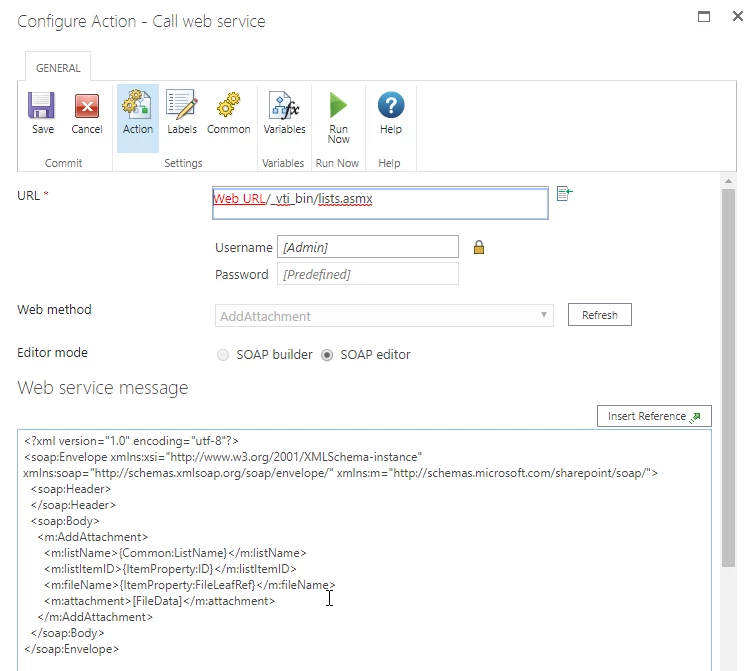
I have followed the steps and created a new document library to copy attachments to. I am running workflow from the library to call web service to get attachments as base64 binaries but i am not sure what i am missing:

3837i46A51245D8360080.png


Simon Muntz
Nintex Partner
Forum|alt.badge.img+23
  • Nintex Partner
  • August 6, 2019
Hi,

What you are doing looks correct to me and worked when I tested it.
I suggest trying to hardcode everything first instead of using references just to make sure everything is working.
If you are on a subsite make sure you add that to your URL.
Hardcode your list name,ID and filename and see how you go.

Forum|alt.badge.img+9
  • Author
  • August 7, 2019

@SimonMuntz 

I get below error when i do that:


Failed to invoke web service. Error returned from server: <soap:Fault xmlns:soap="http://schemas.xmlsoap.org/soap/envelope/"><faultcode>soap:Server</faultcode><faultstring>Exception of type 'Microsoft.SharePoint.SoapServer.SoapServerException' was thrown.


Simon Muntz
Nintex Partner
Forum|alt.badge.img+23
  • Nintex Partner
  • August 8, 2019
Hi,
This appears to be more an issue with the webservice than the action configuration.
I suggest testing to make sure the web service is functioning as expected first using a tool like postman or similar.

Forum|alt.badge.img+9
  • Author
  • August 8, 2019

@SimonMuntz 

I am using web services in other solutions and it is working fine. I really appreciate your patience in helping me.


Simon Muntz
Nintex Partner
Forum|alt.badge.img+23
  • Nintex Partner
  • August 9, 2019
Hi,
This post had the same issue and used the Encode inserted tokens check box to resolve the issue. This is why I suggested testing this by hardcoding everything instead of using references to eliminate other things that can cause issues.

https://community.nintex.com/t5/Nintex-for-SharePoint/Call-Web-Service-GetListItemChanges/m-p/5961

Forum|alt.badge.img+9
  • Author
  • August 9, 2019

@SimonMuntz 

I am finally to make this work, i was doing it all wrong in hopes of getting the BASE64. I had the workflow created in the document library and trying to add attachment in the same library, which did not work. Now, i have the workflow in the document library, run workflow on the document to add attachment to another list item. Below is the config:

<?xml version="1.0" encoding="utf-8"?>
<soap:Envelope xmlns:xsi="http://www.w3.org/2001/XMLSchema-instance" xmlns:soap="http://schemas.xmlsoap.org/soap/envelope/" xmlns:m="http://schemas.microsoft.com/sharepoint/soap/">
<soap:Header>
</soap:Header>
<soap:Body>
<m:AddAttachment>

<m:listName>Destination List Title</m:listName>

<m:listItemID>Destination List Item ID</m:listItemID>

<!--Below {ItemProperty:FileLeafRef} is the name of the document in the document library -->
<m:fileName>{ItemProperty:FileLeafRef}</m:fileName> 
<m:attachment>[FileData]</m:attachment>
</m:AddAttachment>
</soap:Body>
</soap:Envelope>