Nintex Community Menu Bar

How to display email address and user name of logged in user in form

  • November 1, 2019
  • 3 replies
  • 74 views

Forum|alt.badge.img+1

I have a form that I created in Nintex Workflow Cloud that is configured to require a user to log in to view the form.

How can I display the name and email address of the logged in user in the form itself?

I know that once the form is submitted I can grab that information but I would like to display it in the form itself when it loads.

3 replies

Forum|alt.badge.img+9
  • November 1, 2019

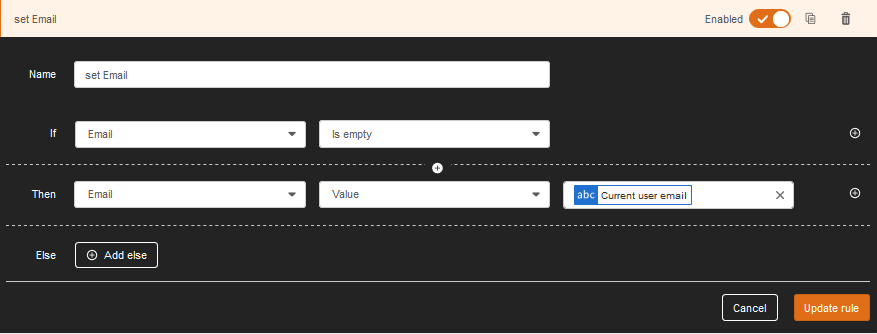
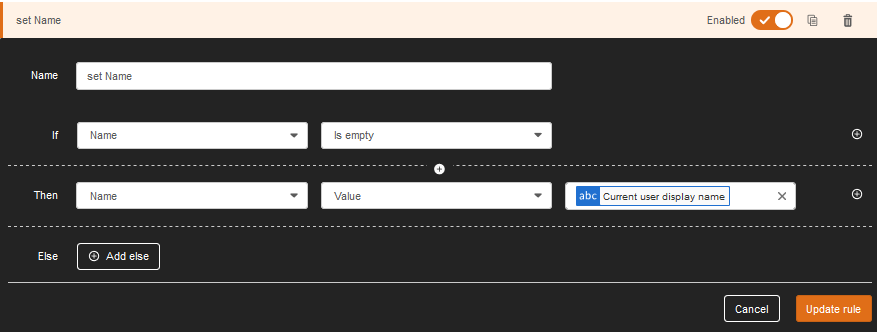
Use two read-only short text fields called Name and Email.

They are Connected to matching columns in the List.

Use two Form Rules to set the value if they haven't already been set:

5274i748CE9E84188690B.png5275i1BF95853D0A28D7B.png


This will display the Name and Email on your form and record the creator of the List item.


Forum|alt.badge.img+1
  • Author
  • Nintex Partner
  • November 3, 2019

This is Nintex Workflow Cloud, not SharePoint or SharePoint Online, there are no lists.


Thanks for the effort though.


Simon Muntz
Nintex Partner
Forum|alt.badge.img+23
  • Nintex Partner
  • November 3, 2019
Hi,

Unfortunately this functionality is currently not available in NWC.
If you would like to see this feature please visit http://nintex.uservoice.com to request it.