Nintex Community Menu Bar

How to create state machine workflow in nintex workflow

  • September 8, 2019
  • 11 replies
  • 24 views

Forum|alt.badge.img+5

Dear All,

I have a form submits by the user, now his/her manager gets mail for the approval, if the manager approves, it goes to audit approver, if audit approver approves, it goes to quality dept, if quality approves, the process completes. If manager requires more info, it has to go back to the user for correction, again comes back to manager, this applies in every approval step.

How do i create a workflow to achieve this.

I have created a workflow like below but here when auditor rejects, the request goes back to the initiator, once initiator do some correction, it should directly come to auditor inbox, should not go to his manager.


 

11 replies

Forum|alt.badge.img+5

Dear All,

I have done some changes to my workflow, please find the attachment. but don't know how to run different states.


Simon Muntz
Nintex Partner
Forum|alt.badge.img+23
  • Nintex Partner
  • September 9, 2019

Hi,

You were more on the right track on your first attempt I think.

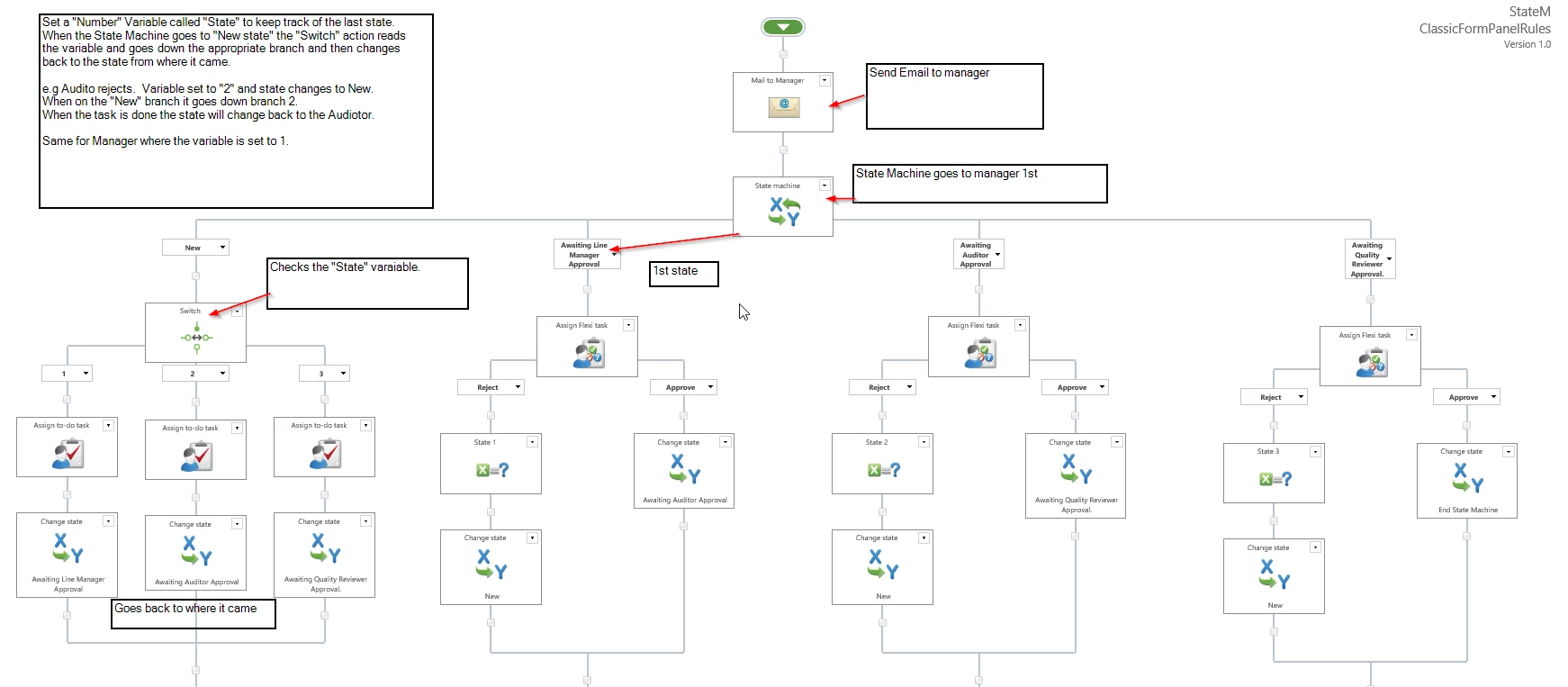
I would do it like this.

4285i9F876559852A440F.png


Attached sample workflow.


Forum|alt.badge.img+5

Dear Simon,

sorry for the delay in response,

We have to assign a task to the manager instead of sending a mail in the first step, i see there is an email that goes to the manger in your workflow.

Regards,

Ram


Simon Muntz
Nintex Partner
Forum|alt.badge.img+23
  • Nintex Partner
  • September 9, 2019
Hi,
Remove the send notification action then if it’s not required.
The workflow will then hit the state machine and go down the manager branch and they will get a task.

Forum|alt.badge.img+5
is workflow to be set to run even if the item is updated right Simon.

Simon Muntz
Nintex Partner
Forum|alt.badge.img+23
  • Nintex Partner
  • September 9, 2019
Hi,
I dont recommend configuring the workflow to run if the item is updated.
The reason being is that this workflow could take time to run due to the amount of steps involved and if you start the same workflow on the item which already has the workflow running it will fail.

Forum|alt.badge.img+5

if i don't configure the workflow to run if the item is updated, when manager is rejected, the email is triggering back to initiator but when author is done some correction and resubmits, again manager should get email notification for the approval which is not happening....


Forum|alt.badge.img+5

Dear Simon,

I am trying to send edit item url to the initiator when manager is reversed/rejected for more clarification, i have tried with below line of syntax as i have spaces in the list name - Clinical Audit Proposal Form.


{Common:WebUrl}//Lists/{Common:ListName}/Item/editifs.aspx?ID={ItemProperty:ID}

{Common:WebUrl}//Lists/fn-replace({Common:ListName}," ","%20")/Item/editifs.aspx?ID={ItemProperty:ID}

both did not work for me, please suggest me.


Simon Muntz
Nintex Partner
Forum|alt.badge.img+23
  • Nintex Partner
  • September 10, 2019
When the Manager rejects the Task there is no update done to the Item.
The State Machine should change state to the Initiator and a task run and the initator emailed about the task.
If the State Machine is not changing State this would indicate an issue with the timer service in the environment.

Forum|alt.badge.img+5

Simon,
User is getting notification for correction, once user resubmits the form again manager is assigning a task to approve but when manager tries to click on the link, it says "you are not authorized to respond to this task", please find the attachment.


Simon Muntz
Nintex Partner
Forum|alt.badge.img+23
  • Nintex Partner
  • September 10, 2019
Hi,
This is a little odd.
The manager receives the email for a Task but is not able to approve it?
You may need to raise a support request with Nintex support to look into this issue further. Email support@nintex.com