Nintex Community Menu Bar

how to adjust the section position in form after hide some section

  • September 6, 2019
  • 6 replies
  • 69 views

Forum|alt.badge.img+4

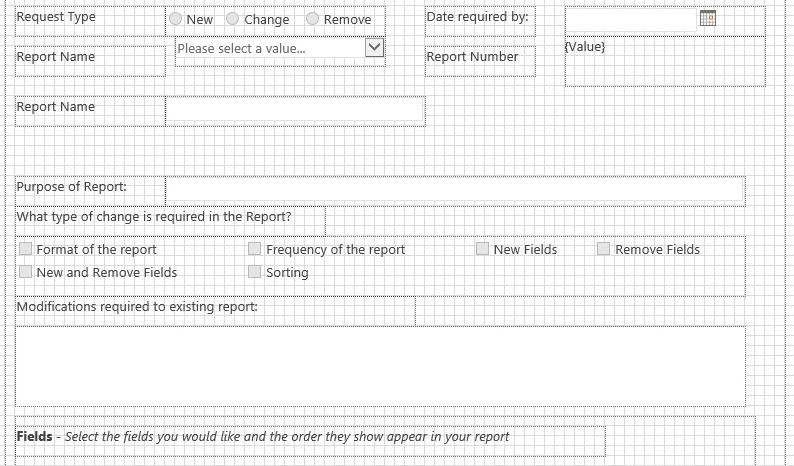
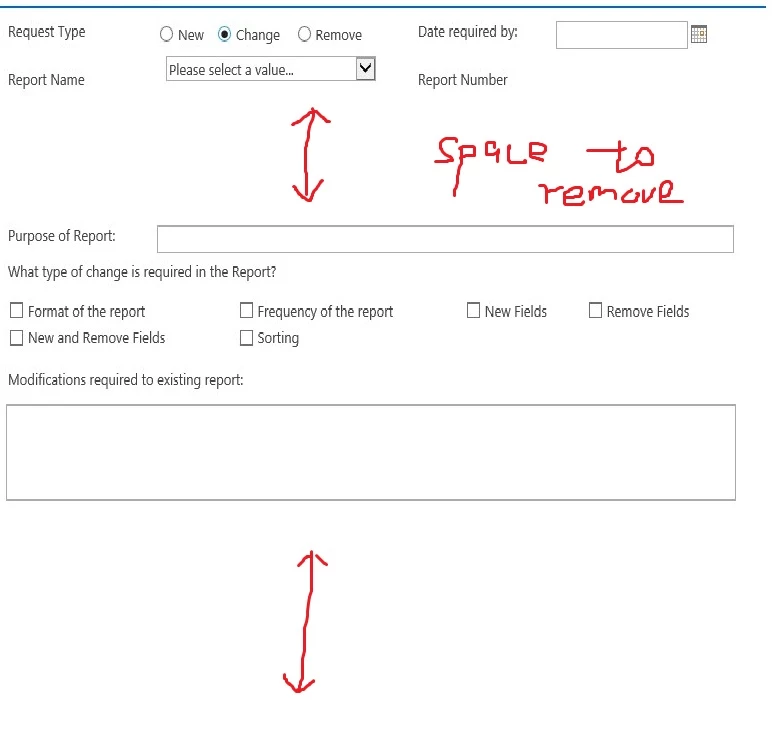
I created a form with some hide/show sections, how to adjust the layout of sections? I set Resize in runtime to 'YES', but still not looks good, see picture4282i2F0E77584A794928.jpg4283i72A6B1EDB2FBA3EA.jpg ( 1st form, 2nd nintex form designer)
6 replies

Simon Muntz
Nintex Partner
Forum|alt.badge.img+23
  • Nintex Partner
  • September 7, 2019
Hi,
You need to group the controls that you want to hide into Panels.
When a panel is hidden the canvas will shrink to remove the white space.

These are the steps that I follow when creating Classic Nintex forms to avoid white space.

1. Group controls that you want to hide into a panel.
2. Apply the hide rule to the panel only.
3. Do not overlap panels.
4. Apply 1 rule per panel and not 1 rule for multiple panels.
5. Order the rules in the same order as the panels from the top down.

As an alternative use a Responsive Nintex form and you will not need to worry about white space ever again.

Forum|alt.badge.img+4
  • Author
  • September 7, 2019

Thanks, Simon. One question,  to Group controls that you want to hide into a panel, I drag it into the panel, but some are not actually into the panel since when I move the panel, some controls are moving together, some are not moving and stay there. How to ensure a control is into a panel? 


Simon Muntz
Nintex Partner
Forum|alt.badge.img+23
  • Nintex Partner
  • September 7, 2019
Hi,
When you move a control onto a panel you will notice the background of the panel change colour.
If it does not change colour the control is not on the panel.

Forum|alt.badge.img+4
  • Author
  • September 8, 2019

Hi Simon, it works, thanks. Can I apply more than one rules in same panel? One panel need to be show on three selections


Simon Muntz
Nintex Partner
Forum|alt.badge.img+23
  • Nintex Partner
  • September 8, 2019
You can apply as many rules as you need on any control and it will work as long as the rules do not conflict.

If you are able to use the one rule to allow for your 3 selections it will make your form more efficient and easier to edit in the future but this is not a must.

Forum|alt.badge.img+4
  • Author
  • September 8, 2019
I mean apply more than one rules in same panel, not control. I tried it on one panel to hide it, not(contains(Type, "New Fields")), 1st one works; but added 2nd not(contains(Type, "Remove Fields")), not work ( even 1st one not work then, all lose function)