Nintex Community Menu Bar

How the workflow knows that the user accomplished a task ?

  • March 12, 2019
  • 1 reply
  • 8 views

zakaria_botros
Forum|alt.badge.img+2

By sending a task email to the user, and waiting for the task to be completed. how the Workflow or Sharepoint will know if the user really did the task and not only click on a link?

1 reply

MegaJerk
Forum|alt.badge.img+14
  • Scholar
  • March 28, 2019

Assuming that you're asking, "How does a Workflow or SharePoint know when a user has *actually* completed a task in the Real World?", the simple answer is...

It doesn't. 
----------------

A longer answer might be:

The workflow knows that the task has been completed when whoever the task is assigned to, accesses the Task Form and fulfils the conditions that have been placed on it (by you, the Designer) that satisfy whatever constitutes 'completion' for that particular process. 

If you have designed a Task Form that can be considered "Complete" if the user just clicks on a Button, or checks a box before submitting it, then there is nothing stopping them from just doing those things and moving on, at least in the world of SharePoint. However, in the eyes of your company, there may indeed be repercussions for doing something like that without having actually completed the task in real life! 

It really depends on how you have your processes set up in your company, and how you have architected your SharePoint / Nintex environment to complement those processes. 
----------------

A Technical Answer Might Be:

If you're just asking what constitutes 'complete' in such a way that Nintex Workflow knows to move forward onto the next step, well that's just a matter of when the Status column of a Task has been set to Complete. 

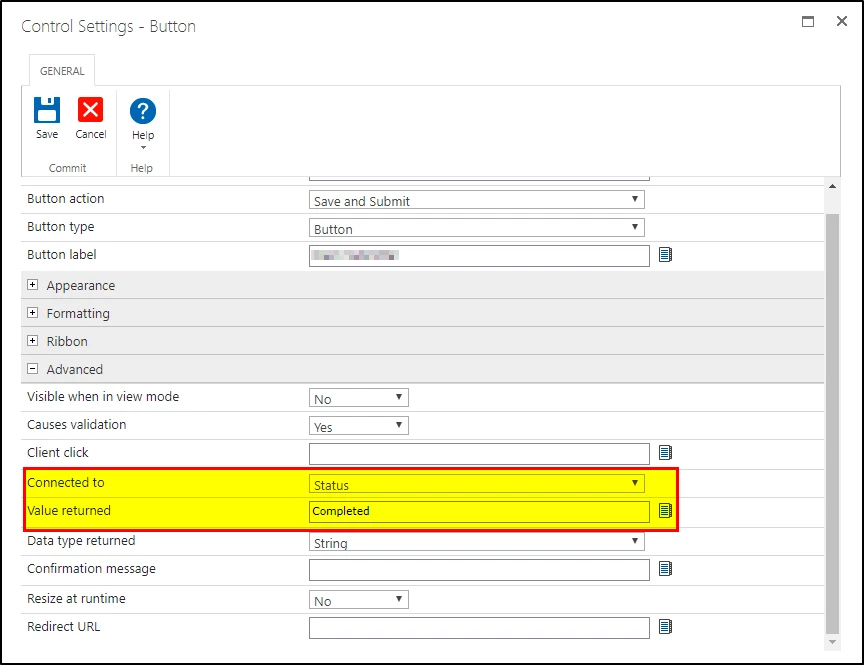
Here are the properties of a "Claim Item" button on a Task Form that is accessible to everyone in a particular group: 

1237iC4A843EC49653746.png

As you can see, once someone clicks on this button, it'll change the connected Columns' (Status) value to "Completed". It is as this point that the Workflow would know to move on. 

I hope that you are able to find this information useful.