Nintex Community Menu Bar

How do you add ID to Site Workflow URL

  • April 26, 2019
  • 3 replies
  • 23 views

Forum|alt.badge.img+2

I have a Site workflow modeling after this one: https://community.nintex.com/t5/Community-Blogs/Site-Workflow-Document-Review-Date-Approaching-Reminders/ba-p/79279 


I have a variable -varListID, which returns the ID value. i.e. 16, 21, 30 


In my send notification body, I manually add a URL to the body text. ex. https://widget/sites/car/lists/Color/DispForm.aspx?ID=


Next I add the variable; {WorkflowVariable.varListID} to produce the "16" at the end of the URL. 


It displays in the email body correctly, but when clicked on, it's not part of the URL. The user is taken to https://widget/sites/car/lists/Color/DispForm.aspx?ID= which takes them to a blank page.


How do I correctly make it one user selectable line such as: https://widget/sites/car/lists/Color/DispForm.aspx?ID=16 

3 replies

Forum|alt.badge.img+8
  • Nintex Employee
  • April 26, 2019

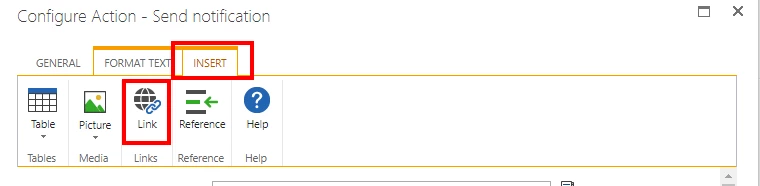
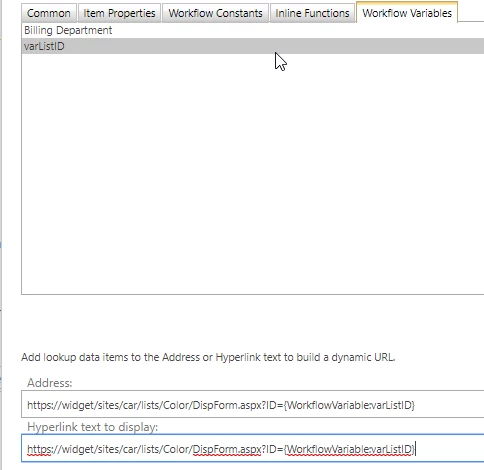
If this is in a send notification action, you can use the click in to the body of the email, then click the 'Insert' tab then select 'Link.' From there you can insert the address with the ID token into the 'Address' option, as well as the text to display if you want to show the url as the hyperlink.  Screenshots below:

1710i31C87776CB6A110E.png


1711i3EE7DA959003D9B6.png


Forum|alt.badge.img+2
  • Author
  • Rookie
  • April 26, 2019

Well that was super simple. Thank you!


Forum|alt.badge.img+4
  • October 21, 2019

HI,   I followed your steps and have the url built.... now I would like to have the new url open at end of workflow.  any thoughts?  

Regards,

Pam L