Nintex Community Menu Bar

How Do I Get Rid of This Whitespace?

  • January 31, 2019
  • 3 replies
  • 11 views

Forum|alt.badge.img+9

So looking at a typical send notification action HTML source code, the occurence of   is fairly common.

<td colspan="4">&#160;<span id="NWRTEReference18">

Manually deleting &#160; is a hit or miss, either they come back or they don't.


In most instances, I definitely don't want them because they're adding unnecessary whitespaces in my email body.


Any solutions?

3 replies

Forum|alt.badge.img+11
  • Nintex Partner
  • January 31, 2019

If you put your email text in the body part of the message section of an action (task notification email, send email...) then I'm afraid there's little you can do. Best is to outline your email's HTML using Build string actions. It's more of a pain, but with the support of online HTML editor you can reduce the actual tag coding part.


Forum|alt.badge.img+9
  • Author
  • January 31, 2019

Urgh, not another action please...

Nintex needs to - what else - fix this!


Forum|alt.badge.img+9
  • Author
  • February 13, 2019

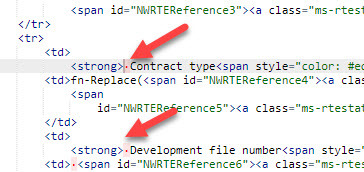
Further investigation reveals there are hidden whitespaces that cannot be seen in the HTML source editor.


You can see them if you use a third-party HTML beautifier, for e.g. https://www.cleancss.com/html-beautify/


Problem solved, but Nintex needs to fix this.


53iF53D258123AD38AC.jpg